Danish Interpretation Systems User Manual
as a wireless microphone to the floor language.
‘In 2’ is used for connection of an “Emergency
EvacuationMessage(EEM)”audiosignal.
6. Emergencyswitchconnector–Aterminalblock
socketforasingle,‘normallyopen’switch.When
theswitchisclosed,theaudiosignalonthe‘In2’
connector is distributed on all output channels,
overridingallotheraudioinputs.
Note:Thereisnovolumecontrolavailableforsetting
thevolumeon‘In2’.Thevolumehastobesetatthe
equipment generating the “Emergency Evacuation
Message(EEM)”audiosignal.
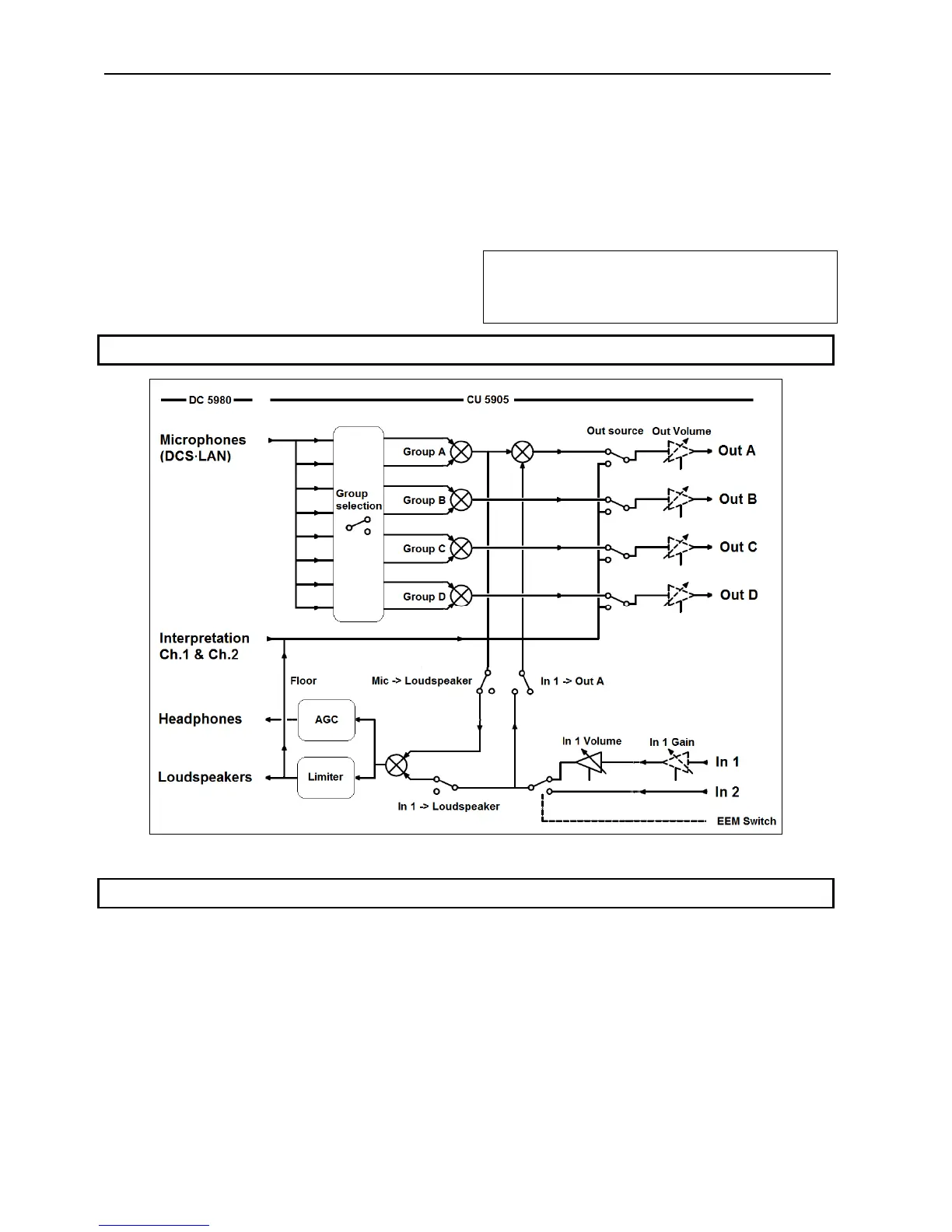
5.2 Audio Schematic
Figure5.2‐A DDS5900DigitalDiscussionSystemAudioSchematic
5.3 Installation
TheCU5905CentralUnitscanbeplacedonatableor
d cinstalledinastandar 19”ra k.
When installing in a 19” rack the supplied 19”
bracketsshallbefixedtothefrontsideoftheCU5905
CentralUnitbyunscrewingthecrewsholdingthetop
andbuttoncoverandthenfixthebracketsusingthe
samescrews.
Theunithasabuilt‐infantakingairinattheleftside
of the unit and blowing the hot air out at the right
side.Thatallowsunitsin19”rackstobestackedclose
withotherunitswithoutextraroomforcoolingair
betweenthem.
leasecheckthattheotherunitswillallowthis.P
User Manual DDS 5900
16



 To Next Page