Danish Interpretation Systems User Manual
3. Speak button –Touchingthe‘Speak‘button
turns the microphone ‘On’ or sets the user into
‘Request to Speak’ depending on the ‘System
Operation Mode’. Please refer to section ‘
5.7
OperationModes
’.
4. Language selection – Used to switch between
‘Floor’ language and ‘Ch.1’ and ‘Ch.2’ if
interpreterunitsareconn teec d.
5. Language indication – ‘Ch.1’ selection is
indicatedwithlightinLed1and‘Ch.2’selection
isindicatedwithlightinLed2.Withnolightthe
‘Floor’channelisselected.
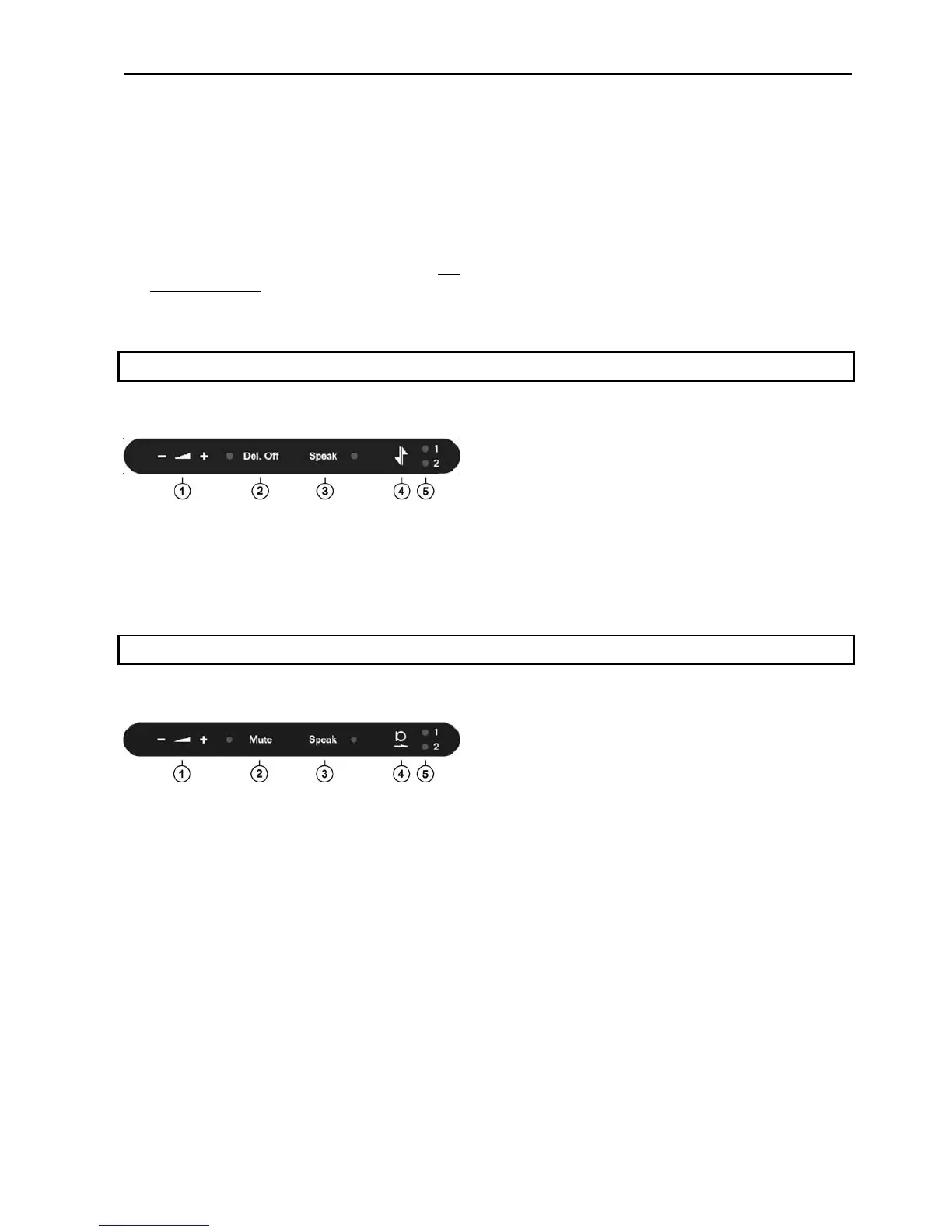
6.4 Chairman Unit
WhenaunitisconfiguredasaChairmanunitthe
buttonshavethefollowingfunctionality:
1. Headphone volume control – The ‘‐‘ button
decreases the sound level in the connected
headphoneandthe‘+’buttonincreasesthesound
level.
2. Del. Off button –Touchingthe‘Del.Off‘button
switchedofalldelegatemicrophones.
3. Speak button –Touchingthe‘Speak‘button
turnsthemicrophone‘On’.
4. Language selection –Switch between ‘Floor’
languageand‘Ch.1’and‘Ch.2’ifinterpreterunits
areconnected.
5. Languageindication–‘Ch.1’selectionisindicated
with light in Led 1 and ‘Ch.2’ selection is
indicatedwithlightinLed2.Withnolightthe
‘Floor’channelisselected.
6.5 Interpreter Unit
WhentheunitisconfiguredasInterpreterunitthe
buttonshasthefollowingfunctionality:
1. Headphone volume control – The ‘‐‘ button
decreases the sound level in the connected
headphoneandthe‘+’buttonincreasesthesound
level.Thesoundintheheadphonewillalwaysbe
the‘Floor’ soundwhen the unitis configuredas
Interpreterunit.
2. Mute button –Touchingthe‘Mute‘buttonmute
the sound from the microphone without
switching off the unit as long as the button is
activated.Whenmuted,theredlightringonthe
microphoneisturnedoff.
3. Speakbutton–Touchingthe‘Speak‘buttonturn
the microphone ‘On’ and deliver audio to the
selected interpreter channel. Any other
interpreterunitinterpretingonthesamechannel
willbeturnedoff.
4. Interpreter channel –Usedforswitchingthe
‘Out‐going‘ interpreter channel between ‘Ch.1’
and‘Ch.2’.Audiofromthemicrophoneissendto
theselectedinterpreterchannel.
5. Outgoing language indication –‘Ch.1’selection
isindicatedwithlightinLed1and‘Ch.2’
selectionisindicatedwithlightinLed2.
User Manual DDS 5900
37



 To Next Page