Danish Interpretation Systems User Manual
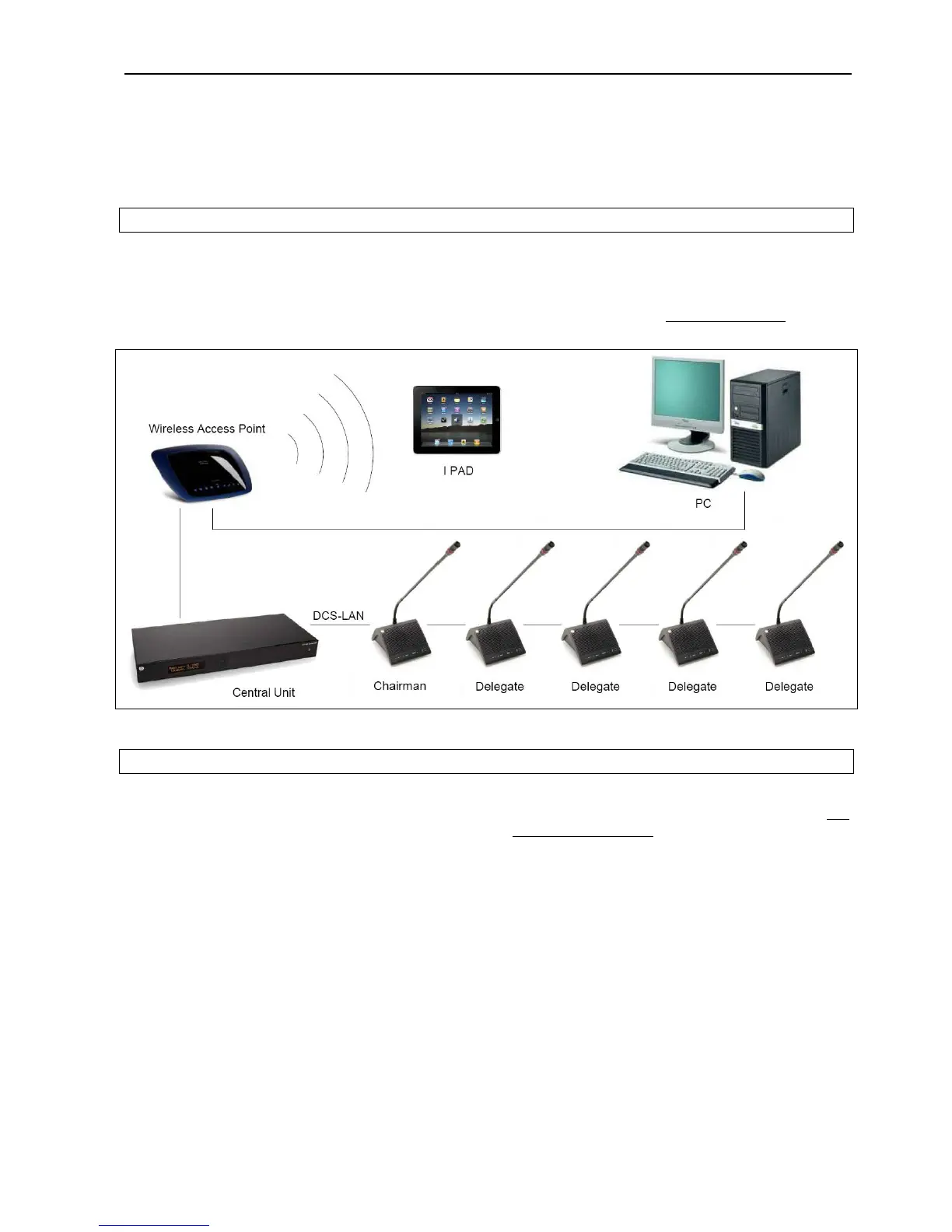
5.4.3 Connecting a PC and an iPad
The CU 5905 is connected to the DC 5980P
ConferenceUnitsusingEC6001‐xxCat5ecables.
Awirelessaccesspointwithbuilt‐inrouterisusedfor
connection to the CU 5905 and the PC. The iPad is
connectedwireless.
Opening the browser in the PC or on the iPad gives
theoption ofconfiguringthe systemand controlling
ndtheconferenceunitsfromthePCa /oriPad.
Please refer to section ‘
5.6 Web Browser’formore
information.
Figure 5.4-C Connecting the DDS 5900 Digital Discussion System to a PC and an iPad
5.4.4 Connecting an audio recorder
The CU 5905 is connected to the DC 5980P
EC6001‐xxCaConferenceUnitsusing t5ecables.
This configuration is used when ‘Floor’ sound or
soundfromoneormoremicrophonesisrequiredto
berecorded.
Use the ‘Group’ selection for the four outputs and
select the seats for each group. Refer to section ‘
5.6
ebBrowserW
’item#8.
User Manual DDS 5900
19



 To Next Page