Danish Interpretation Systems User Manual
5.4.8 Connecting an emergency signal
Tousetheemergencysignalfunction,aswitch
(normally‐open)mustbeconnectedtotheemergency
switch connector. When the switch is closed an
“EmergencyEvacuationMessage(EEM)”audiosignal
presentonthe‘In2’inputisdistributedtoalloutput
channels,overridingallotheraudioinputs.
Important:Thelevelofthesignalmustbecontrolled
externally.
5.5 Using the Interactive Menu
5.5.1 Overview
The major configurations and operation options of
theCU5905canbesetviaaninteractivemenu,using
the 2x20 character OLED display and the 5‐button
keypad.
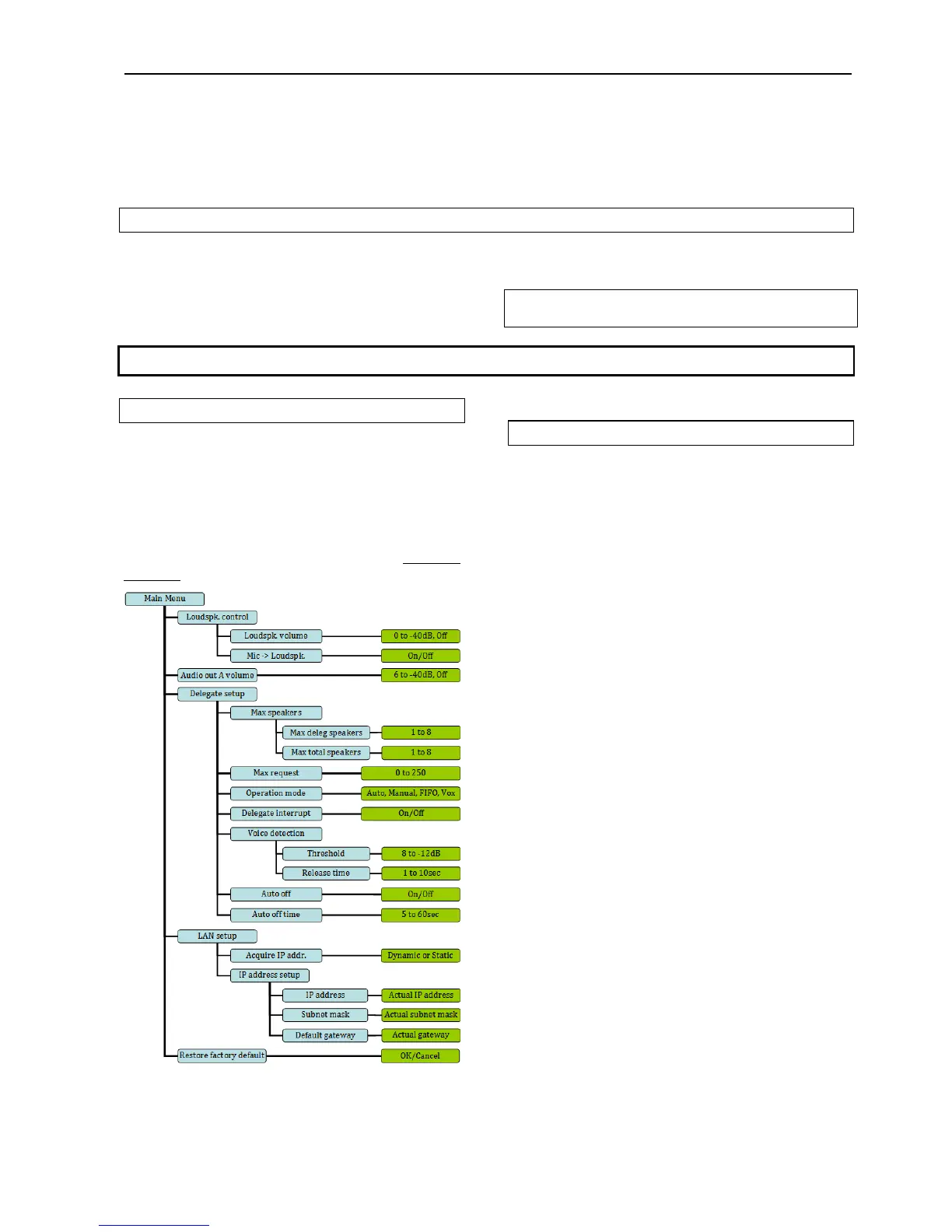
‘Figure 5.3 A’ gives an overview of the menu
structure, however for a general description of the
settingsinthemenurefertothesection‘
5.6 Web
Browser
’,whereallCU5905settingsareexplained.
Figure 5.5-A Menu overview
5.5.2 Navigate through the menu
Navigation in the menu and changing parameters is
donebyactivationthe5‐buttonkeypad:
Cycle through the menu items (Blue marking)
withthefour‘arrow’buttons(Left‐Right,Up‐
Down).
Navigatetoasettableoption(Greenmarking).
Cycle through the available values for a settable
optionusingthe‘arrow’buttonsUp‐Down.
Press the ‘Enter’ button in the centre to accept the
value. Pressing the Enter button concludes the
selection made, and at the same time it indicates a
confirmationofthepossiblechangesmadewithinthe
selection.Pleasenotethatsomechangesareapplied
mmediately,andconfirmationisthusnotrequired.i
User Manual DDS 5900
23



 To Next Page