Danish Interpretation Systems User Manual
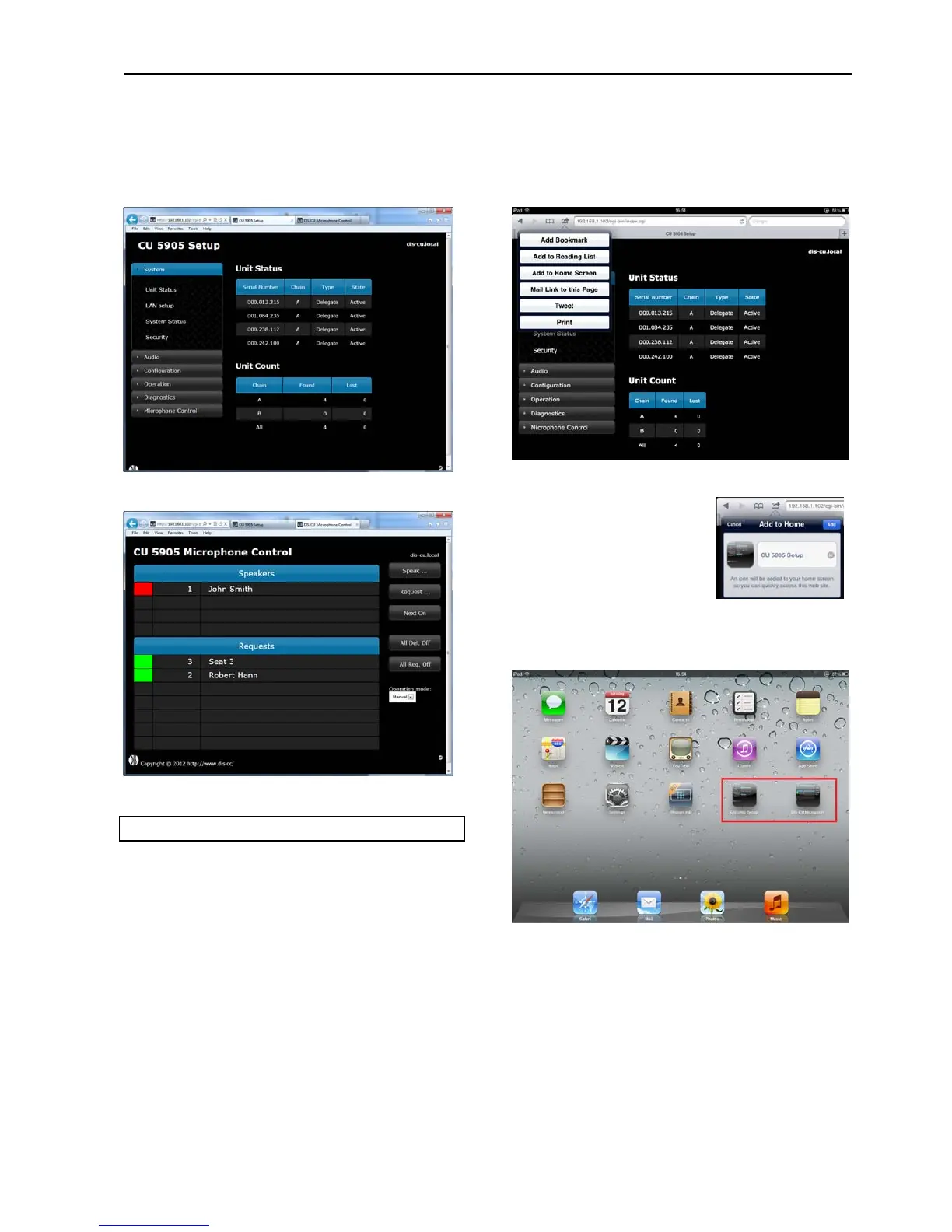
Figure 5.6-E CU 5905 Setup Tab selected
Figure 5.6-F CU 5905 Microphone Control Tab selected
5.6.4 Using Web browser in iPad
Makingshortcutsonthedesktopfor‘CU5905Setup’
andthe‘CU5905MicrophoneControl’makesiteasy
tostarttherequiredbrowser.Thescreenwillstartin
‘fullscreenmode’.
Open the CU 5905 Browser application using the
‘Safari’ browser on the iPad. Then select ‘Add to
Homescreen’:
Figure 5.6-G Select ‘Add to Ho Screen’ me
Click the ‘Add’ button and a
shortcut to the ‘CU 5905
Setup’ is placed on the
opdeskt ontheiPad.
Click ‘Microphone Control’
andinthesimilarwaymakea
shortcutforthisscreenaswell.Thetwoshortcutscan
now be activated separately opening the screens in
‘fullscreenmode’.
Figure 5.6-H CU 5905 Browser shortcuts on the desktop
User Manual DDS 5900
33



 To Next Page