Operation Section
50
Location of controls
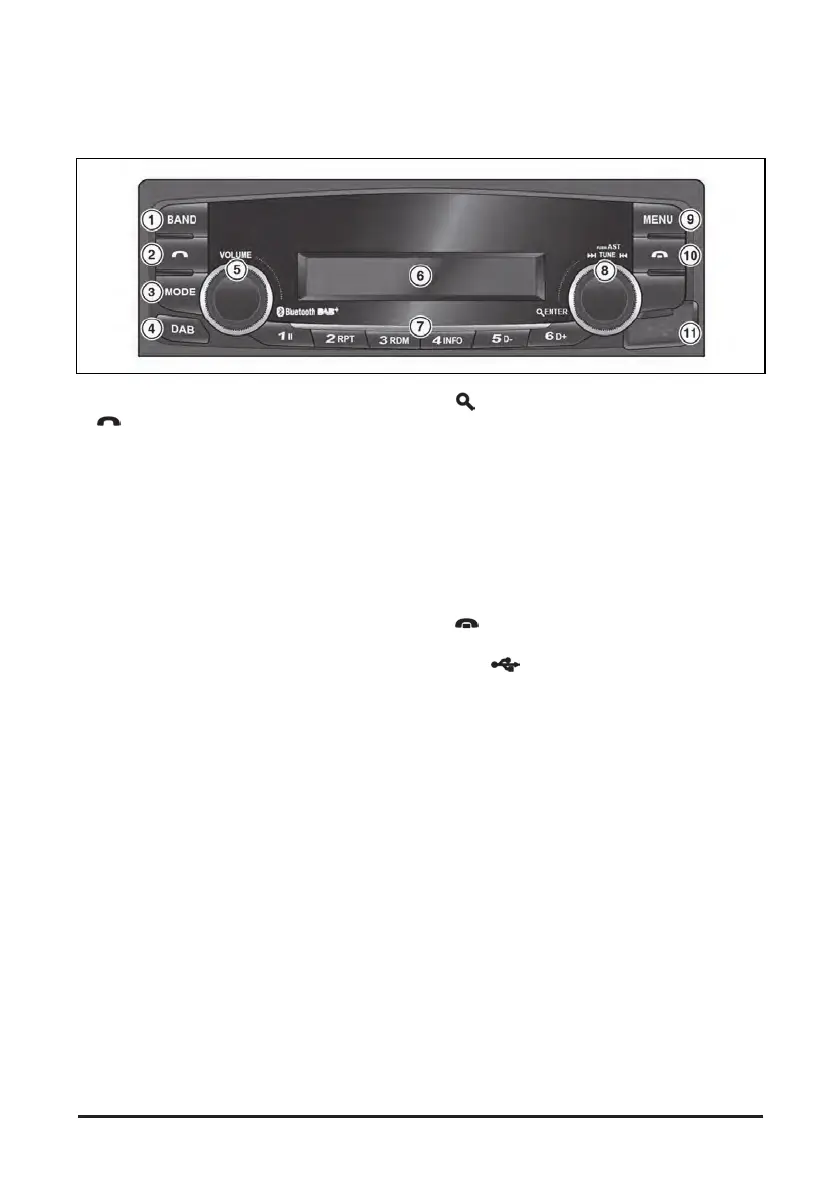
Front view
1. BAND button: selects AM/FM Radio mode.
2.
(Call) button: accept incoming a call or enter
the call log mode, switch between hands-free
and private call modes (press); make a call a
recently connected number (press and hold).
3. MODE button: selects USB, Bluetooth audio or
AUX play mode (press)
4. DAB button (option for DAB service region only):
enters DAB mode (press).
5. POWER
button with VOLUME dial: turns power
on, mute function on/off or selects a menu item
(press); turns power off and shows clock (press
and hold); control the volume level or menu items.
6. Display window for Play/Reception/Menu state
and information.
7. PRESET [1∥] - [6 D+] buttons
• Radio/DAB: Recall each stored station(press);
store each station (press and hold)
• USB: Changes playback mode (press 1II, 2 RPT
or 3 RDM buttons); shows available information
about the current track (press 4 INFO button);
move to folder down/up (press 5 D-/6 D+
buttons).
• Bluetooth audio: pause/resume playback (press
1II); shows information of the connected
Bluetooth device (press 4 INFO button).
8.
ENTER/AST button with I◀◀TUNE▶▶I dial.
• Radio/DAB: plays radio frequencies with superior
reception for 5 seconds each (press); saves
frequencies with superior reception to Preset
buttons (press and hold); selects reception
frequency manually (rotate).
• USB/Bluetooth audio: scans beginning parts
(approx. 10 seconds) of tracks (press); moves to
the previous/next track (rotate); rewind or fast-
forward the track (rotate and hold).
9. MENU button: enters Menu setting mode or
returns to the previous menu (press).
10.
(End) button: reject incoming a call or ends
a call (press).
11. USB
port with cover for plugging the USB
device.


 To Next Page