Operation Section
43
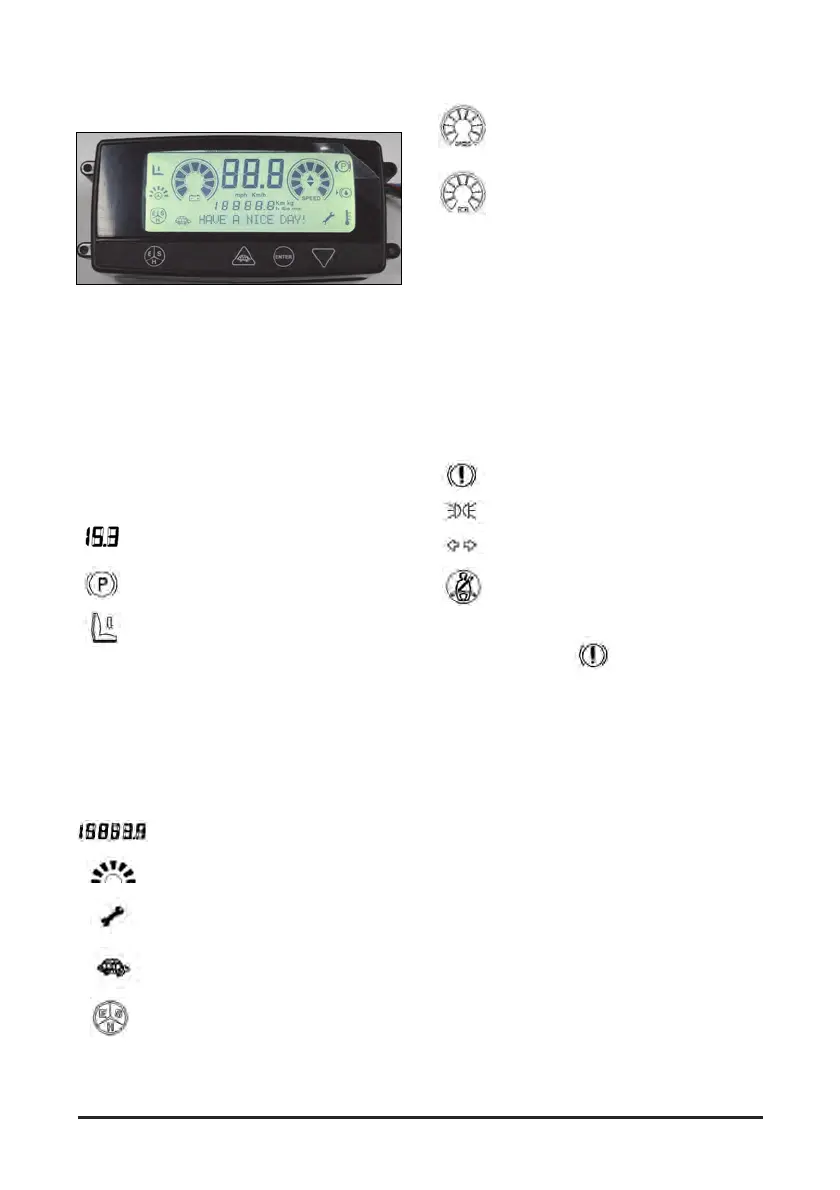
Monitoring Systems Indicator
Located on the middle of the console cover panel.
The symbols shown on the instrument panel
identify different features of the lift truck. The
symbol for each feature is identified and an
explanation of the function and location is described
on the following page.
Display Segments
The display gives the following information about the
operating state of the system:
Lift truck speed (expressed in kmh or
mph)
Warning symbol indicating that the parking
brake is being applied.
Safety contact open, indicated both by EE
blinking message visualized in timemeter
area and by relative symbol
With any directional switch active and safety
contact still open, lift truck can’t be moved, even
after seat switch is closed; in such a case, after
safety contact is closed, the symbol disappears.
EE code disappears only after active directional
switch is turned off.
Time gauge or odometer
Indicates steering angle
Maintenance notice: Notifies
maintenance schedule set time is
arrived.
Turtle mode (Low speed operation
mode)
Economic, Standard or High
Operation mode
Speedometer having graduations from 0
(low) to 9 (high) segments.
Battery voltage level gauge having 9
segments.
Table 1 shows the relationship between the battery
charging progress and the No. of blocks. Both
36V/48V systems have the same relationship.
Warning code EL indicates that the batteries are
fully discharged.
LED Indicator
When switched, 4 LEDs appear in the left side of
the COMPACT display to provide following
information:
Warning message; red LED
Lamp message; green LED
Active indicator lamp; green LED (option)
Seat belt warning (option); red LED on for
10 s
NOTE: The warning LEDs indicate following
information
- Normal operation: LED turns on for a moment at
system switch on or off.
- Communication to control board is lost: LED
turns on after 3 s from the lost of communication
to the control board.
- Board microprocessor failure: warning LED turns
on


 To Next Page