Operation Section
51
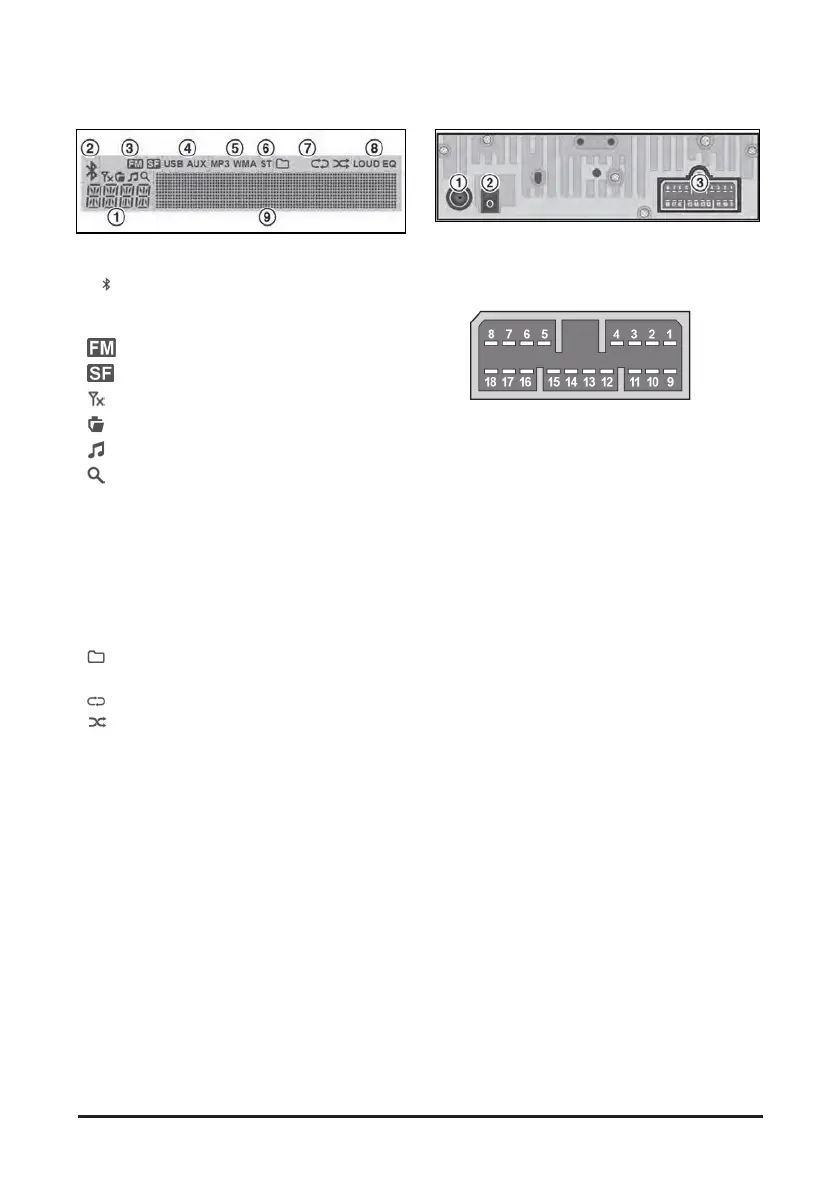
Display window
1. Function display area for showing the function
mode.
2.
(Bluetooth) indicator for the Bluetooth
connection.
3. DAB mode indicator for the DAB function mode.
•
: FM Linking
•
: Service Follow is activated
•
: Digital signals are not received
•
: Ensemble name display
•
: Service name display
•
: Search mode
4. USB/AUX indicators for the USB or External
device connection.
5. MP3/WMA indicators for USB's Audio Stream
detections.
6. ST (Stereo) indicators for FM stereo reception.
7. Playback mode indicators for USB playback
mode.
•
Folder mode
• INT Intro playback
•
Repeat playback
•
Random playback
8. LOUD/EQ indicators for sound effect.
• LOUD: Loudness mode
• EQ: EQ mod
9 Multi-function display area for showing the play,
reception or menu information.
Rear view/Connectors
1. Antenna jack: To plug the FM antenna cable.
2. DAB Antenna jack: To plug the DAB antenna
cable.
3. I/O connector: To plug the I/O cable.
1. Backup B (+)
2. Ground
3. AUX L-CH (option)
4. AUX R-CH (option)
5. AUX Det (option)
6. AUX GND (option)
7. CAN Signal (+)
8. CAN Signal (-)
9. ACC B (+)
10. Illumination (+)
11. External Microphone (+)
12. External Microphone (-)
13. N.C
14. External Microphone Ground
15. Rear Right Channel Speaker (+)
16. Rear Right Channel Speaker (-)
17. Rear Left Channel Speaker (+)
18. Front Left Channel Speaker (-)


 To Next Page