Operation Section
68
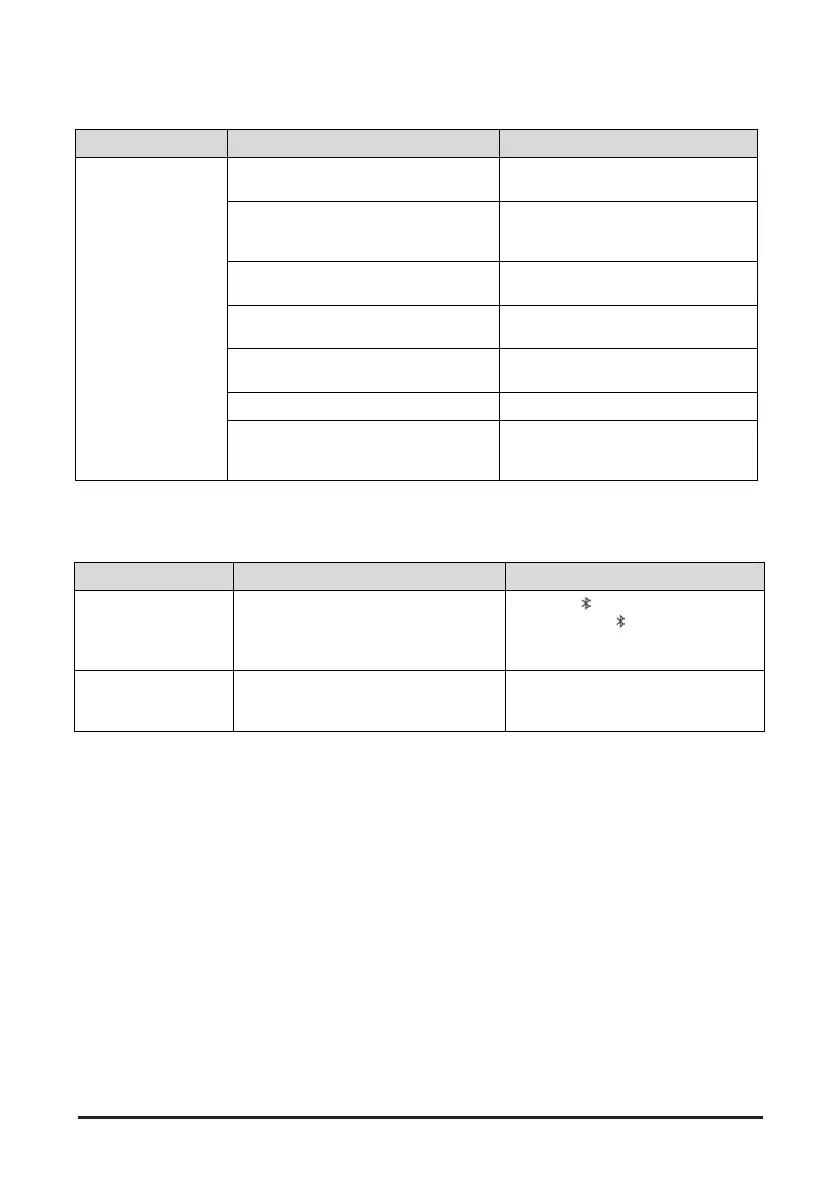
USB
Symbol Possible causes Possible remedies
The USB does not
work.
USB memory is damaged.
Please use after formatting the USB into
FAT 16/32 format.
USB memory has been contaminated.
Remove any foreign substances on the
contact surface of the USB memory and
USB port.
A separately purchased USB HUB is being
used.
Directly connect the USB memory with
the USB port.
A USB extension cable is being used.
Directly connect the USB memory with
the USB port.
A USB which is not a Metal Cover Type
USB Memory is being used.
Use a standard USB Memory.
A HDD type, CF, SD Memory is being used. Use a standard USB Memory.
There are no music files which can be
played.
Only MP3, WMA file formats are
supported. Please use only the supported
music file formats.
Bluetooth
Symbol Possible causes Possible remedies
Bluetooth function does
not work.
Device registration / connection failed.
Check the [ ] is turned on in the function
display. If the [
] indicator is not lit,
connect a Bluetooth device by referring to
"Pairing/Connecting your device".
No audio detected on
Bluetooth device.
Registration mode not executed.
Press the MENU button and select
"BLUETOOTH" > "PAIR" to enter Pairing
Mode.


 To Next Page