Operation Section
85
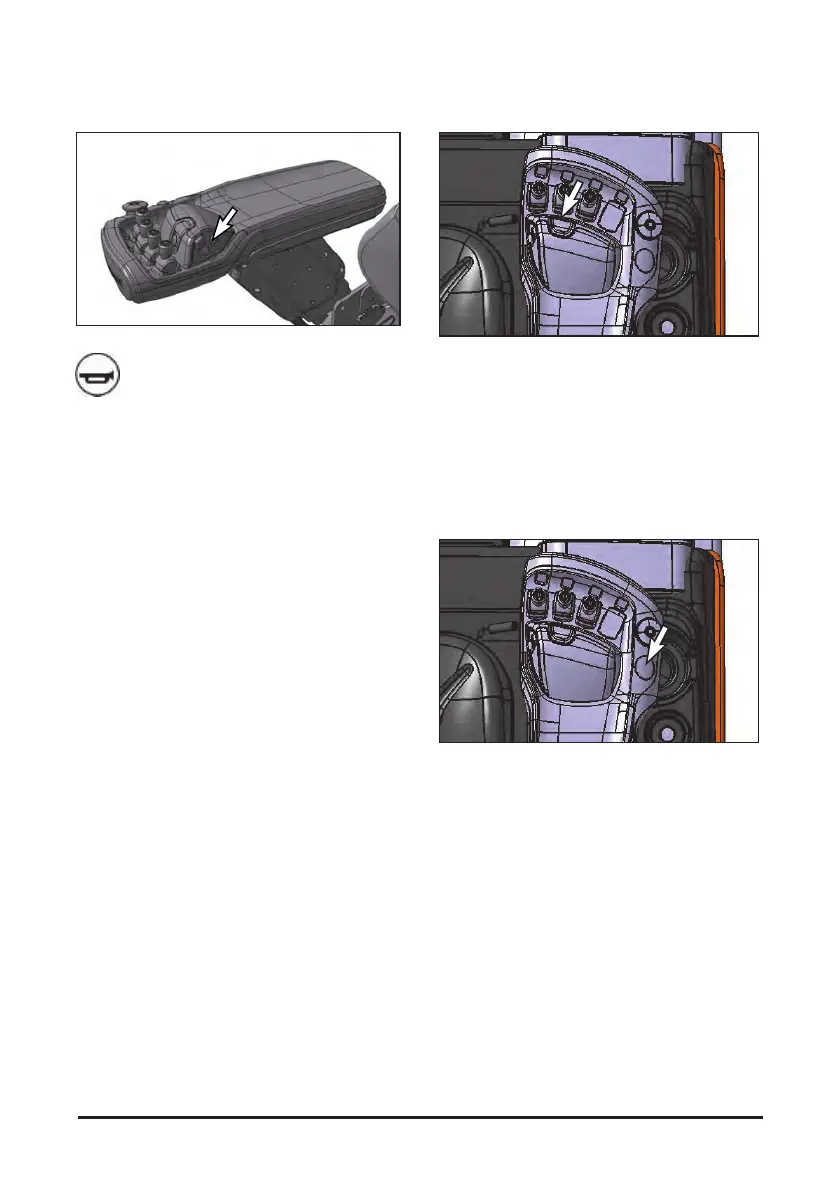
Horn Button
Located in the right side of the directional
control switch.
Push in on the horn button to sound the
horn.
Auto Tilt Control (If provided)
The auto tilt controller is at the rear side of the tilt
knob. Press the auto tilt switch to turn on the switch
lamp and push the tile knob forward. The mast will
stop at 90 degrees angle.
NOTE: To prevent sudden position shift of the load,
operate the lift, tilting and side shift
controller smoothly.
Auto Clamp Control (If provided)
The auto clamp controller is at the rear side of the
emergency switch. Pressing the auto clamp switch
enables operation of the AUX2 knob. If not AUX2
operation signal is provided for 10 s after the trigger,
the AUX2 will be locked. To reset the AUX2, press
the auto clamp switch again. In addition, if no AUX2
operation signal is provided after key switch ON,
the AUX2 will be locked up.
NOTE: To prevent sudden position shift of the load,
operate the lift, tilting and side shift
controller smoothly.


 To Next Page