Drobo 5D3 User Guide 82
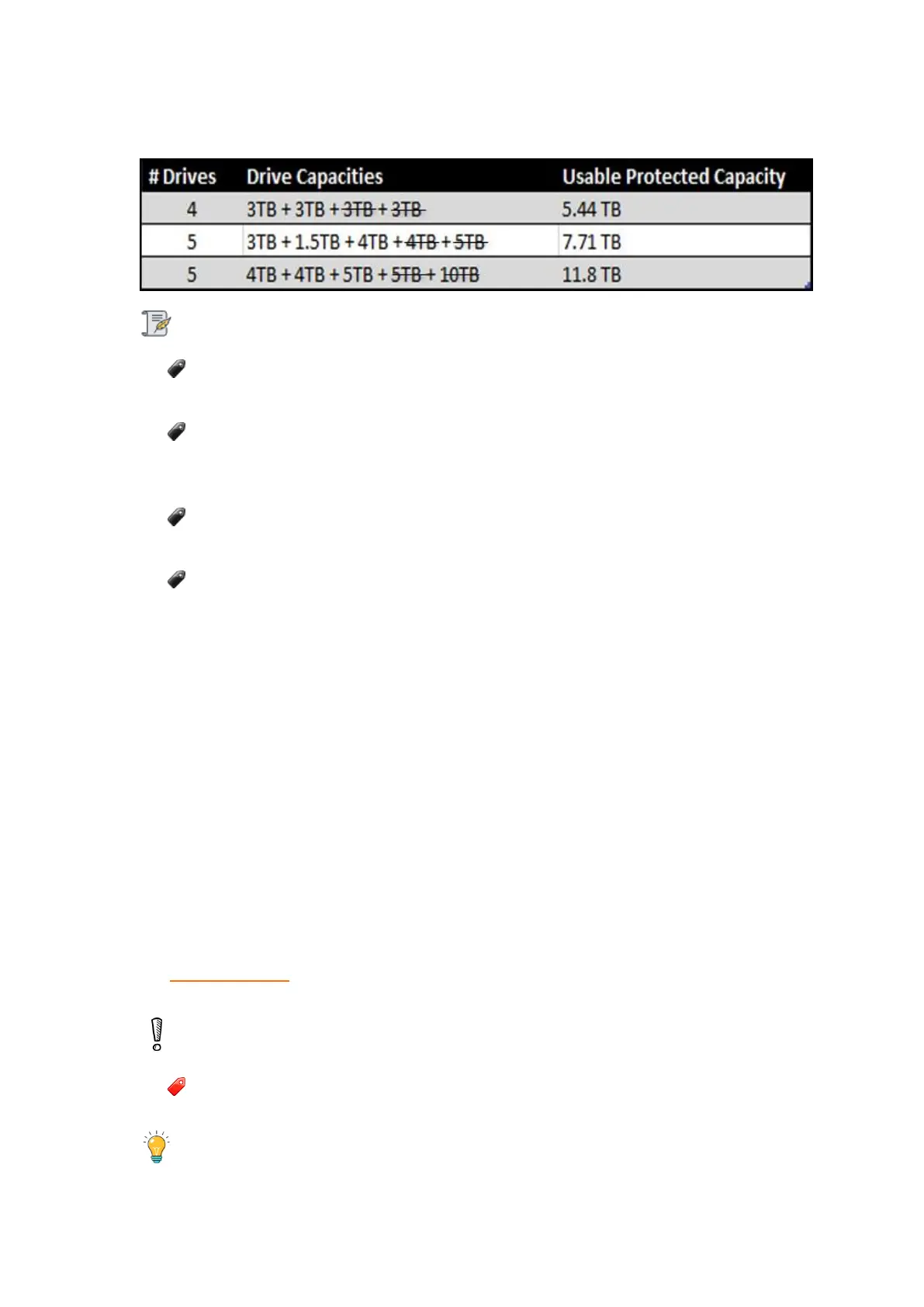
Dual Disk Redundancy
Notes:
Actual capacity may vary from the value shown in the above example due to
different systems used for rating capacity. This has nothing to do with Drobo devices.
Based on your operating system, 64TB of volume is shown as 64TB in Windows
and 70 TB in Mac. Windows uses 2^10 while Mac uses 10^10 for calculating the
volume.
Approximately 91% of the stated capacity will be available for data storage
purpose.
Know that all Drobo devices enable you to easily increase storage capacity at any
time by simply inserting additional drives or replacing smaller drives with larger
ones.
7.2 Adding Capacity (or Drives)
When you find your Drobo 5D3 is running low on space, you can easily add capacity by
either replacing a smaller capacity drive with a larger one, or by inserting a new drive in
an empty drive bay of your Drobo device. Note that once you add the new drive, it
becomes part of the overall storage pool, with all drives functioning as a unit or “pack.”
You can use drives from any manufacturer and with any capacity. For more information,
see Selecting Drives.
Warning:
Any pre-existing data on the drives you add will be erased during installation.
Tip:



 To Next Page