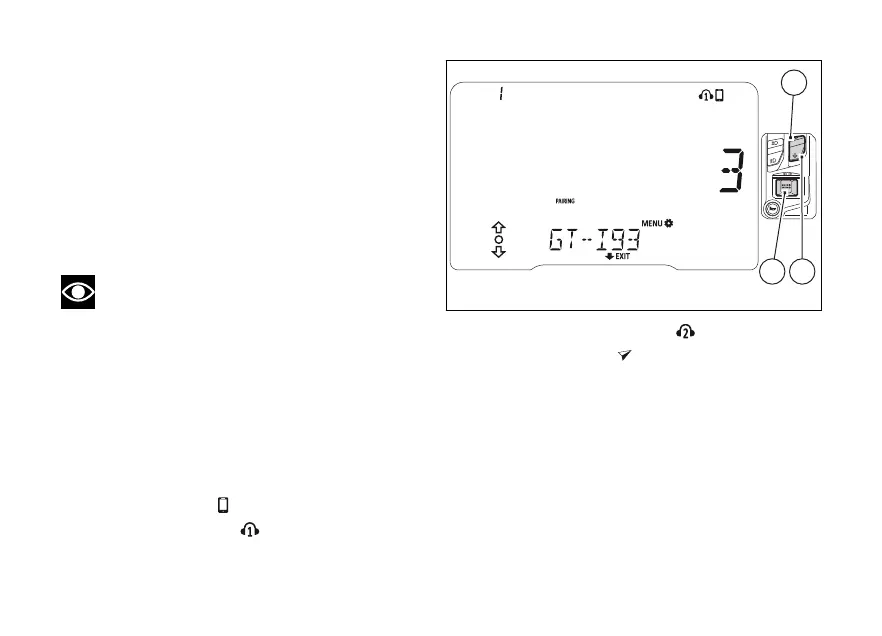
If Pairing is successful, the instrument panel displays
the number of devices detected and their names (in
rolling mode, from right to
Use (1) and (2) to scroll the list of devices and
then press (4) to select the device of interest.
If two or more found devices have the same name,
the list of devices will include two or more devices
with the same name.
If one of the devices detected has no name, it will not
be included in the list of devices detected.
Note
The list of devices found within the range
during the pairing stage does not include already
paired devices even if their Bluetooth connection is
ON.
When a device in the list is selected, the user will
have to specify the type of connected device, using
(1) and (2) until the relevant symbol flashes
and then pressing (4) to confirm.
In this sequence:
-
SMARTPHONE
-
RIDER HELMET (1)
-
PASSENGER HELMET (2)
-
GPS NAVIGATOR
When device type is selected, the display reads
“WAIT..” and number of paired devices is refreshed.
To pair a the pairing procedure with the
Bluetooth control unit is carried out directly via the
If you wish to connect a Bluetooth navigator, the
connection procedure shall be completed on the
Fig 93
139












 To Next Page