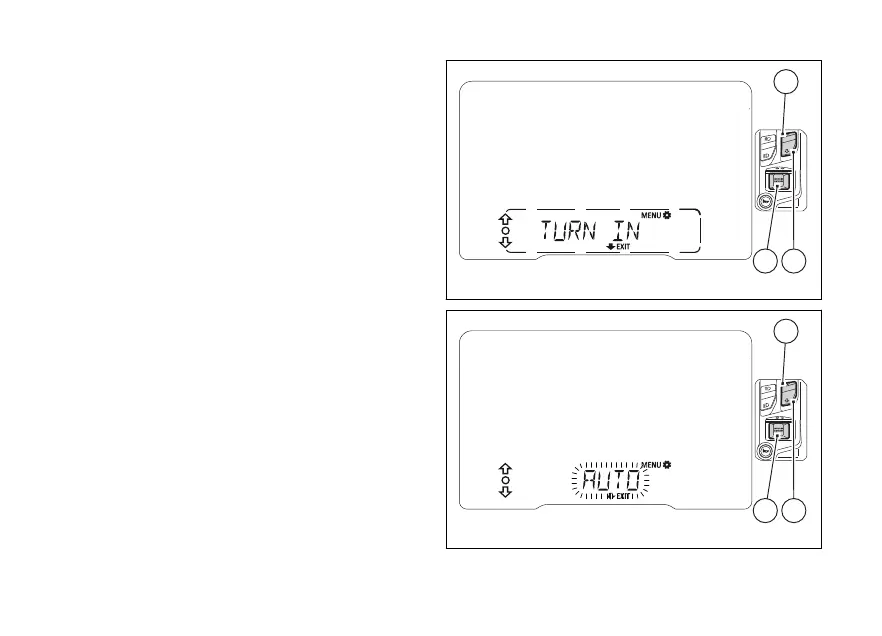
Turn indicator automatic
feature (TURN INDICATORS)
This function allows user to set the strategy for
automatically switching the turn indicators based
on lean angle, vehicle speed and distance run to
manual mode (MANUAL) or automatic mode
(AUTO).
Enter the SETTING MENU.
Select “TURN INDICATORS” by pressing (1)
or (2).
Once function is highlighted, press (4).
When entering this function, the instrument panel
will display the currently set mode flashing.
With (1) and (2) it is possible to select the
"AUTO" or "MANUAL" values.
Press (4), instrument panel will set the
selected mode and then go back to previous screen.
To exit and go back to the previous displaying mode
without editing the parameter, keep (2)
pressed for 2 seconds.
Fig 96
Fig 97
144












 To Next Page