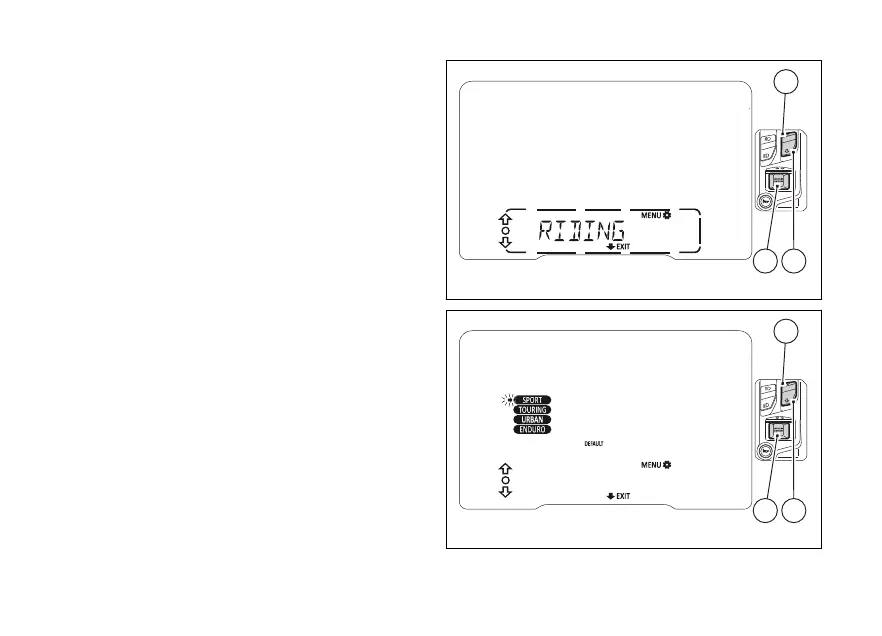
Customising the Riding Mode
(RIDING MODE)
All of every riding mode can be customised.
Enter the SETTING MENU.
Select RIDING MODE by pressing (1) or (2).
Once function is displayed, press (4).
entering the function the display shows the
four available riding modes “SPORT”, “TOURING”,
“URBAN”, “ENDURO”, with a flashing arrow pointing
at the “SPORT” riding mode.
You can use (1), (2) and (4) to do the
following:
- use (1) and (2) to select the riding mode
to customize, then press (4) to enter the
customization of the selected riding mode;
- use (1) and (2) to select “DEFAULT”
(flashing frame), then press (4) for 2
seconds to restore default values for all four
Riding Modes (ALL DEFAULT).
To exit and go back to the previous screen, keep
(2) pressed for 2 seconds.
Fig 43
Fig 44
92












 To Next Page