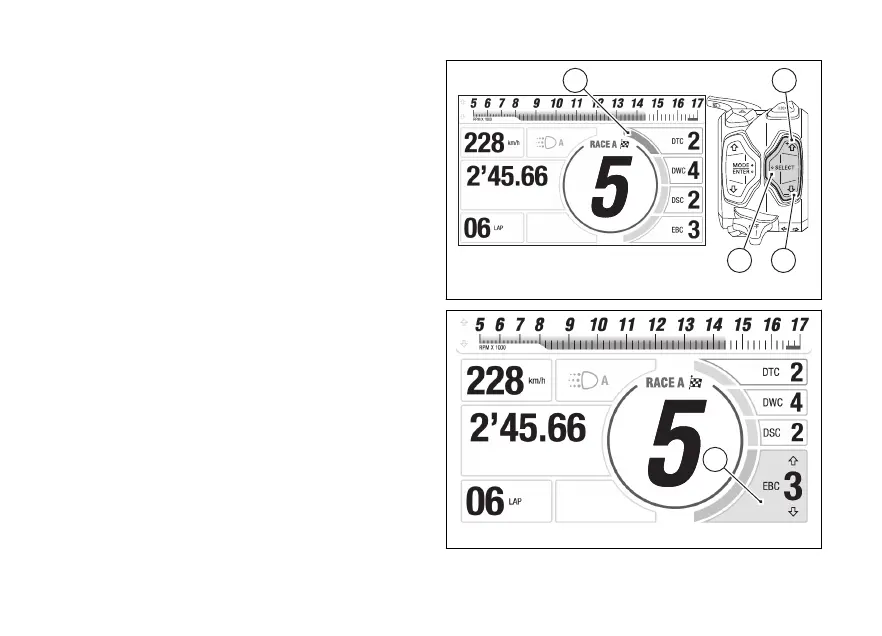
Parameter menu and level change with Track
Evo Info Mode
If Track Evo Info Mode is active, the following
parameters and their current are displayed
on the right side of the screen:
●
DTC
●
DWC
●
DSC
●
EBC
The currently selected parameter is indicated by the
colouring of the corresponding cursor (B, in the
example “DTC”).
The UP (1) and DOWN (2) quick selection can
be used to move the parameter selection.
Press the quick selection “SELECT” (3) to
change level.
The window of the selected parameter (C, in the
example “EBC”) is then enlarged, above and below
the current level, 2 arrows are displayed indicating
that by using the UP (1) and DOWN (2) it is
possible to scroll through the levels available for the
parameter being modified.
By pressing the SELECT (3) you confirm the
selected level and the instrument panel shows the
previous screen.
Fig 68
Fig 69
112













 To Next Page