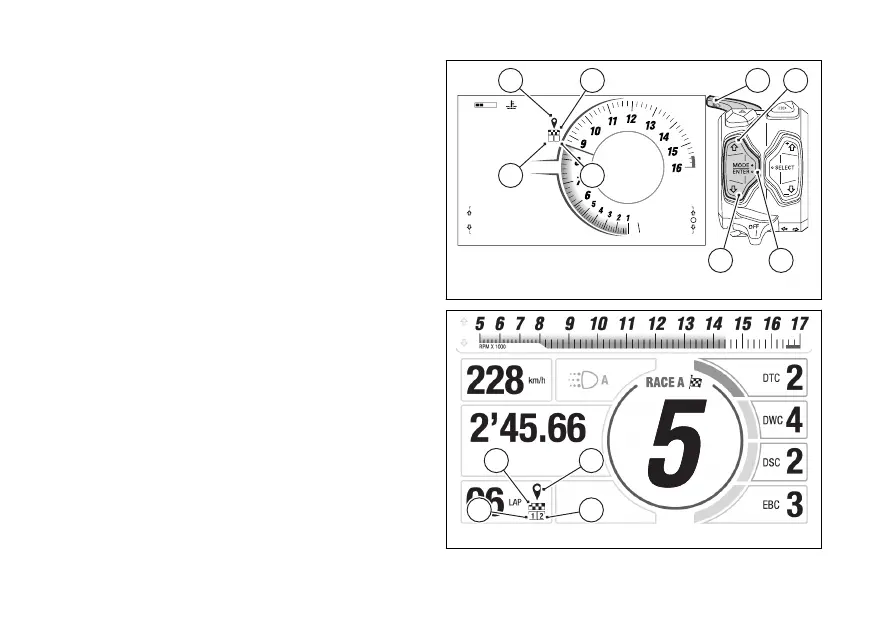
LAP EVO
If the bike is equipped with the GPS EVO module, the
LAP EVO function is enabled. The display shows GPS
symbol (D) to timer and lap number.
Here are the screens for Track Info Mode (Fig 79) and
Track Evo Info Mode (Fig 80).
Unlike the LAP BASIC, the LAP EVO allows recording
the position of the finish-line and 2 Once
the finish-line and coordinates are
recorded, the LAPs are managed by the GPS.
To set the finish-line and the coordinates it
is necessary to:
●
position the bike on the finish-line and press the
FLASH (4) to record the coordinates; the
symbol (E) is displayed;
●
position the bike on the first and press
the FLASH (4) to record the coordinates;
the symbol (F) is displayed;
●
position the bike on the second and
press the FLASH (4) to record the
coordinates; the symbol (G) is displayed.
The set coordinates remain recorded also a
To change the coordinates of one or more positions,
repeat the recording procedure described above by
190
01’35.27
km/h
Lap 1/60
4
11:34
A.M.
SPORT
RPM X 1000
Gear
DWC 3
DTC 3
DSC 2
LO HI
SETTING MENU
TRIP 1
TOT km
1245
0.0 km
1 2
D E
F G
14
32
Fig 79
Fig 80
126













 To Next Page