17
Service Manual for Flexible Batch Broiler Units
Control Board
The Control Board is located on the front of the
broiler. Control Board programming is preset at
the factory with standard BURGER KING
®
recipes.
Any ne adjustments made at the restaurant level
are the responsibility of the restaurant manager.
WARNING
DISCONNECT THE ELECTRICAL
POWER TO THE BROILER AND
FOLLOW LOCKOUT / TAGOUT
PROCEDURES.
1. Remove the Electrical Access Panel. Refer to the
COVERS and PANELS section of the manual.
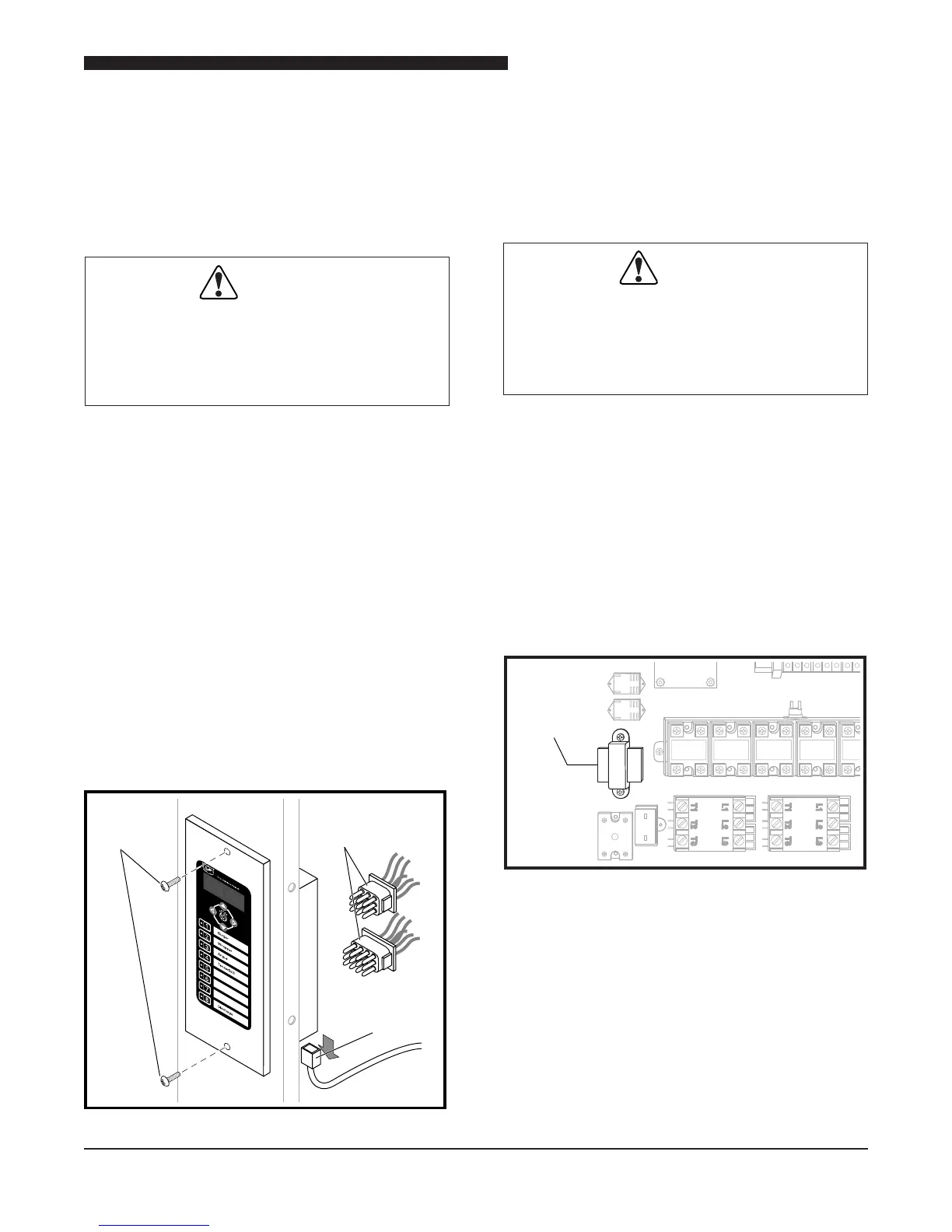
2. Remove the two screws on the front of the
Control Board.
3. Disconnect the Cook Chamber Temperature
Probe connector at the bottom of the Control
Board.
4. Disconnect the 9-pin and 12-pin connectors
from the back of the Control Board Bezel..
5. Remove Control Board from broiler.
6. Reverse procedure to install new Control
Board.
7. Alert the restaurant manager the Control Board
has been replaced and ne adjustments may
be required.
Screws
Cook Chamber
Temperature
Probe
9-Pin and
12-Pin
Connectors
Control Board
Step-Down Transformer
The Step-down Transformer is accessible by
removing the Electrical Access Panel. The
Transformer reduces the incoming voltage to
24 VAC.
WARNING
DISCONNECT THE ELECTRICAL
POWER TO THE BROILER AND
FOLLOW LOCKOUT / TAGOUT
PROCEDURES.
1. Remove the Electrical Access Panel. Refer
to the COVERS and PANELS section of the
manual.
2. Disconnect wires from the Transformer to be
removed.
3. Remove screws securing Transformer to
frame.
4. Remove Transformer.
5. Reverse procedure to install a Transformer.
Step-Down
Transformer
Step-Down Transformers


 To Next Page