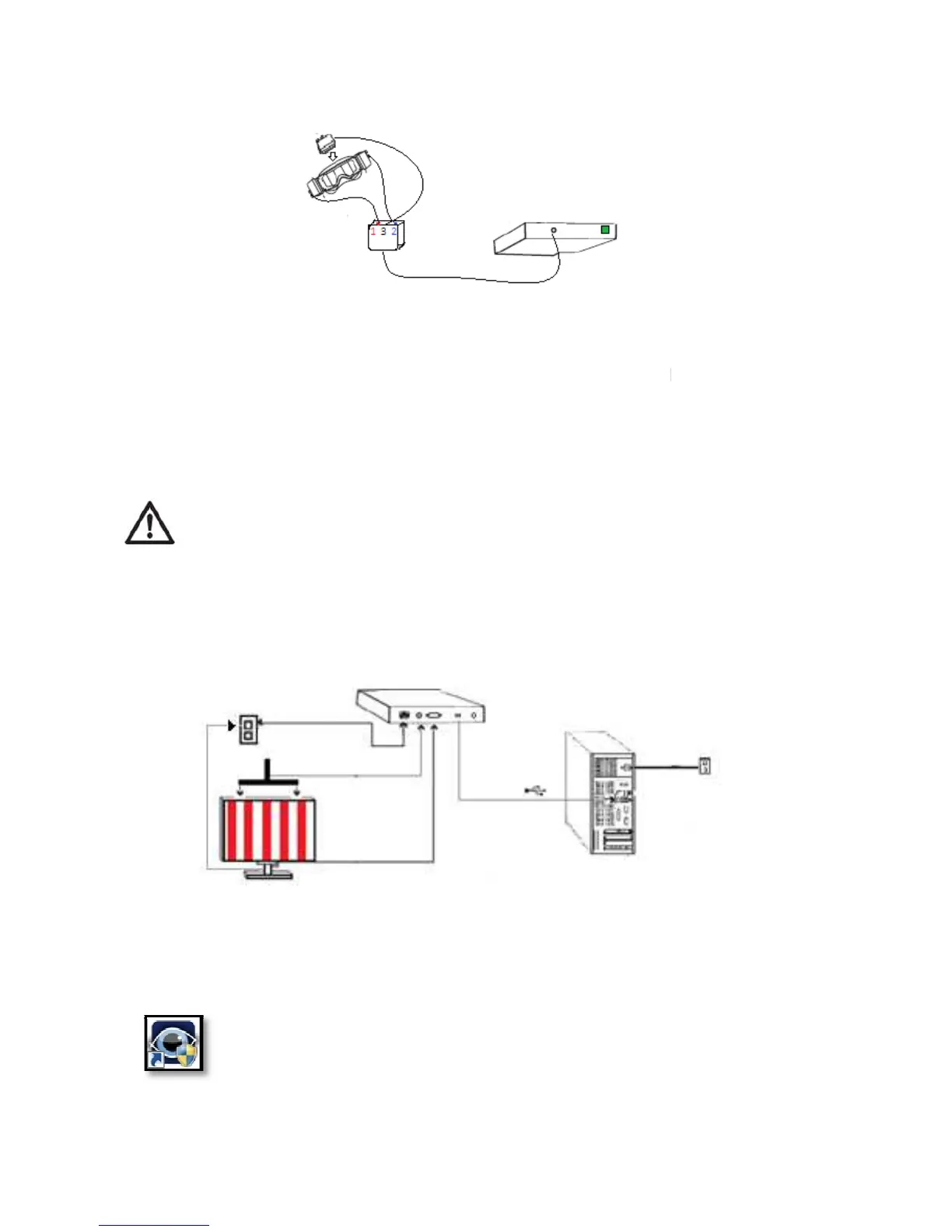
Connect the ultrasound bar to the connector on the rear pan
Connect the visual stimulus monitor to the VGA on the back panel of the
console.
7. Connect the monitor to the power network
8.
Connect the console to a free USB port of the desktop or laptop PC
Do not use the front ports of desktop PCs, as th
ey are usually not properly
assembled. This can cause communication errors.
9.
Connect the Power Supply Cable to the Power connector located on the
back of the equipment (1)
10. Connect the Power Cable to the Network.
11. Turn on the device from the ON / OFF tab
to finish the automatic loading of
At the end of the installation, run the software from the desktop icon of
your PC, to verify that it has been installed perfectly. If an error occurs,
restart the PC. If the error persists consult troubleshootin
Connect the ultrasound bar to the connector on the rear pan
Connect the visual stimulus monitor to the VGA on the back panel of the
Connect the console to a free USB port of the desktop or laptop PC
ey are usually not properly
Connect the Power Supply Cable to the Power connector located on the
to finish the automatic loading of
At the end of the installation, run the software from the desktop icon of
your PC, to verify that it has been installed perfectly. If an error occurs,
restart the PC. If the error persists consult troubleshootin



 To Next Page