78
CHANGE THE CUSHION OF GOGGLES
Peel off the pad and wipe the surface well with a soft cloth lightly moistened with
alcohol.
Remove the protective paper from the new pad and press the self-adhesive side onto
the mask. Do not stretch the pad.
FUSES CHANGE
Replace the fuses as detailed below:
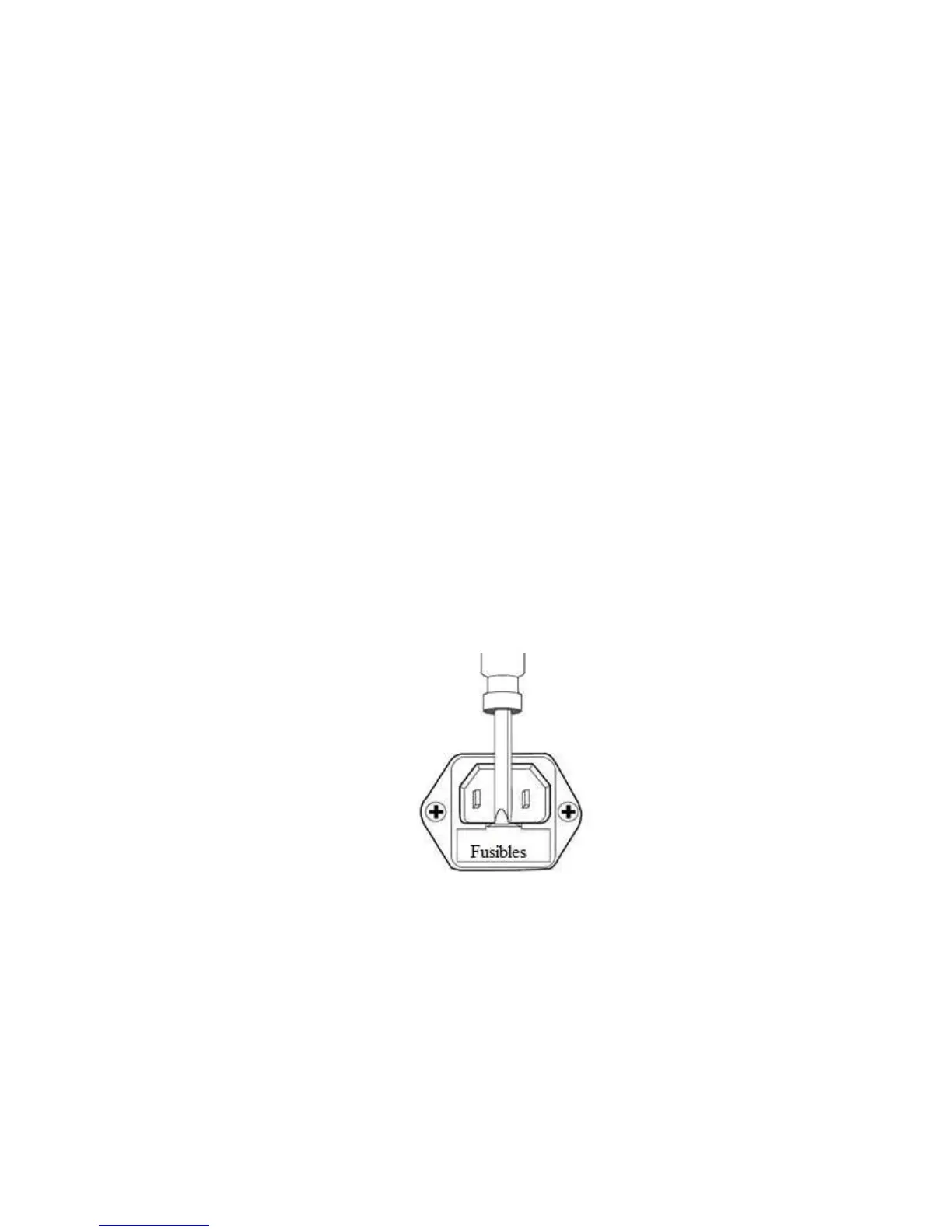
1. Under the connector for the power cable is a small box where the fuses are
housed
2. Open the fuse compartment. To do this, insert a flat head screwdriver into
the notch and gently lift the fuse compartment with a slight downward and
outward movement.
3. Fuses must be replaced if they appear black or burned.
4. Replace the fuses with a new T1AL250V.
5. Close the lid of the fuse box until you hear a "Click".
6. Connect the power cable to the computer.
.
Note: It is convenient to have two spare fuses, in the event of requiring a replacement.
DISPOSE
Dispose of all parts removed from the device according to local, community and
national regulations and then the protocols of the health institutions.
Especially as regards the protection of the environment, especially when disposing of
the electronic device or parts thereof (eg: fuses)



 To Next Page