138
3‐9ParentalControl
YoucancontrolwhenyourchildisabletoaccesstheInternetunder“ParentalControl”.
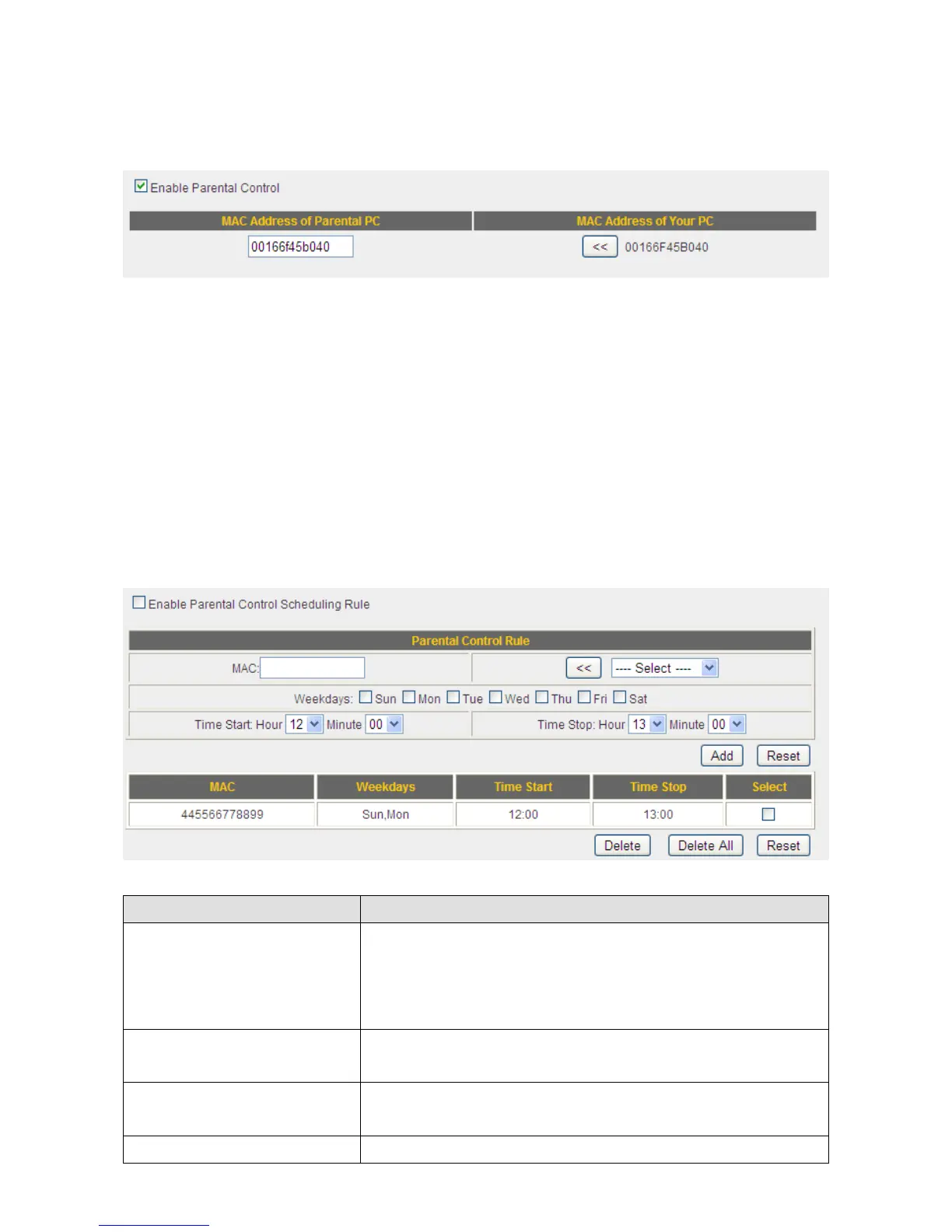
Toenabletheparentalcontrolfunction,check“EnableParentalControl”.Thisrouter
willonlyallowInternetaccesstoothercomputerswhenyourcomputerispresent.By
default,yourcomputer’sMACaddresswillbelistedhereautomatically.Youcanalsoinput
anothercomputer’sMACaddressmanuallyinthe“MACAddressofParental
PC”field.
NOTE:YoudonotneedtoenterthepunctuationmarksintheMACaddress.Just
enterthe12hexadecimalnumbers(asshownabove).
Youalsohavetheoptionofsettingupaparentalcontrolschedule.
ItemName Description
MAC InputtheMACaddressofthecomputeryouwantto
control(i.e.yourchild’scomputer)inthe“MAC”field.
Youcanalsoselectacomputer’sMACaddressinthe
“Select”dropdownlist,andcopyitbyclicking“<<”.
Weekdays Selectthedaysthatwillbeaffectedbytheparental
controlrule.
TimeStart/TimeStop Selectthestarting/endingtimetheparentalcontrol
rulewilltakeeffect.
Add Click“Add”toaddtheparentalcontrolruletothelist.



 To Next Page