28
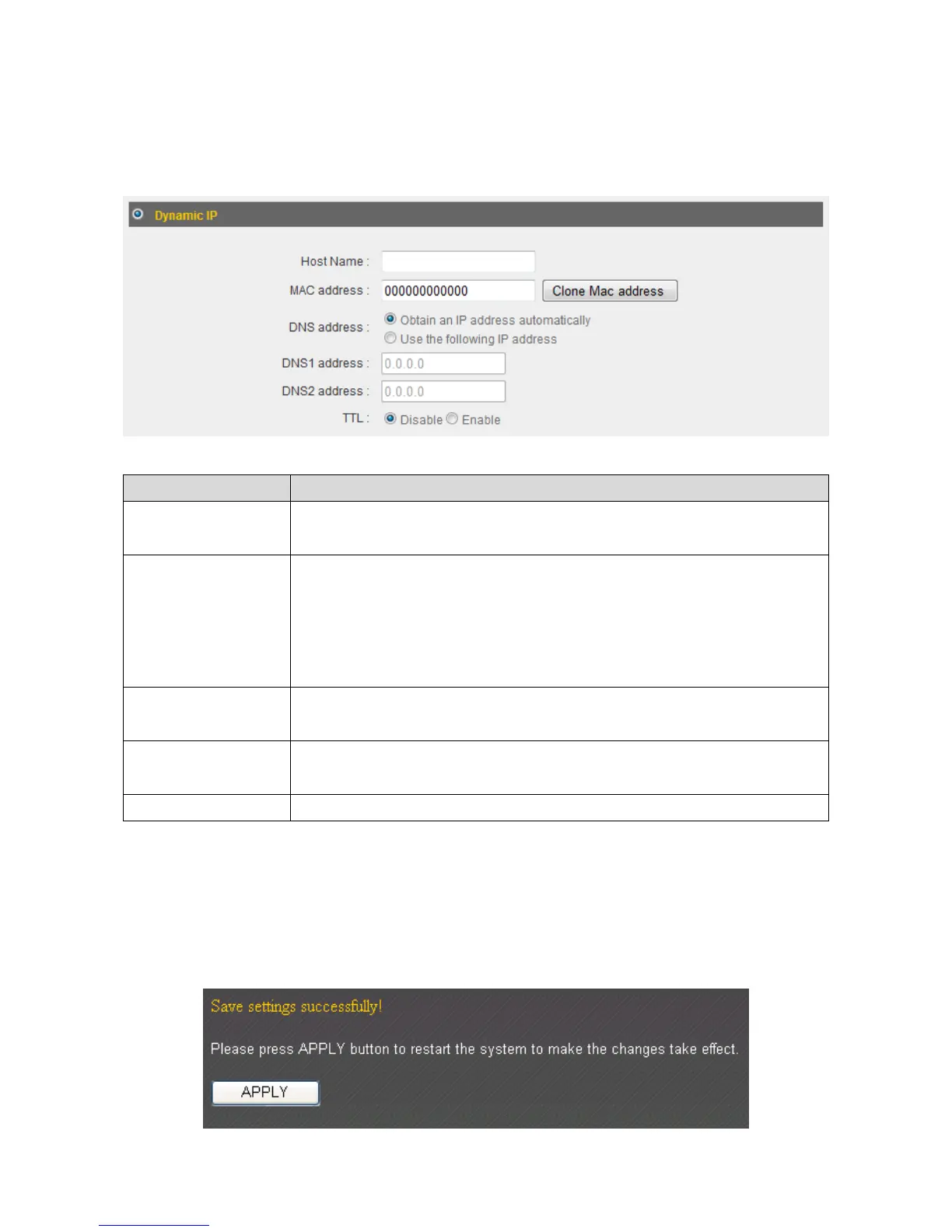
2‐4‐1Using“DynamicIP”asbroadbandconnectiontype
1. IfyourInternetserviceproviderassignsIPaddressestoyouautomaticallythrough
DHCP(DynamicHostConfigurationProtocol),select“DynamicIP”.
ItemName Description
HostName Inputthehostnameofyourcomputerhere.Thisisoptional
andonlyrequiredifyourISPasksyoutodoso.
MACAddress IfyourISPonlypermitscomputerswithcertainMAC
addressestoaccesstheInternet,inputyourcomputer’sMAC
addresshere.Press“CloneMacaddress”tofilltheMAC
addressfieldwithyourcomputer’sMACaddress
automatically.
DNSAddress Select“UsethefollowingIPaddress” ifyourISPrequiresthat
youdoso.
DNSAddress1
and2
EntertheprimaryandsecondaryDNSaddressesassignedby
yourISPhere.
TTL Enablethe“TTL”functionifyourISPrequiresyoutodoso.
2. Click“OK”tocompletesetup.
3. Whenthefollowingmessageappears,click“Apply”tosavethechangesandrestart
thebroadbandrouter.Thero uterwilltakeabout60secondstorestart.



 To Next Page