30
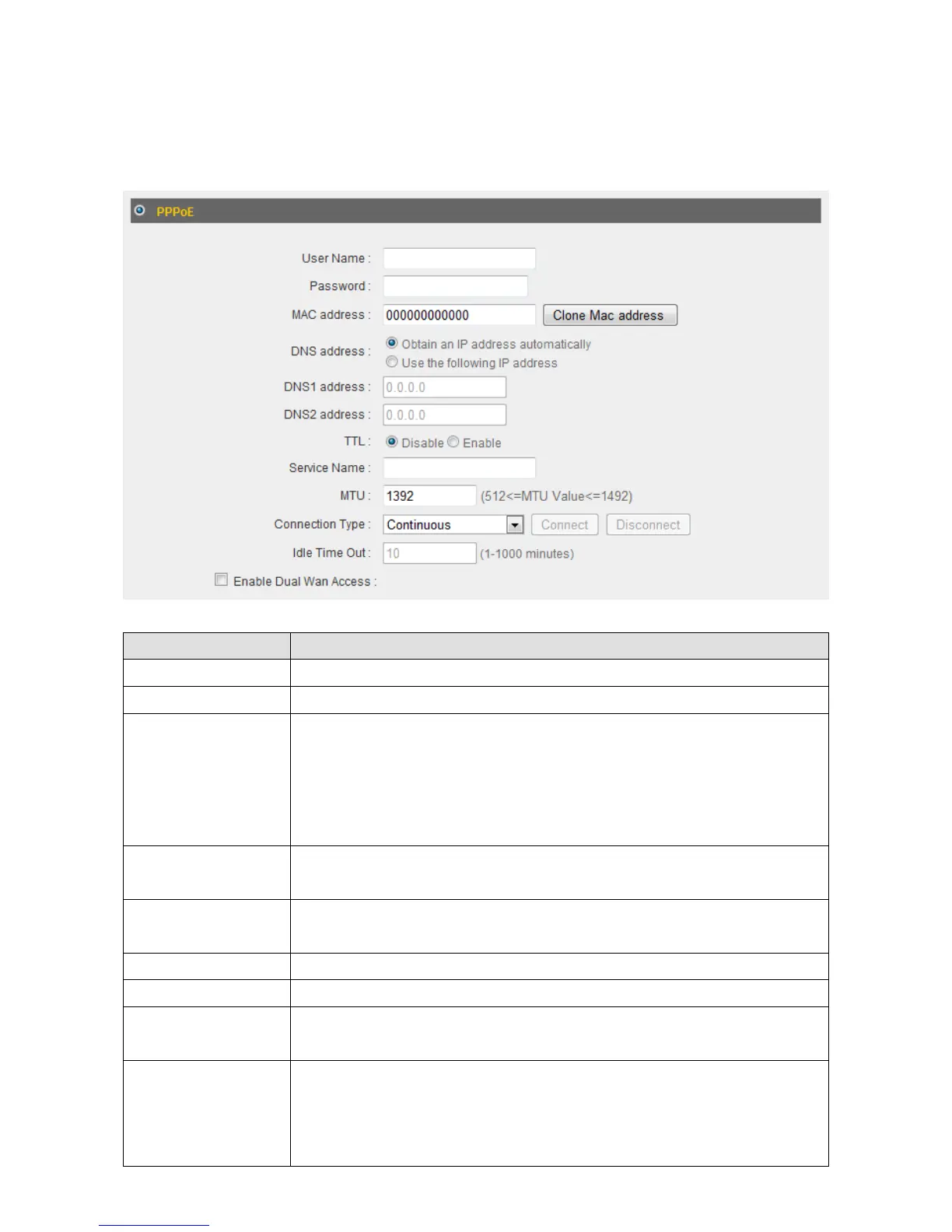
2‐4‐3Using“PPPoE”asbroadbandconnectiontype
1. IfyourISPisprovidingyouInternetaccessviaPPPoE(Point‐to‐PointProtocolover
Ethernet),select“PPPoE”.
ItemName Description
UserName InputtheusernameassignedbyyourISPhere.
Password InputthepasswordassignedbyyourISPhere.
MACAddress IfyourISPonlypermitscomputerswithcertainMAC
addressestoaccesstheInternet,inputyourcomputer’sMAC
addresshere.Press“CloneMacaddress”tofilltheMAC
addressfieldwithyourcomputer’sMACaddress
automatically.
DNSAddress Select“UsethefollowingIPaddress” ifyourISPrequiresthat
youdoso.
DNSAddress1
and2
EntertheprimaryandsecondaryDNSaddressesassignedby
yourISPhere.
TTL Enablethe“TTL”functionifyourISPrequiresyoutodoso.
ServiceName GivethisInternetserviceaname(optio nal).
MTU InputtheMTUvalueofyournetworkconnectionhere.Ifyou
donotknow,usethedefaultvalue.
ConnectionType Pleasespecifyaconnectiontypehere.Thereare3options:
1. “Continuous”keepstheInternetconnectionaliveallthe
time.



 To Next Page