Software Overview
Document ID: OMM-00165 Rev. C Pro 32r Operations Guide 51
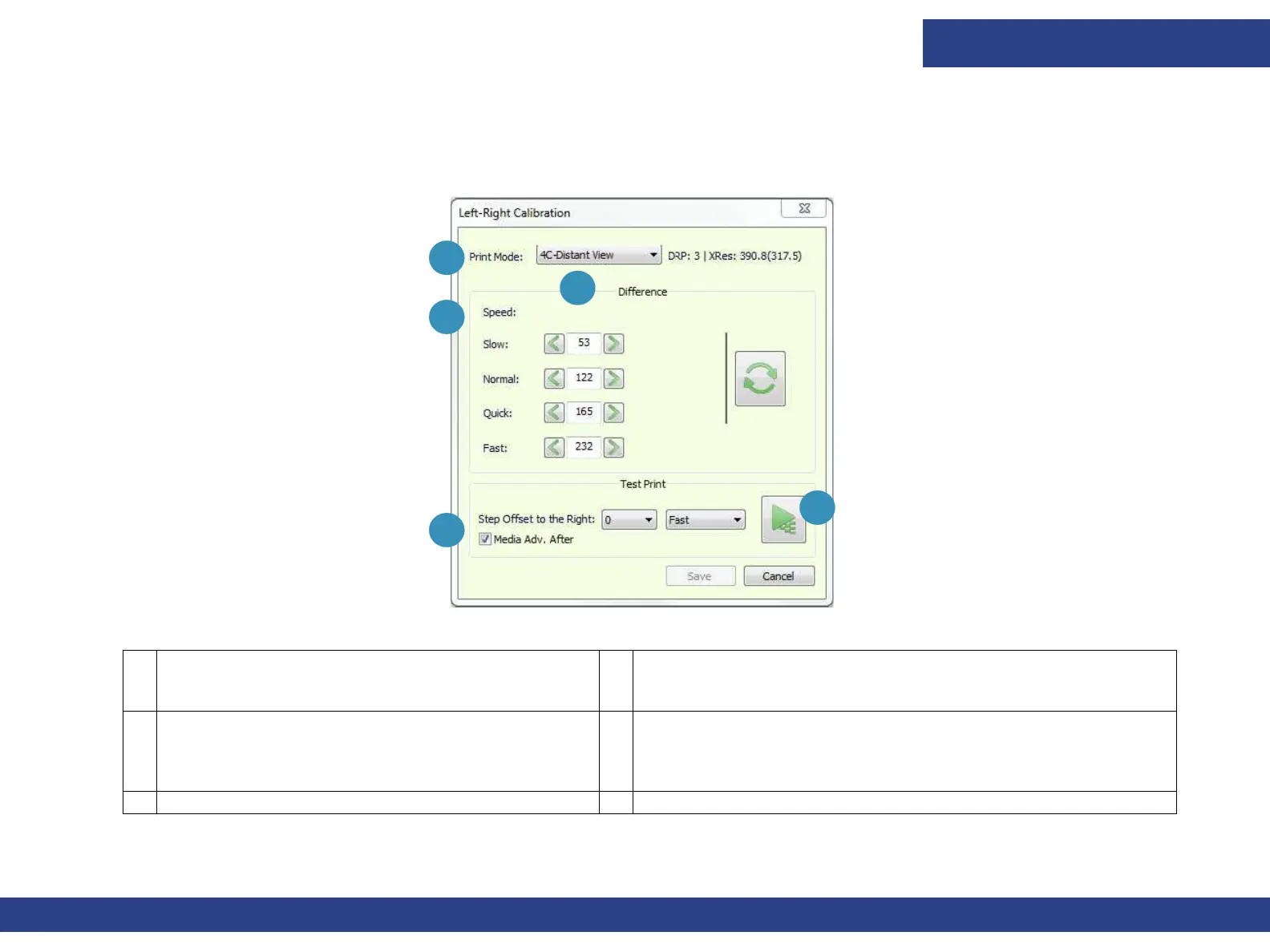
4.2.3 Left-Right Calibration Dialog
This dialog sets the position of heads firing during bi-directional printing, in units of pixels. Opens via the Left-Right icon on the Front-
end window’s Control Panel or from the Calibrations options in the Tools menu.
Figure 4-5 Left-Right Calibration
1 Print Mode – Select the Print Mode to calibrate. 3 Speed - Carriage speed in which you are printing: Slow, Normal,
Quick, and Fast.
2 Difference – There are four optional carriage
speeds for each print mode. Speed is
predefined in
the Print Mode list and is usually set to Fast. Make
sure to insert values in the
correct spin box.
4 Set the Step Offset to the Right – Sets the location of the
pattern on the media width.
5 Test Print – Print the Left-Right Calibration test pattern.
1
2
3
4
5



 To Next Page