Software Overview
Document ID: OMM-00165 Rev. C Pro 32r Operations Guide 50
4.2.2 Media Settings Dialog
1
2
3
4
5
6
7
8
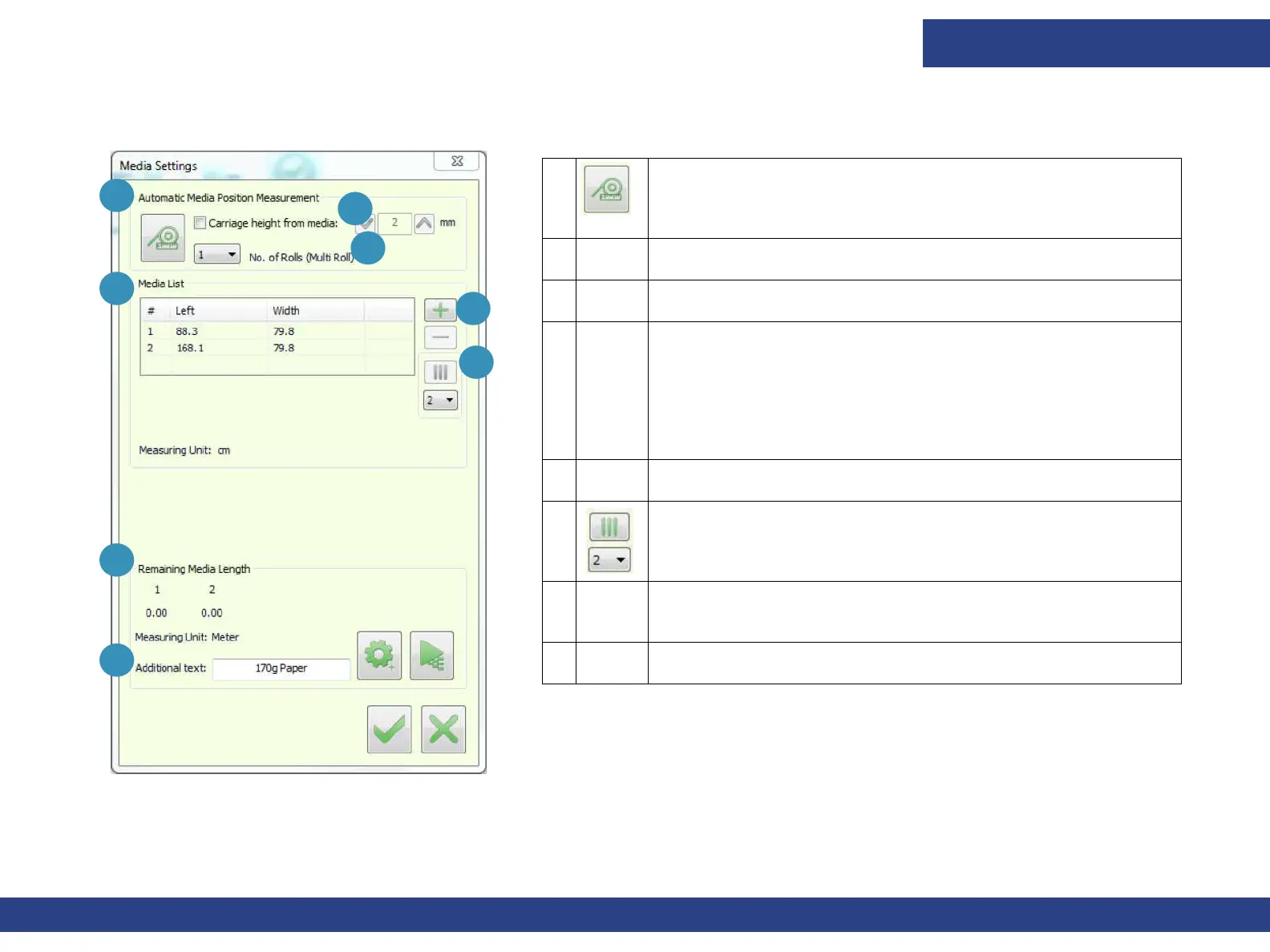
Figure 4-4 Media Settings
1 Measures distance between the left edge of the print table
and the left edge of each media roll. Also measures the width
of the roll(s) in the printer.
2 Specify the required height above the media in the spin box.
3 Number of Rolls identifies the number of rolls to be printed.
4 Media List.
Left: Distance between the left edge of the print table and
the left edge of the media. If printing multi-roll, the distance
between the left edge of the print table and the left edge of
each roll displays in the Media List box.
Width: The width of each of the media rolls being printed.
5 + Add Roll
- Remove Roll
6 Split media into virtual rolls. Enables you to split the media
into up to 6 rolls.
7 Remaining Media Length. Settings – Length of Media before
printing. Prints the remaining Media length.
8 Additional Texts – Add free text to the label.



 To Next Page