Software Overview
Document ID: OMM-00165 Rev. C Pro 32r Operations Guide 68
4.6.4
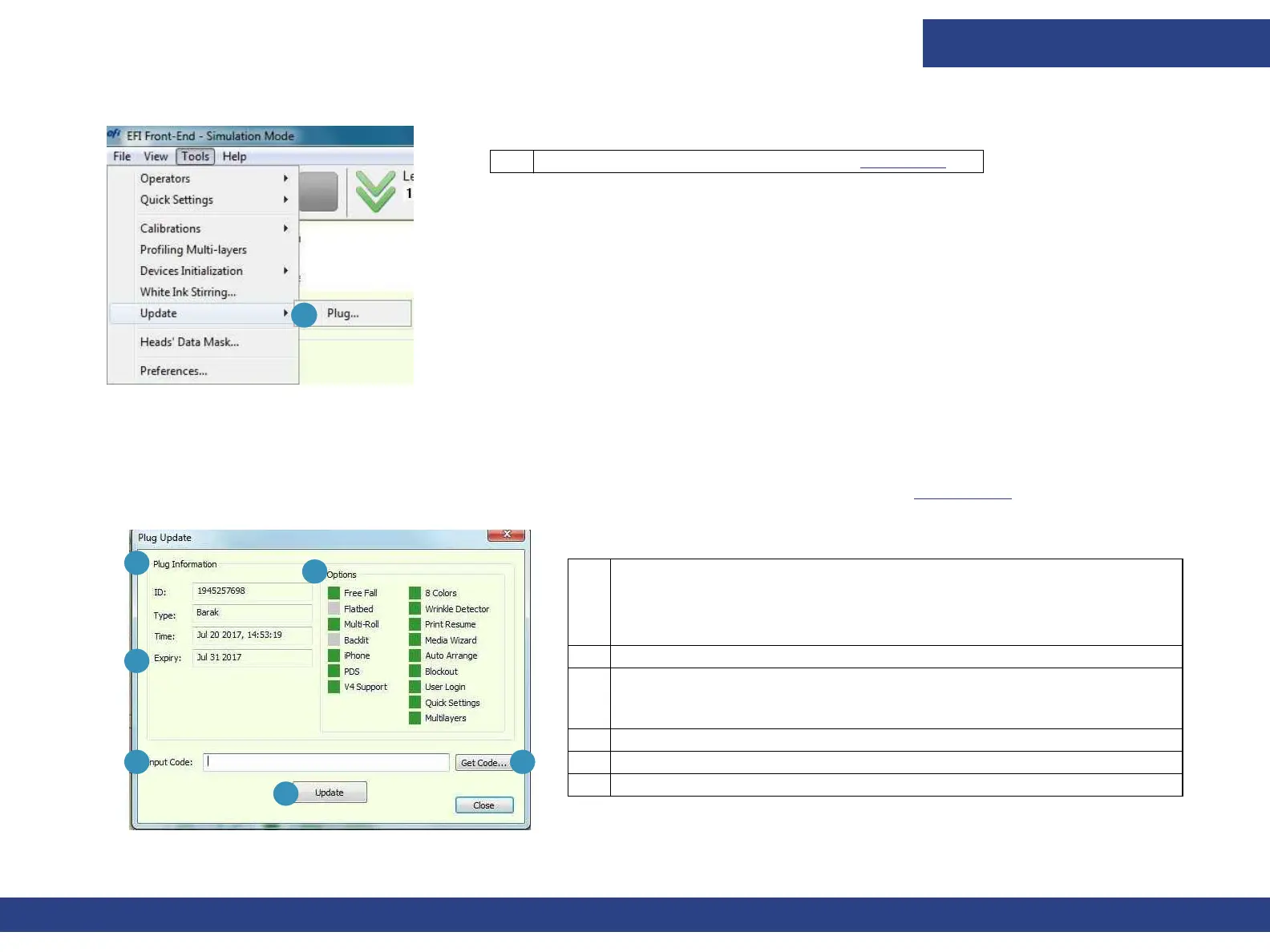
Figure 4-24 Update Sub-menu
1
1 Enables you to update the HASP. See HASP Plug.
Tools Menu - Update Sub-menu
4.6.4.1 HASP Plug
The Pro 32r uses a licensed software. You must have a valid license from EFI in order to use the
software. The printer’s
features are HASP protected and enabled according to the client’s agreement
with EFI. In Figure 4-25 see the dialog box for
updating the printer’s HASP Plug.
.
Figure 4-25 Plug Update Dialog Box
3
1
2
4 5
6
1 Plug Information:
• ID: The ID number of the HASP key.
• Type:
Dongle type
• Time: The internal HASP key time and date.
2 Shows the expiration date of the license.
3 Options. Indicates available features on your HASP (in green).
This is preset by EFI. When these options have to be changed, EFI
sends you a new Plug Input Code, by email.
4 Code emailed from EFI.
5 Browse for the Input Code’s location.
6 Updates the HASP dongle with the new data.



 To Next Page