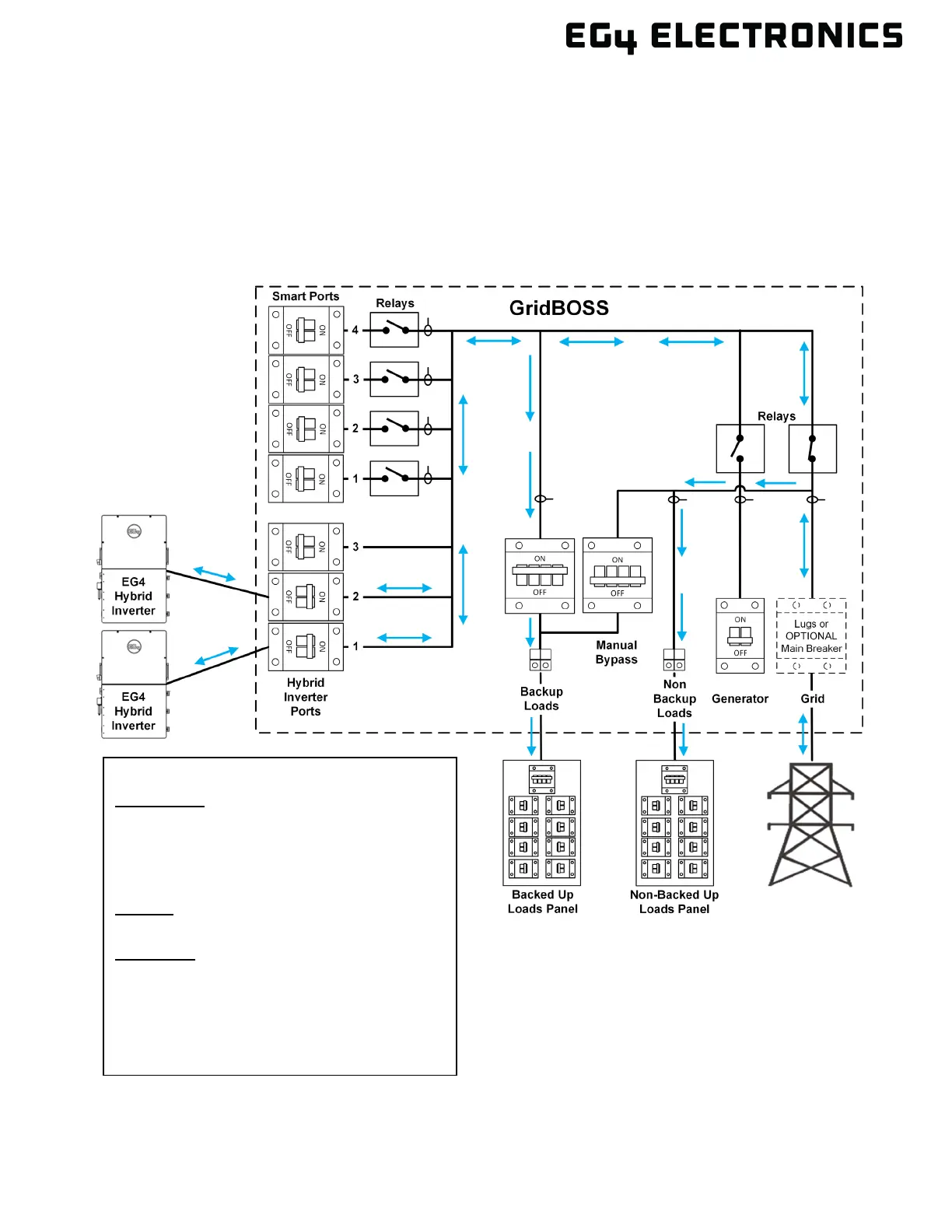
Grid Sell Back
In this example, “Grid Sell Back” has been enabled within the inverter settings. When the inverter
provides power to the loads, the priority is to power the backup loads first; any extra power will go to the
non-backup loads. Power will also be supplied to the smart loads, where the priority is set within the
smart load settings. To include battery power with grid sell-back, enable “Forced Discharge Enable.”
Enable “PVSellToGrid (Comp. w/ NEM3.0)” to only use PV with grid sell-back. To maximize grid sell-
back, consider load shedding non-critical loads using the smart ports. The grid will assist in providing
power to non-backup loads, backup loads, and the smart ports as needed.
Application:
Power Backup: Enable
Grid Sell Back: Enable
Fast Zero Export: Disable
Off-Grid Mode: Disable
Charge:
AC Charge: Enable or Disable based on need
Discharge:
Forced Discharge Enable: Disable
PVSellToGrid (Comp. w/ NEM3.0): Enable
GridBOSS Settings:
No changes required



 To Next Page