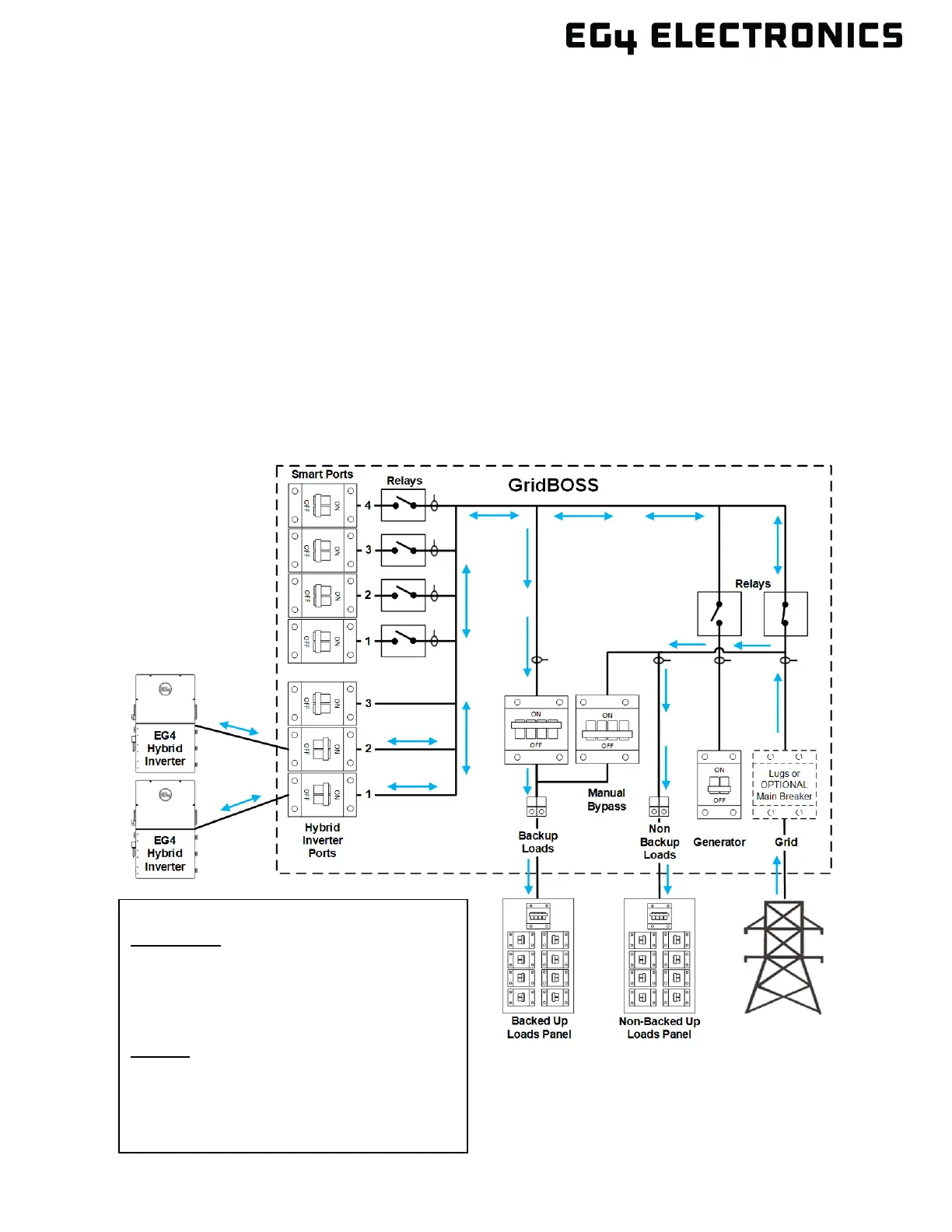
7. SYSTEM OPERATION & CONFIGURATION EXAMPLES
To power up and be ready for operation, the GridBOSS must be set up with at least one powered input.
The input can be from the grid, a hybrid inverter, or a generator. The GridBOSS is a power distribution
unit that controls power flow using internal relays and software. When configuring settings for the
inverters or the GridBOSS, select the proper corresponding serial number in the EG4
®
Monitor Center
or the mobile app.
7.1 HYBRID INVERTERS
When using hybrid inverters with the GridBOSS, the settings for grid interactivity are configured at
the inverter. GridBOSS can only control the ports within the chassis by opening or closing each
individual port relay. The inverters communicate with the GridBOSS using a communication cable
that shares configuration settings, currents, voltages, and any data needed to direct power output.
No Grid Sell Back
In this example, “Grid Sell Back” is disabled within the inverter’s settings. This supports grid assist for
powering backup loads, smart loads, charging battery storage, and non-backup loads.
Application:
Power Backup: Enable
Grid Sell Back: Disable
Fast Zero Export: Enable
Off-Grid Mode: Disable
Charge:
AC Charge: Enable or Disable based on need
GridBOSS Settings:
No setting changes required



 To Next Page