10.3 INVERTER LCD – USB DRIVE
Follow the steps listed below to update the inverter LCD firmware. A 2GB – 16GB USB flash drive is
required. This update requires the inverter to be shut down and restarted.
Download the LCD firmware file using the QR code listed below. The firmware update will be listed
under Inverters 18kPV Firmware updates.
LCD Update Steps:
1. Plug the USB flash drive into a Windows PC.
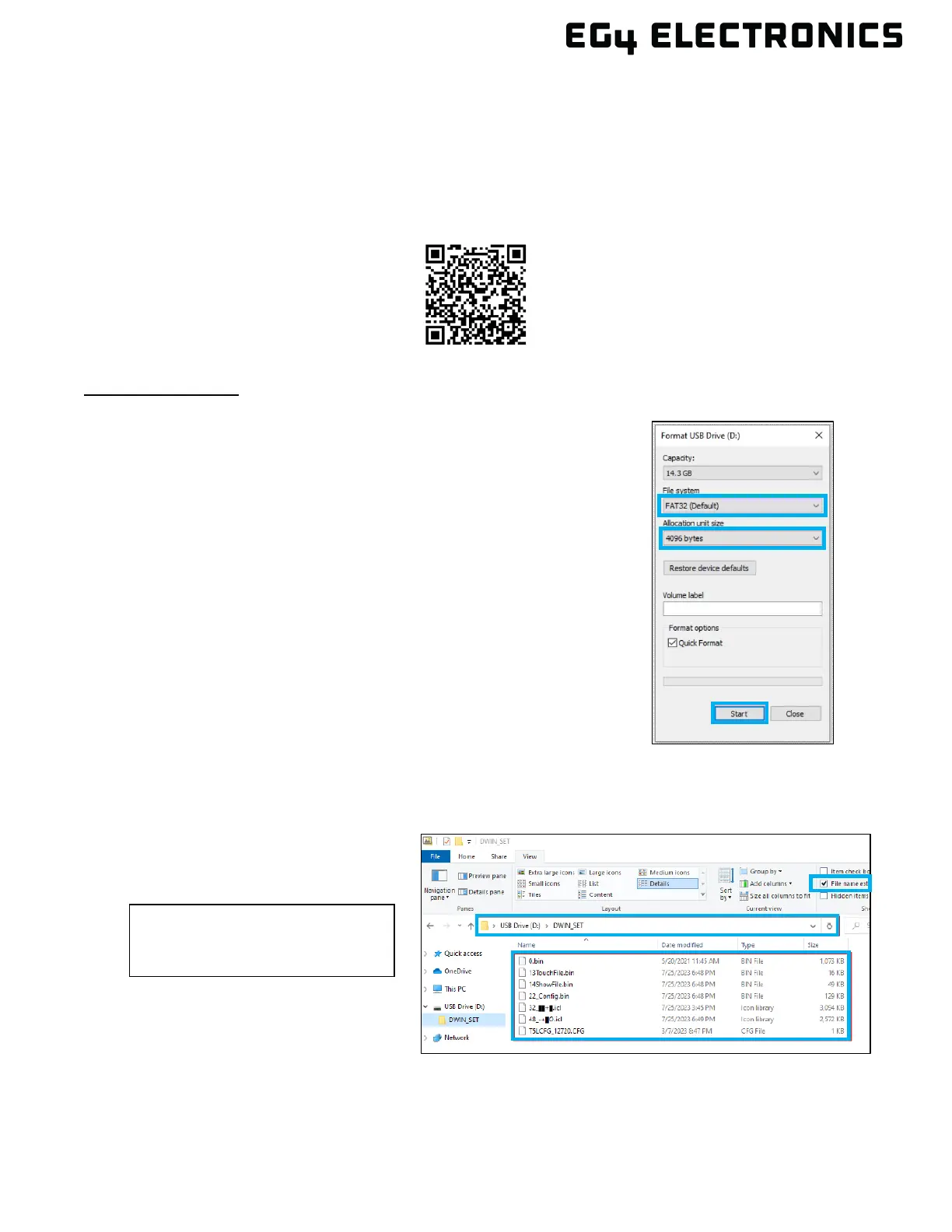
2. Format the flash drive using the following settings:
• File system: FAT32
• Allocation unit size: 4096 Bytes
• Select “Quick Format”
3. Press “Start” to format the USB flash drive. ALL existing
data on the flash drive will be ERASED!
4. Create a folder on the flash drive named DWIN_SET
5. Extract the downloaded zip file containing the LCD
firmware to the DWIN_SET folder created on the flash drive.
6. Open the DWIN_SET folder on the flash drive and verify there
are seven total files as follows:
• .bin (4 files)
• .icl (2 files)
• .CFG (1 file)
In file explorer, use the “Details”
view and make sure “File name
extension” is checked.
EG4 Electronics - Inverters



 To Next Page