10. FIRMWARE UPDATES
Before commissioning the system, please ensure the GridBOSS and inverter firmware are fully up to
date. When upgrading the firmware, the GridBOSS and all inverters use system firmware. The 12kPV
and 18kPV inverters also use LCD firmware. The system firmware can be updated using the EG4
®
mobile app or the EG4
®
Monitor Center, described below.
10.1 SYSTEM - EG4 MOBILE APP
1. Open the mobile device’s wireless settings. Locate and select the dongle’s serial number as the
Wi-Fi network. The dongle’s network ID will be the same as the dongle’s serial number.
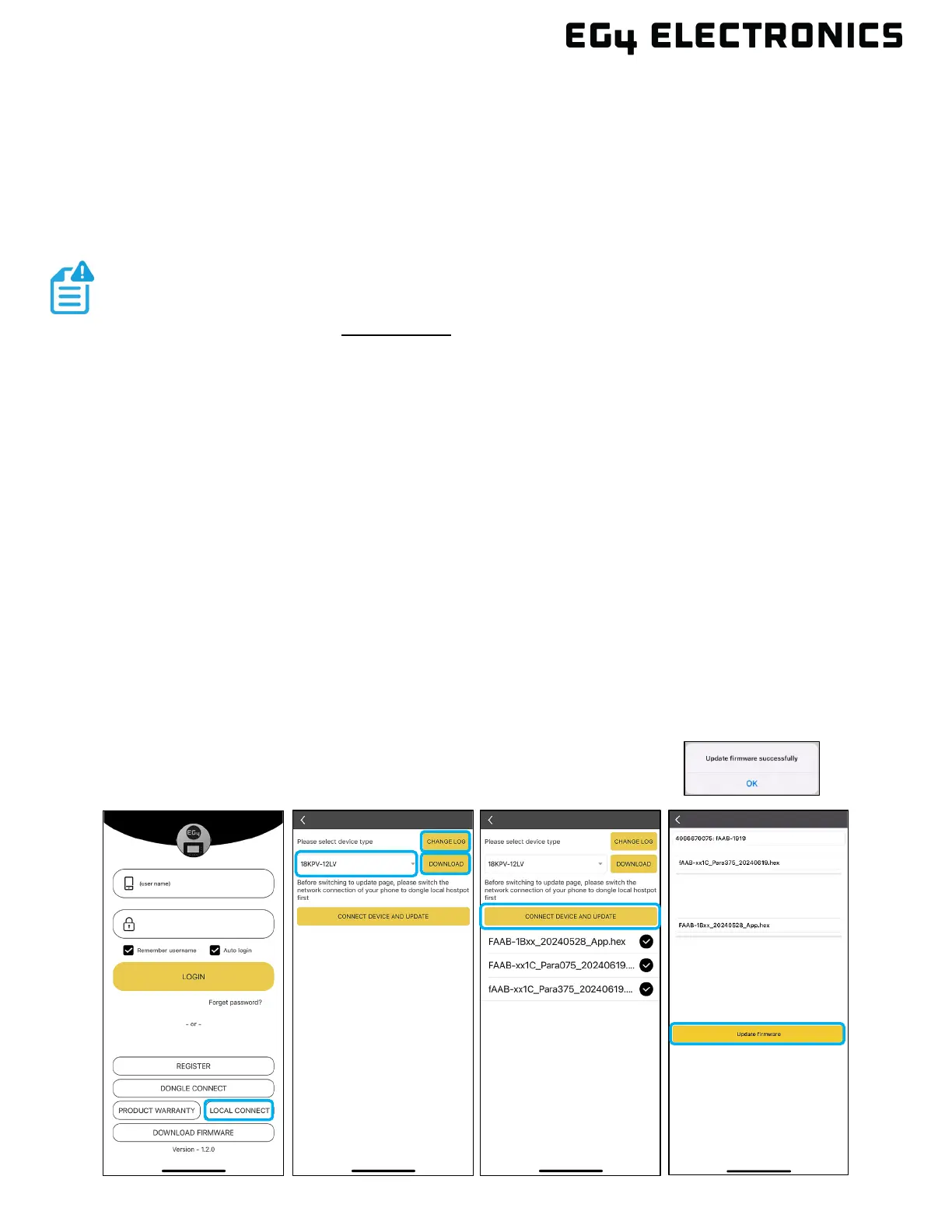
2. Open the EG4 app and select “LOCAL CONNECT.” The app should now be connected to the
inverter or GridBOSS (whichever was selected in step 1).
3. With the app still running, return to the mobile device’s Wi-Fi settings. Connect the home
Wi-Fi network for internet access.
4. Switch back to the EG4
app on the mobile device. Select the correct device type from the drop-
down menu. Then select the “DOWNLOAD FIRMWARE” button. To view the firmware change
log, select the “Changelog” button.
5. Once the check mark appears beside each firmware package, the download is complete. If the
check marks do not appear, ensure Wi-Fi is connected to the home network, not the dongle
serial number.
6. With the app still running, go back to the mobile device’s Wi-Fi settings and connect the mobile
device to the Wi-Fi dongle’s network.
7. Switch back to the EG4
app and select the “CONNECT DEVICE AND UPDATE” button. Next,
select the “Update Firmware” button. The firmware update process should begin. Do not close
the app or change wireless settings while the update is taking place.
8. The app will display “Update firmware successfully” once the update is
complete.
NOTE:
When updating the firmware through the EG4 app, ensure the device has
plenty of battery life and do not close the app. Before performing the following
steps, ensure the Wi-Fi dongle is securely connected and properly configured.



 To Next Page