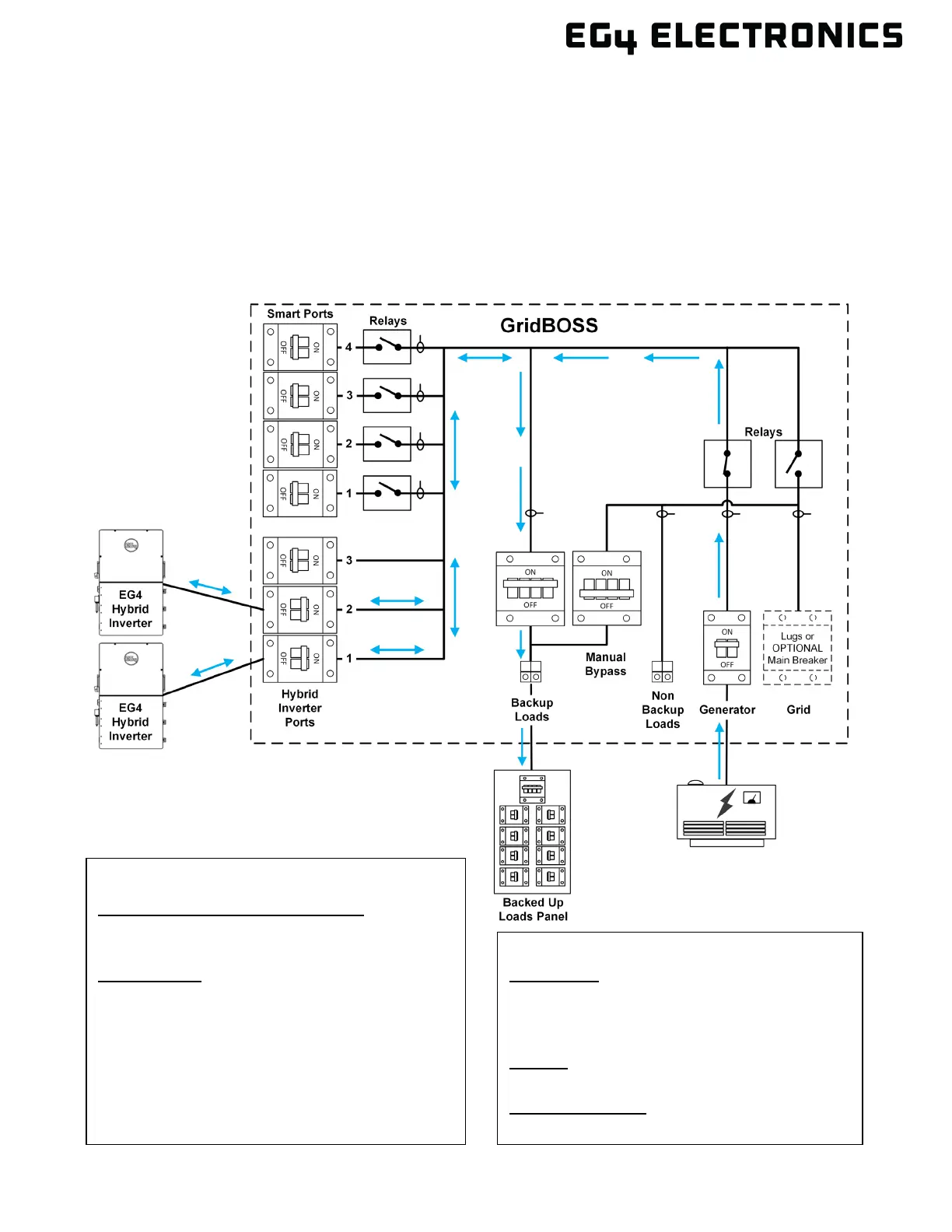
7.2 GENERATOR
In this example, a generator has been added to the GridBOSS to power the backup loads and to
supplement charging the batteries, if needed. The generator breaker and relay are closed, allowing
current to flow to the backup loads. Generator output could assist in charging the batteries as long as
the proper settings are configured and the loads are small enough, leaving the extra power from the
generator to charge the batteries. If a small generator is used that cannot fully power the critical
loads, enable “Generator Boost” at the inverter. Verify that the generator start/stop wiring is properly
connected to support generator start and stop functionality. The smart ports in the example below will
not receive current unless the ports are set up for operation in the EG4
®
Monitor Center.
Application:
Grid Sell Back: Enable or Disable
Fast Zero Export: Disable or Disable
Off-Grid Mode: Disable or Disable
Charge:
AC Charge: Enable or Disable
Generator Charge:
Generator Boost: Enable or Disable
GridBOSS Settings:
Battery Control (Common Settings):
Charge Control: SOC
Discharge Control: SOC
GENERATOR:
Generator SOC/Vbat Enable: Enable
Batt Charge Current Limit (Adc): 250
Gen Rated Power (kW): 25.5
Charge Start SOC: 50%
Charge End SOC: 80%
Generator Warm Up Time(s): 120
Generator Remote Auto Turn off time(m): 20



 To Next Page