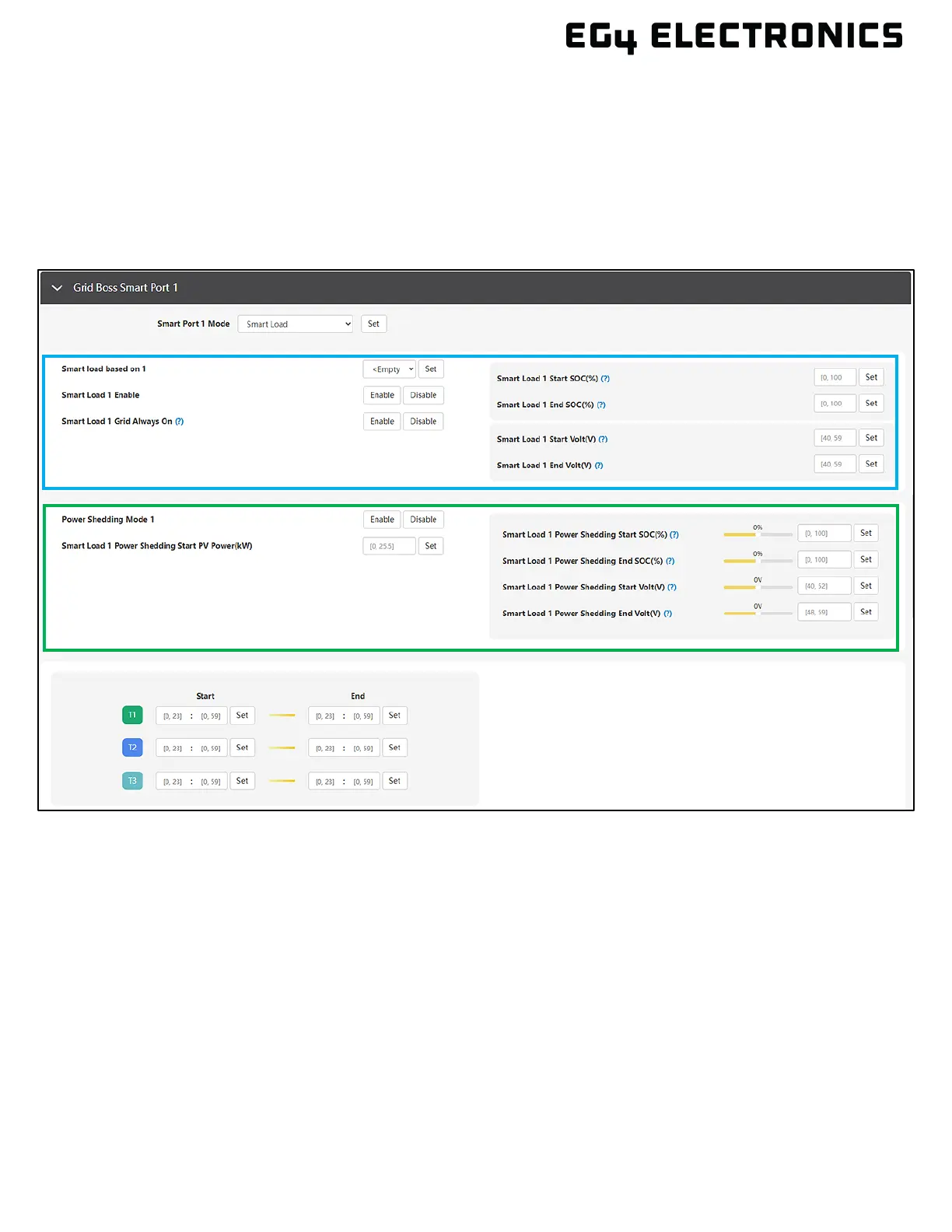
SMART LOADS
This section describes the various smart load settings. There are three areas within the smart port
settings page. The first area is used for load shedding and uses SOC/voltage to enable and disable the
load port (outlined in blue). The goal is to turn off a smart load when the battery SOC hits a low
threshold. The second area is used to configure power shedding, which adds PV power as an option for
enabling the load port (outlined in green). The goal is to enable a smart port when unused PV is
available to power a load. The last area is used to enable or disable a smart load based on time or to
add a time period to SOC/Voltage.
Smart Port Mode: Unused | Smart Load | AC Couple
Select “Smart Load” to configure the smart port with smart load settings.
Smart load based on: Empty | Time | SOC/Volt
Select “Time” to configure the smart load based on a time period. Select “SOC/Volt” to configure
the smart load based on battery SOC% or voltage level.
Smart Load Enable: Enable | Disable
Turns the smart load feature on or off. Always select disable until the port is fully configured and
ready to be turned on.
Smart Load Grid Always On: Enable | Disable
Enable: The port relay will remain in the closed (on) position when there is grid input.
Disable: The port relay will operate based on time and/or SOC/Volt settings, regardless of the
state of the grid connection.



 To Next Page