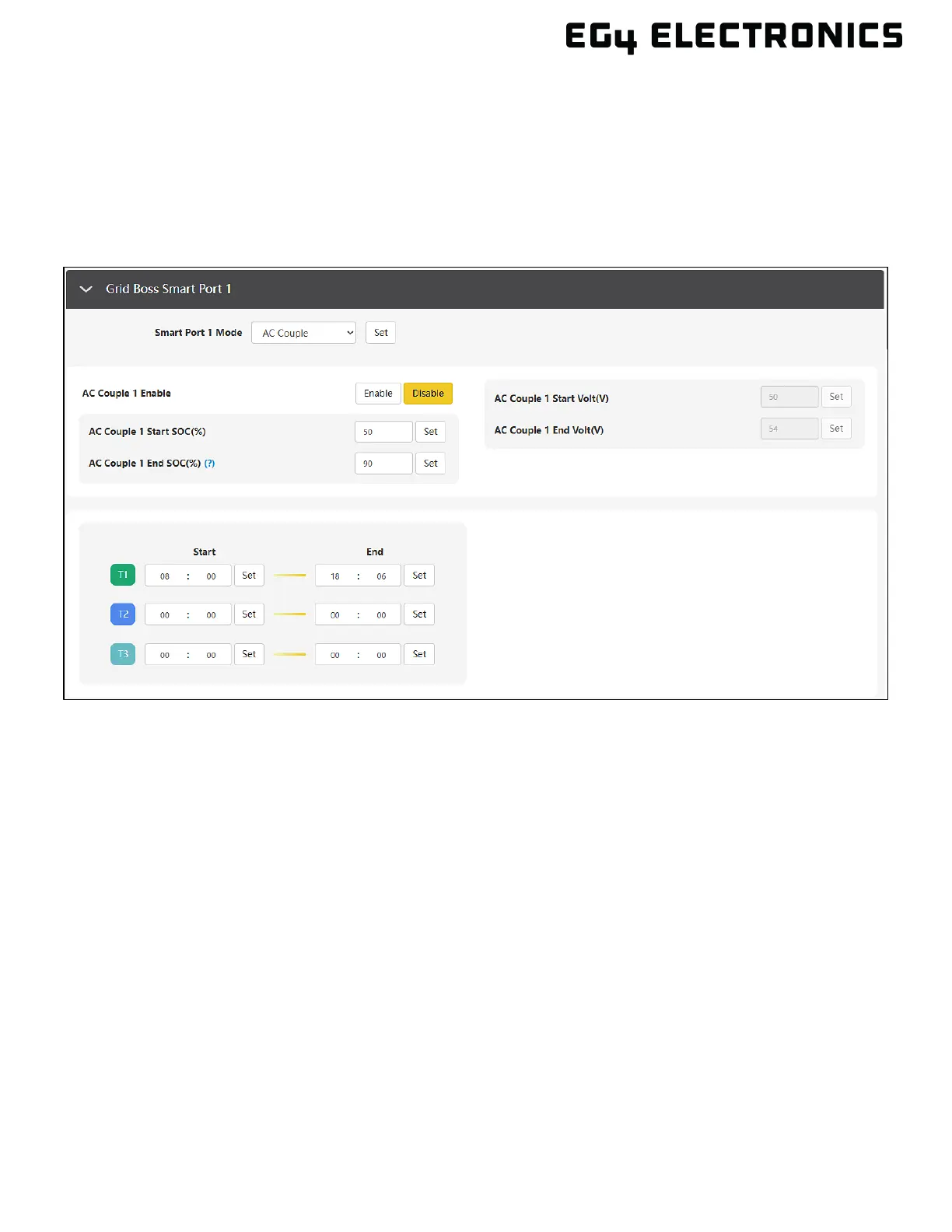
When the inverter is working in an on-grid status, the GridBOSS will ignore battery SOC/Voltage. The
AC-coupled relay will be closed (powered on) when the hybrid inverter’s “Export to Grid” setting is
enabled and the time period logic is met. The GridBOSS will also open (power off) the AC-coupled port
relay when the hybrid inverter’s “Export to Grid” is disabled to avoid pushing power to the grid.
When the inverter is working in off-grid status, the GridBOSS will control the AC couple relay based on
battery SOC/voltage and/or time period logic. The relay will also be opened (powered off) if the
inverters receive too much power from the AC coupled inverter.
Smart Port Mode: Unused | Smart Load | AC Couple
Select AC Couple to enable the smart port to be configured with AC Couple settings.
AC Couple Enable: Enable | Disable
Turns the AC couple feature on or off. Always select “Disable” until the port is fully configured and
ready to be turned on.
AC Couple Start & End SOC(%): [0 – 100] and [0 – 100]
The SOC values that enable and disable the AC-coupled port
AC Couple Start Volt: [40V – 59V]
The AC couple port is enabled when the voltage value is below the configured value.
AC Couple End Volt: [40V – 59V]
The AC couple port is disabled when the voltage is above the configured value.
AC Couple Start Time: [00:00 – 23:59]
The AC couple port is enabled at the defined start time. If one of the three time periods is met, the
port relay will close (power on). Range is 00:00 – 23:59
AC Couple End Time: [00:00 – 23:59]
The AC couple port is disabled at the defined end time. Range is 00:00 – 23:59



 To Next Page