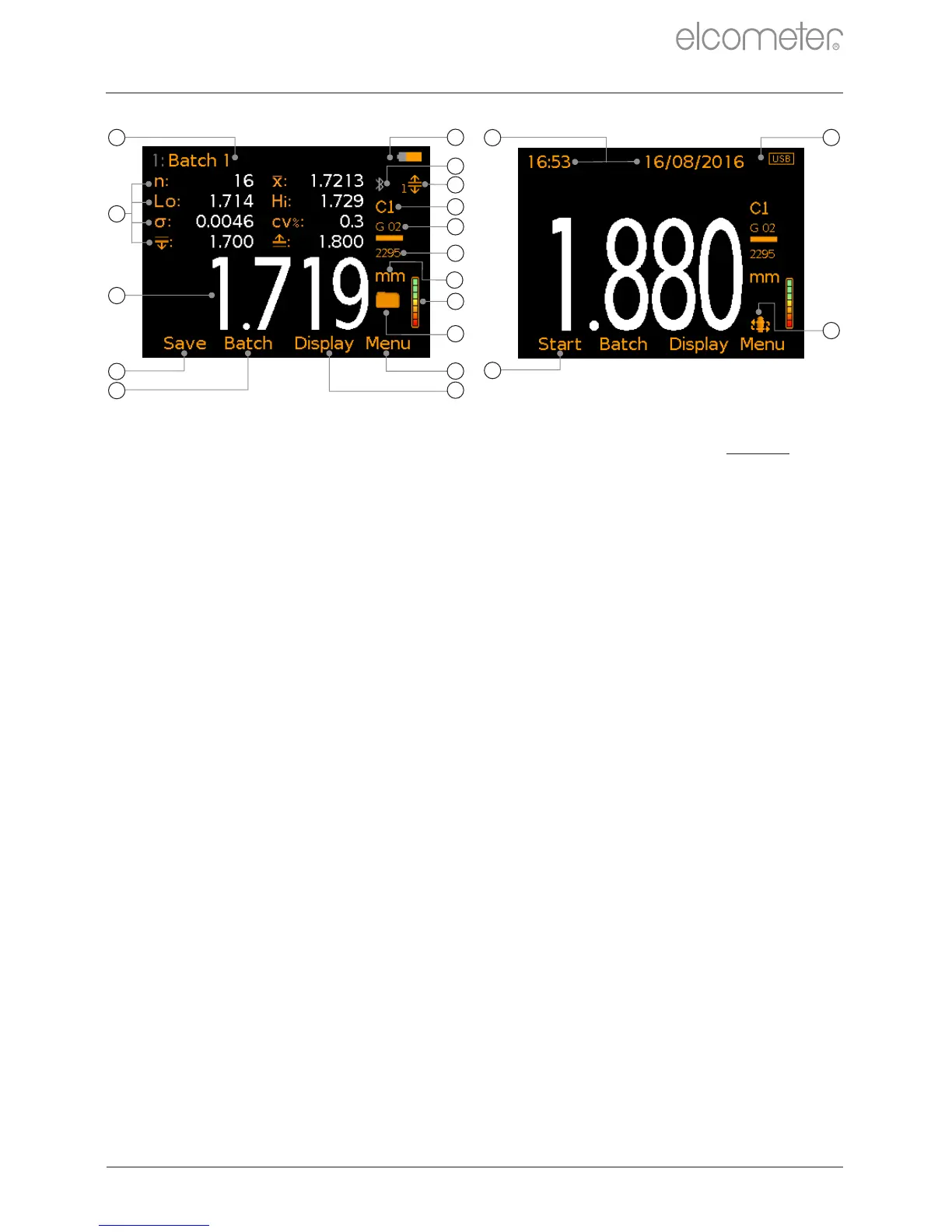
Power: Batteries - including battery life indicator
Bluetooth On - Grey: not connected; Orange: connected
Limits On (with Limit Index Number) - Red: limit exceeded
Probe Type Connected - C1 or C2
Calibration: Sound-Velocity
Measurement Units - µm, mm, mils, inch
Signal Strength Indicator -
Green: valid and stable reading
Save Current Reading Value
Reading Value - White: valid and stable reading;
Grey: probe in free air; Red: limit exceeded
User Selectable Statistics - Maximum of 8
Batch Name - when in batching
Scan Mode On - icon ashes during a scan
Start / Stop Scan - when in Scan Mode
Date & Time - when enabled and not in batching
a
b
c
d
e
f
i
h
n
o
p
g
j
k
l
m
q
s
r
t
www.elcometer.com
en-4
R



 To Next Page