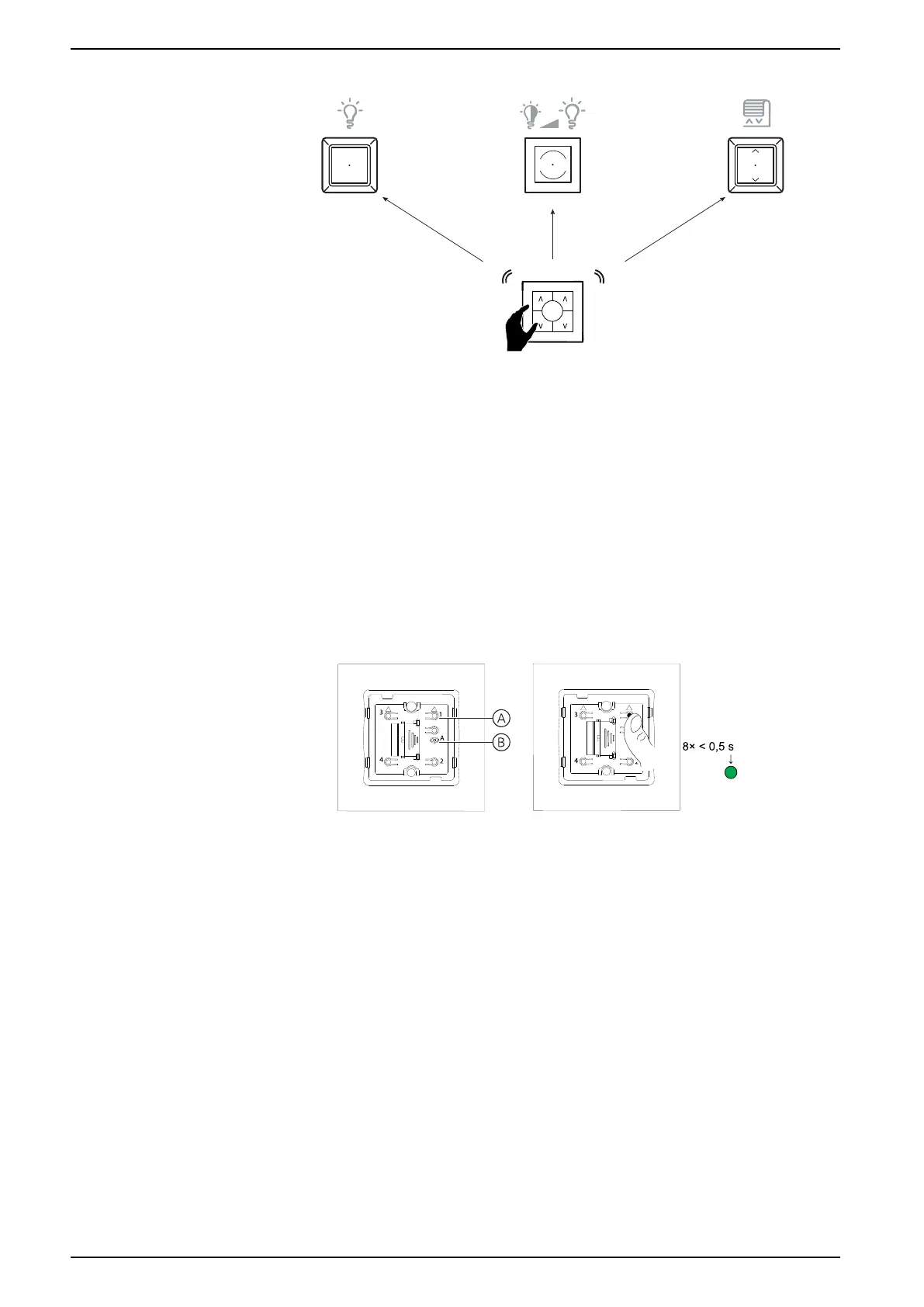
Pairing to other devices
NOTE: The Wireless Switch cannot be used to create a network.
Perform this task to assign device controls to a push button on the Wireless
Switch for remote control operation
• The devices to be paired to the Wireless Switch must be added to a Room
Control network. The maximum time out for a Room Control network is 180 s,
hence the devices must be paired within 180 s (See Creating a network for
Room Control, page 46).
• Lighting devices such as light switches and dimmers can be operated on the
same Wireless Switch push button, but the shutter control must be paired to a
different push button than that used for lighting.
1. (See A, B) Short press the push button (A) 8 times.
The status LED (B) displays solid green and the LEDs on all the devices
displays solid green once the Room Control network is opened.
TIP: To save the battery, the green LED on the Wireless Switch turns off
after 15 s, but the Wireless Switch remains in pairing mode.
2. Select a compatible device and short press the device control button 3 times.
• Connected lighting load blinks On/Off.
• Connected shutter moves slightly up/down.
50 SUG_ELKO_Norway_04


 To Next Page