6 Chapter 1
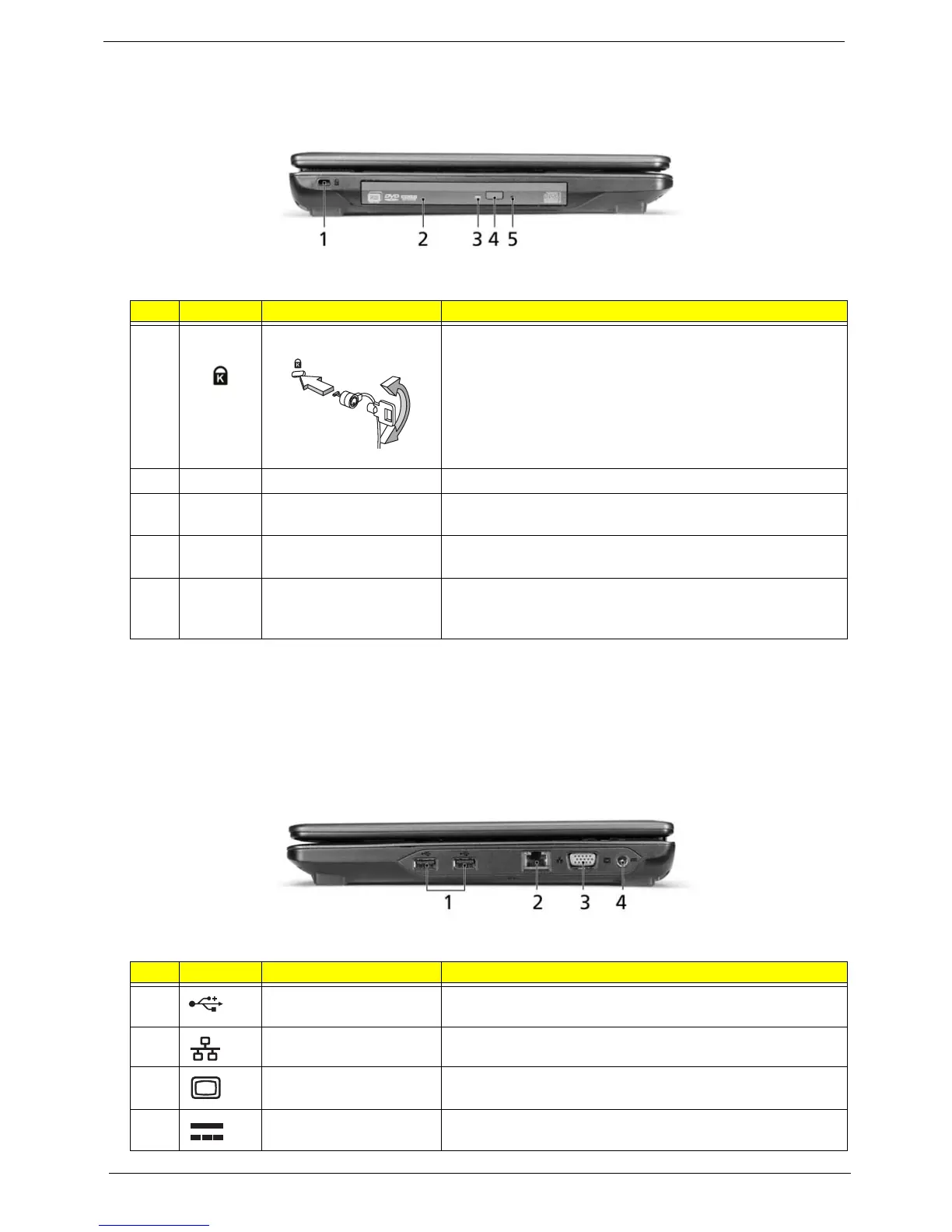
Left View
NOTE: Location depends on model
Right View
# Icon Item Description
1 Kensington lock slot Connects to a Kensington-compatible computer security
lock.
Note: Wrap the computer security lock cable around an
immovable object such as a table or handle of a locked
drawer. Insert the locki nto the notch and turn the key to
secure the lock. Some keyless models are also available.
2 Optical drive Internal optical drive; accepts CDs or DVDs.
3 Optical disk access
indicator*
Lights up when the optical drive is active.
4 Optical drive eject
button*
Ejects the optical disk from the drive.
5 Emergency eject hole* Ejects the optical drive tray when the computer is turned off.
Note: Insert a paper clip to the emergency eject hole to eject
the optical drive tray when the computer is off.
# Icon Item Description
1 USB 2.0 port Connect to USB 2.0 devices (e.g., USB mouse, USB
camera).
2 Ethernet (RJ-45) port Connects to an Ethernet 10/100-based network
3 External display (VGA)
port
Connects to a display device (e.g., external monitor, LCD
projector).
4 DC-in jack Connects to an AC adapter.













 To Next Page