Chapter 3 77
Removing the LCD Bezel
1. See “Removing the Battery Pack” on page 51.
2. See “Removing the Lower Cover” on page 51.
3. See “Removing the Lower Cover” on page 51.
4. See “Removing the Fan Module” on page 59.
5. See “Removing the CPU Heatsink Module” on page 60.
6. See “Removing the CPU” on page 61.
7. See “Removing the Middle Cover” on page 62.
8. See “Removing the Keyboard” on page 63.
9. See “Removing the LCD Module” on page 64.
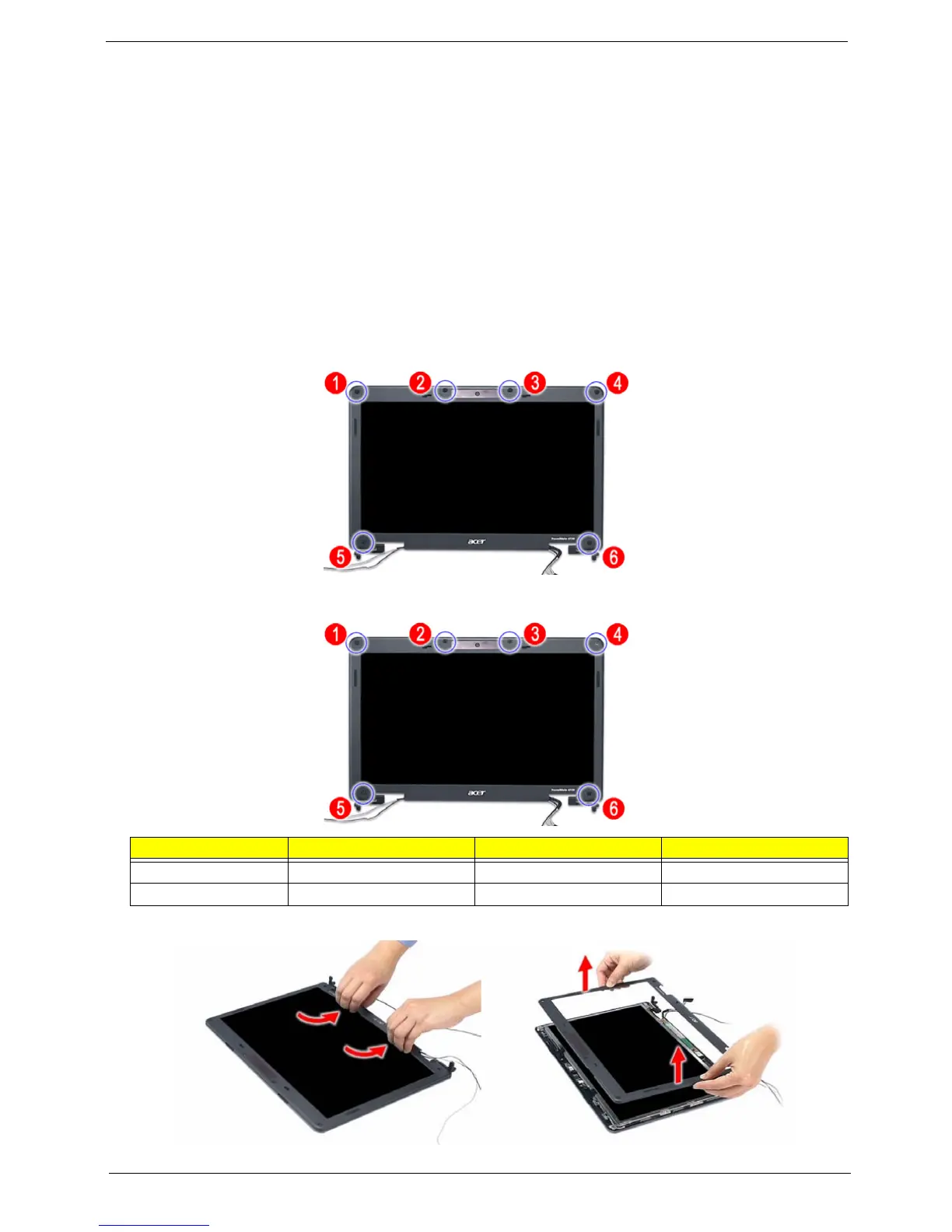
10. Remove the six rounded screw caps as shown.
11. Remove the six screws (Ex2, Hx4) on the LCD module in the order as shown.
12. Carefully pry open the LCD bezel and remove the bezel from the LCD module.
Step Size (Quantity) Color Torque
1~4 M2.5 x L5 (4) Black 3.0 kgf-cm
5~6 M2.5 x L6 (2) Black 3.0 kgf-cm













 To Next Page