ESD3000-System
30/66
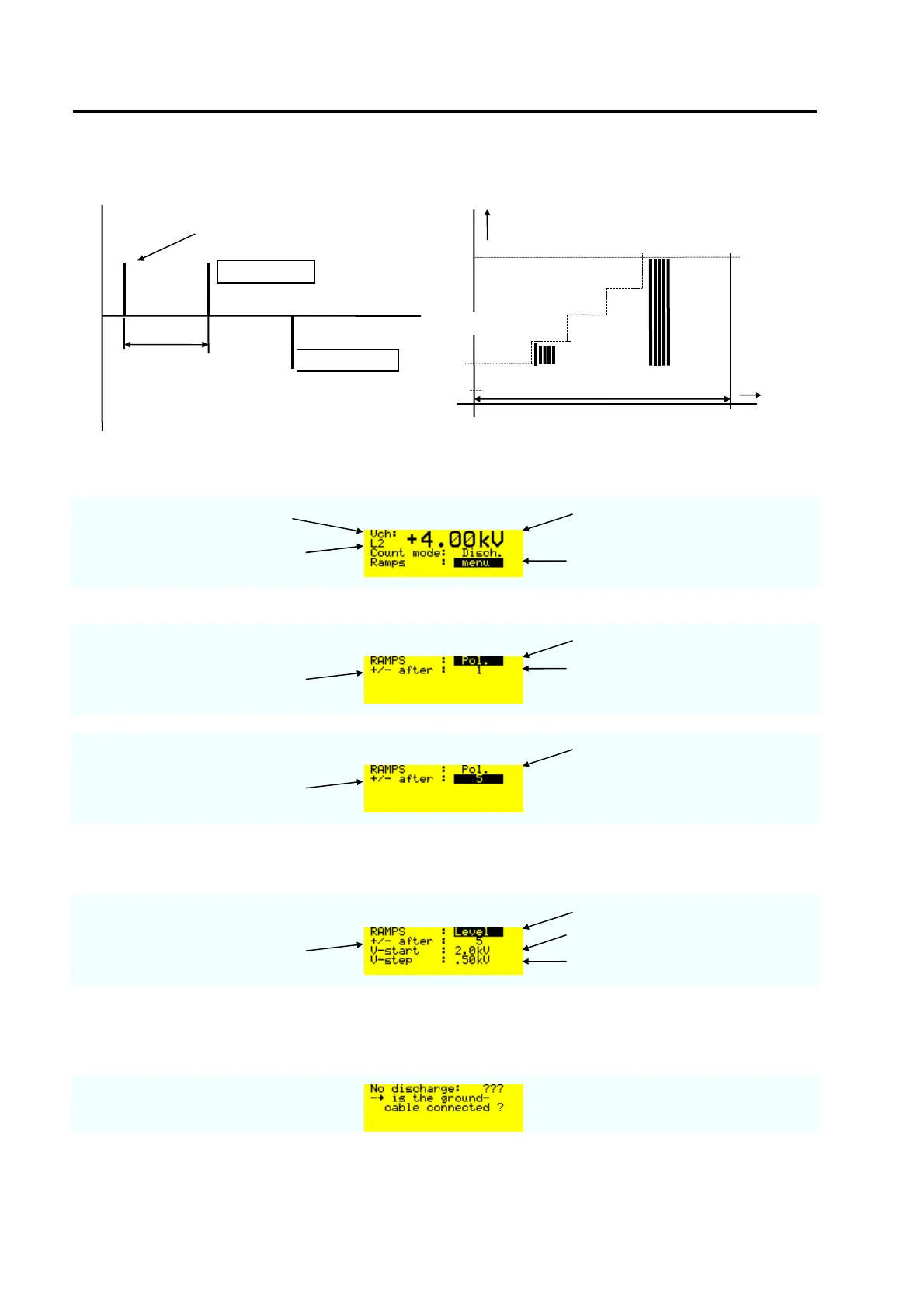
6.4.2 Menu „Ramps“
Polarity
charging voltage selected voltage level
voltage level selected L2 = 4 kV
Press the ENTER button to open
the „Ramps“ menu.
When the „ENTER“ button has been pressed twice the displays indicate:
Ramp polarity
Polarity change after the selected
number of pulses
Press the ENTER button to
change the number of pulses with
up or down
Ramp polarity
Polarity changes after 5 pulses
Voltage
When the „ENTER“ button has been pressed an additional once:
Ramp Level
Level changes after the selected
number of pulses
The ramp starts at this level
After 5 pulses the voltage will be
increased with 500 V
Remark: The maximum voltage is equal the nominal voltage or selected level 4 kV.
The following message will occur when after three releases no discharges was happen
polarity pos.
polarity neg.
repetition 1/T
number of pulses
Nominal
= 8000V
t
V
Start 2000V
e.g. 10 pulses per step
discharge



 To Next Page