ESD3000-System
31/66
6.4.3 Menu „Setup“
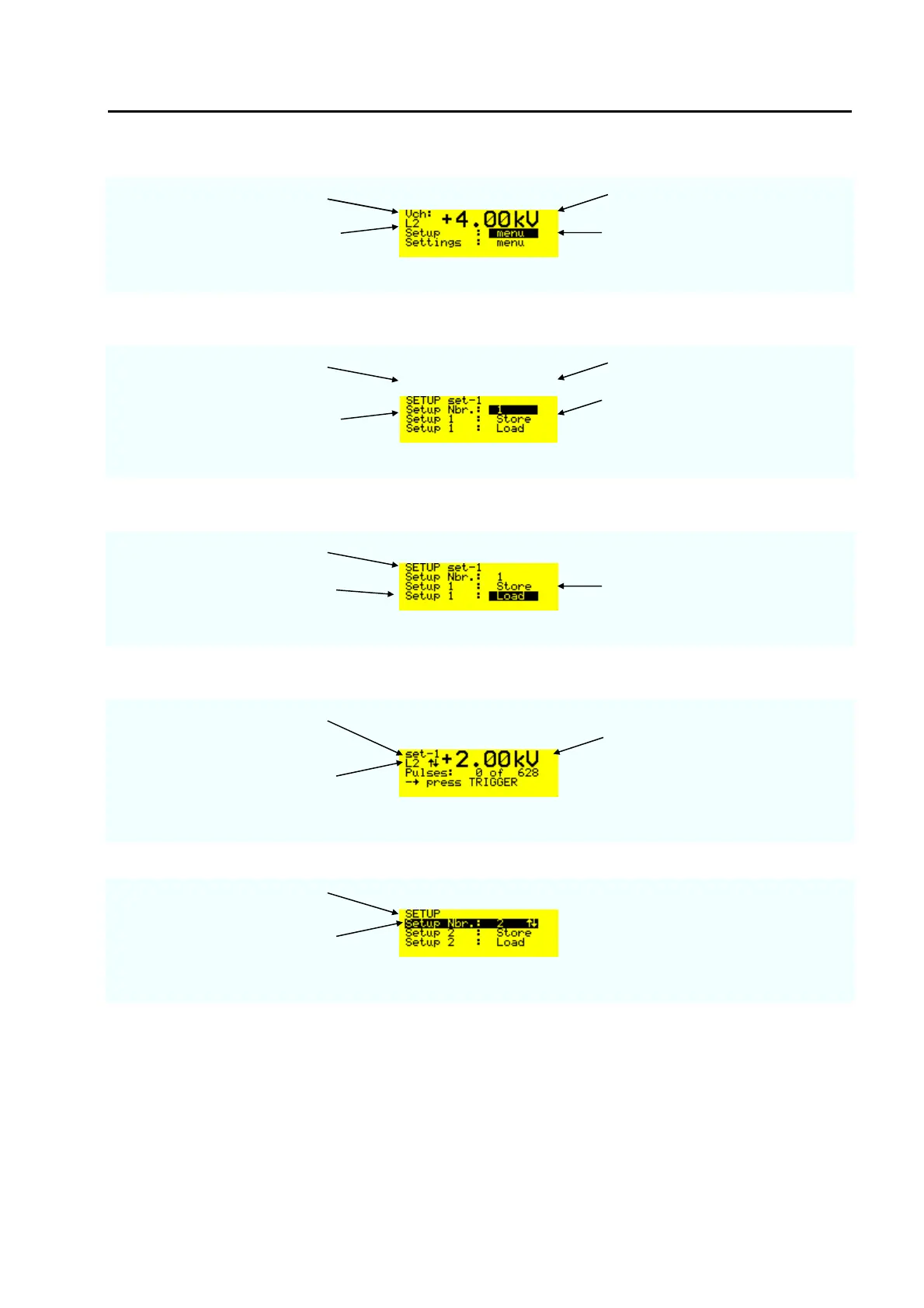
charging voltage selected voltage level
voltage level selected L2 = 4 kV
Up to 9 customised parameter set-
up can be stored
When „ENTER „ has been pressed
SETUP indicates that in storage
place 1 set-1 is stored
selected voltage level
Setup Nbr. 1 to 9
All setted parameter of the
ESD3000 will be stored into the
set-1
With „Load“ and „ENTER“ button the set-1 can be activated.
Setup number
Setup Nbr.1 will loaded in to the
ESD3000 control
Up to 9 customised parameter set-
up can be stored
When the „ENTER“ button has been pressed twice.
Instead of Uch, set-1 indicats that
customer set-1 is loaded
selected voltage level to start the
ramp
L2 with the up and down arrow
indicates that a voltage ramp is
activated in the set-1
The set-up number 2 is empty
With up and down it can be
checked whether the storage
places are empty



 To Next Page