ControlWave Instruction Manual (CI-ControlWave)
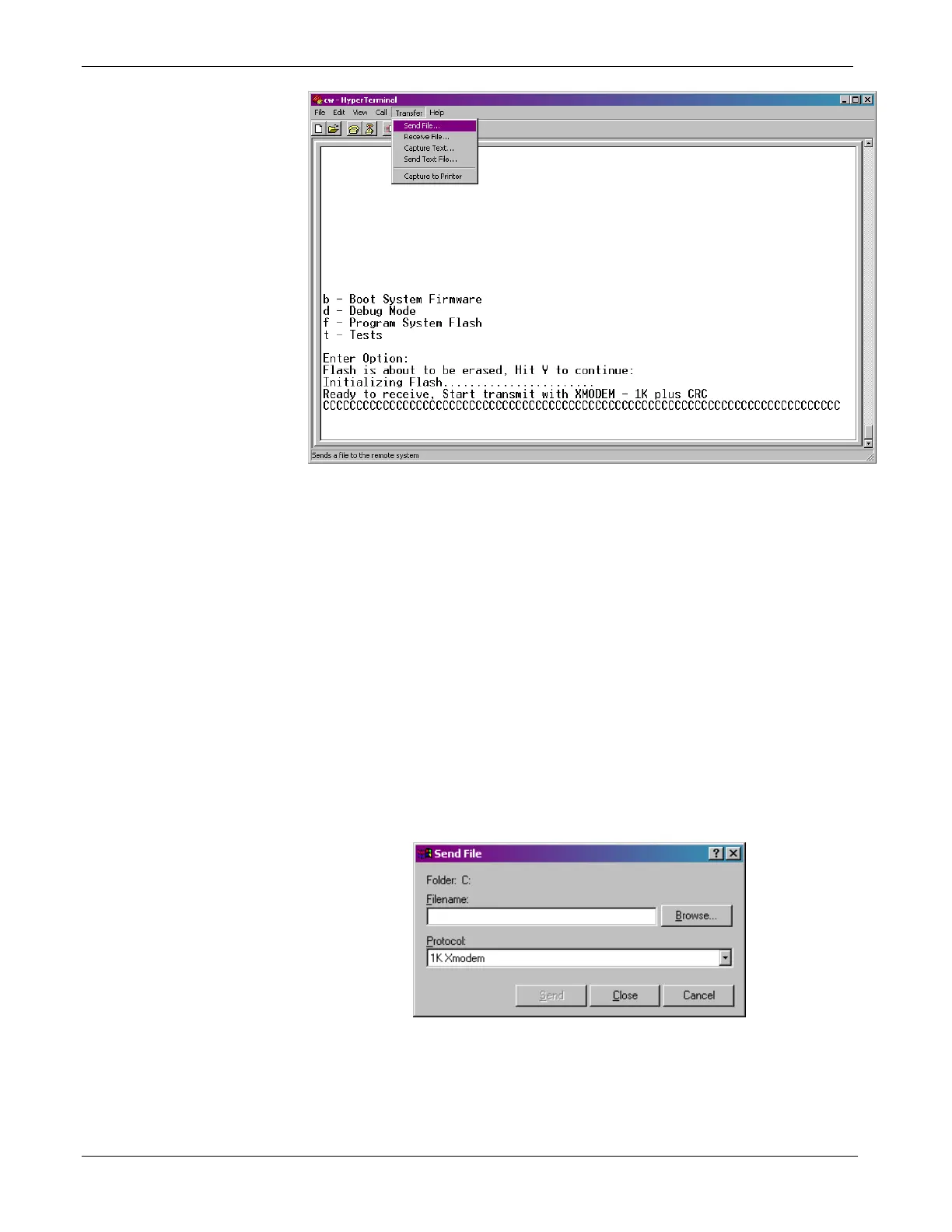
Figure 5-2. HyperTerminal (Ready to Download)
8. In the Send File dialog box (see Figure 5-3), select 1KXmodem
for the protocol, enter the filename of the appropriate .bin file in
the format “CWPxxxxx.bin” (where xxxxx varies from release to
release) and click Send to start the flash upgrade (see Figure 5-
4). When you see the HyperTerminal Mode Menu again, it
means the download has completed.
9. Exit HyperTerminal and power down the ControlWave. If
desired, you can disconnect the null modem cable between the
ControlWave and the PC.
10. Set CPU switch SW3-3 to OFF (Recovery Mode Disabled).
11. Restore power to the ControlWave.
Figure 5-3. Send File dialog box
5-4 Service & Troubleshooting Revised Nov-2010







 To Next Page