ControlWave Instruction Manual (CI-ControlWave)
3-34 I/O Modules Revised Nov-2010
Software Configuration
To use data from a UDI module you must add a CW_HSC12 board in
ControlWave Designer’s I/O Configurator, and then configure it.
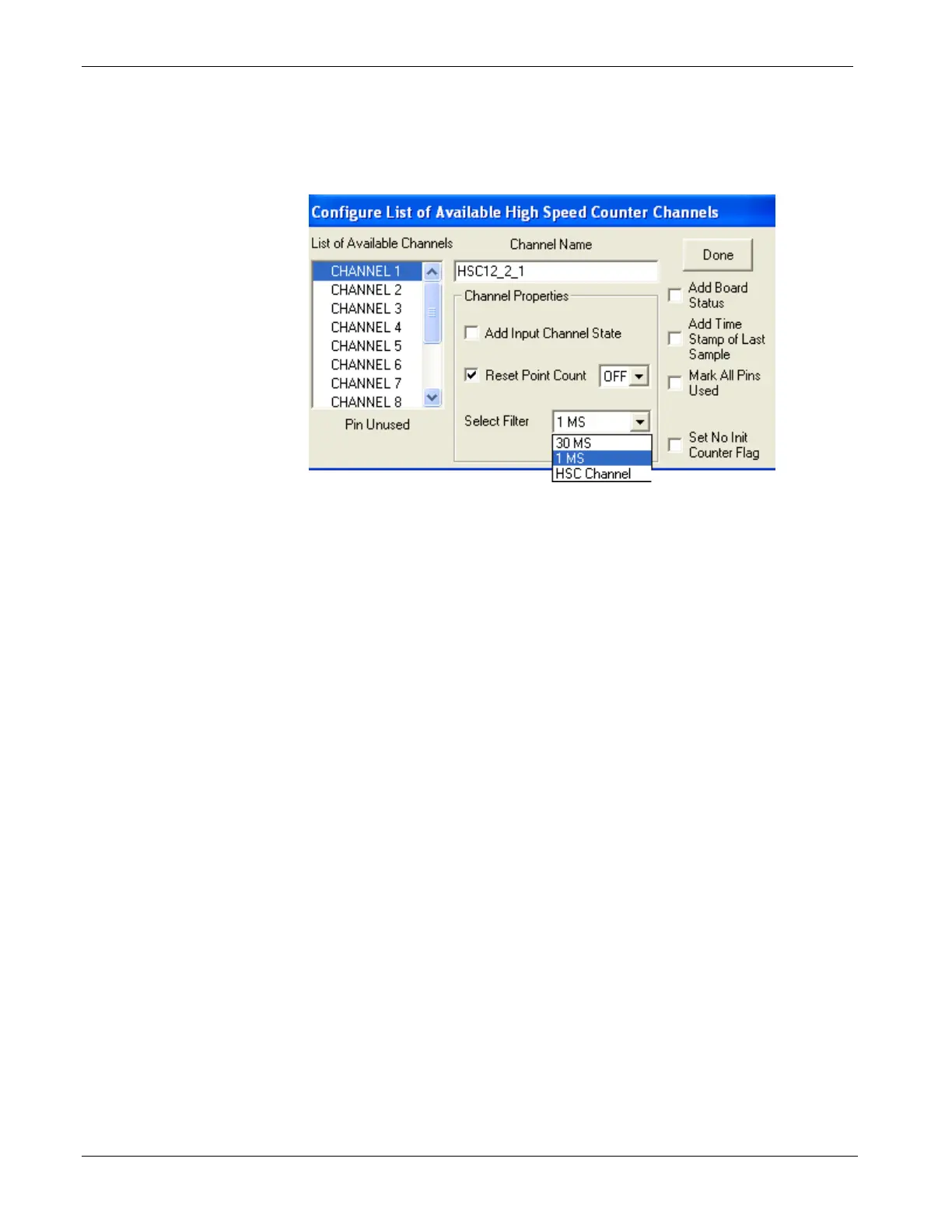
The I/O Configurator is where you specify the usage for each input
using the Select Filter list box.
Figure 3-29. Selecting Input Type in ControlWave Designer I/O
Configurator
Choose one of the following:
“HSC Channel” to select a 20 microsecond delay for 10 kHz high
speed counter applications.
“1 MS” to select a 1 millisecond delay for a low speed
counter application.
“30 MS” to select a 30 millisecond delay for a polled
input. This is for general purpose inputs or
contacts where contact bounce may apply.
See the ControlWave Designer Programmer's Handbook (D5125) for
more information. That same manual includes an I/O Mapping section
that describes, for advanced users, the I/O map for this module.







 To Next Page