ControlWave Instruction Manual (CI-ControlWave)
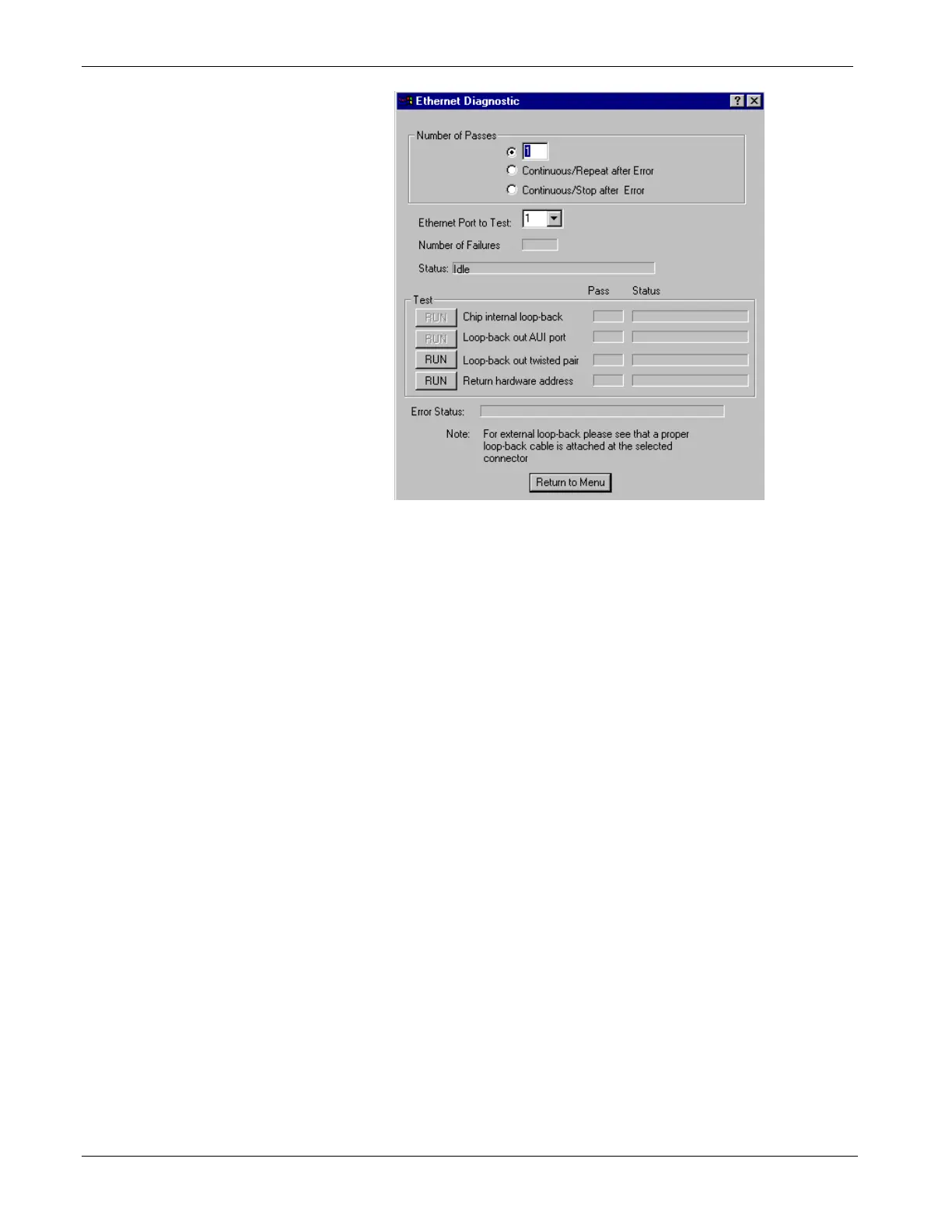
Figure 5-25. Ethernet Diagnostic Menu
3. Enter 1 in the Number of Passes field.
4. Enter 1, 2, or 3 in the Ethernet Port to Test field.
5. Click RUN next to the Loop-back out twisted pair field to start
the test. At the completion of the test, any failed results appear in
the Status field next to the Loop-back out twisted pair label:
No Hardware Present
Loop-back Send Failed
Loop-back Receive Failed
Loop-back Compare Failed
Error Information Returned
6. Disconnect the loop-back plug and reconnect the Ethernet cable
to the ControlWave and the Ethernet hub.
7. Click Return to Menu to display the WINDIAG Main Menu.
5.5 Core Updump
In some cases—such as when a ControlWave fails for no apparent
reason—you can upload a copy of the contents of SRAM and SDRAM
to a PC for support personnel and service engineers to evaluate. This
upload is called a “core updump.”
A core updump may be required if the ControlWave spontaneously
enters a watchdog state that affects all system operation. This occurs
when the system crashes as a result of a CPU timeout (resulting from
improper software operation, a firmware glitch, and so on). In some
5-32 Service & Troubleshooting Revised Nov-2010







 To Next Page