Installation
16 Emerson
®
MPH2
™
User Manual
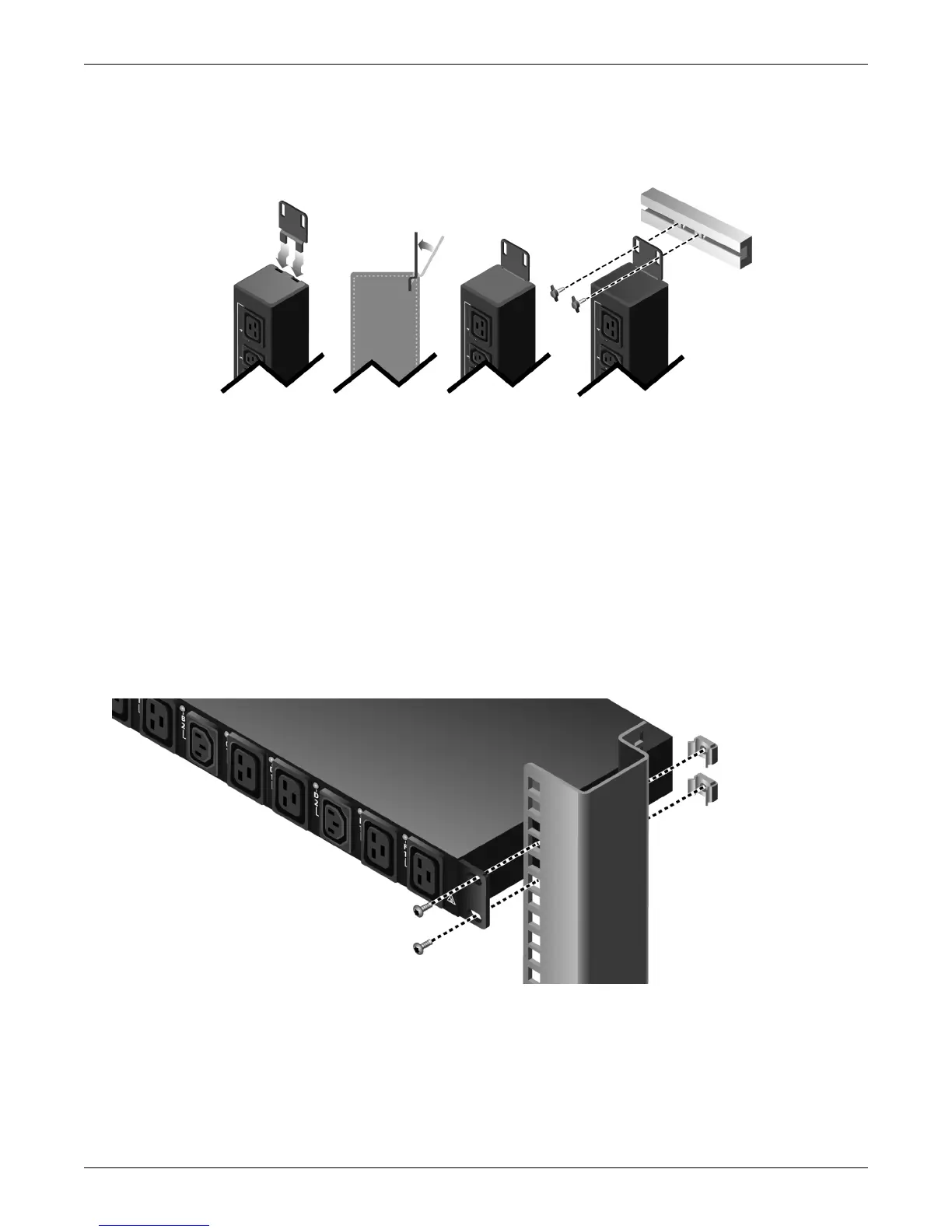
6. Tighten the screws, applying 46 lb-in (5.2 Nm).
7. Repeat Steps 4 through 6 for the lower bracket on the lower end of the PDU.
Figure 2-4 Installing vertical MPH2 in an Emerson rack
2.3.3 Mounting the Horizontal MPH2
The horizontal MPH2 is installed on a vertical frame member in the rack.
1. Choose a position in the rack for the PDU and install 4 cage nuts into the respective slots, Figure 2-5.
2. Hold the MPH2 PDU over the desired mounting holes (now with the cage nuts), and route the input
cable through the rack as desired.
3. Insert screws and use a Torx T30 screwdriver to tighten all of them. Leave the screws slightly loose for
the time being, Figure 2-5.
4. Once all the screws are installed, tighten them completely using 35.4 lb-in (5.2 Nm).
Figure 2-5 Installing horizontal MPH2 in an Emerson rack


 To Next Page