2. Locate the chlorine signal board.
Slot 1 (left) Slot 2 (center) Slot 3 (right)
communication input 1 (chlorine) input 2 (optional)
3. Insert the sensor cable through the conduit opening nearest the chlorine board.
4. Slide the board forward to gain access to the wires and terminal screws.
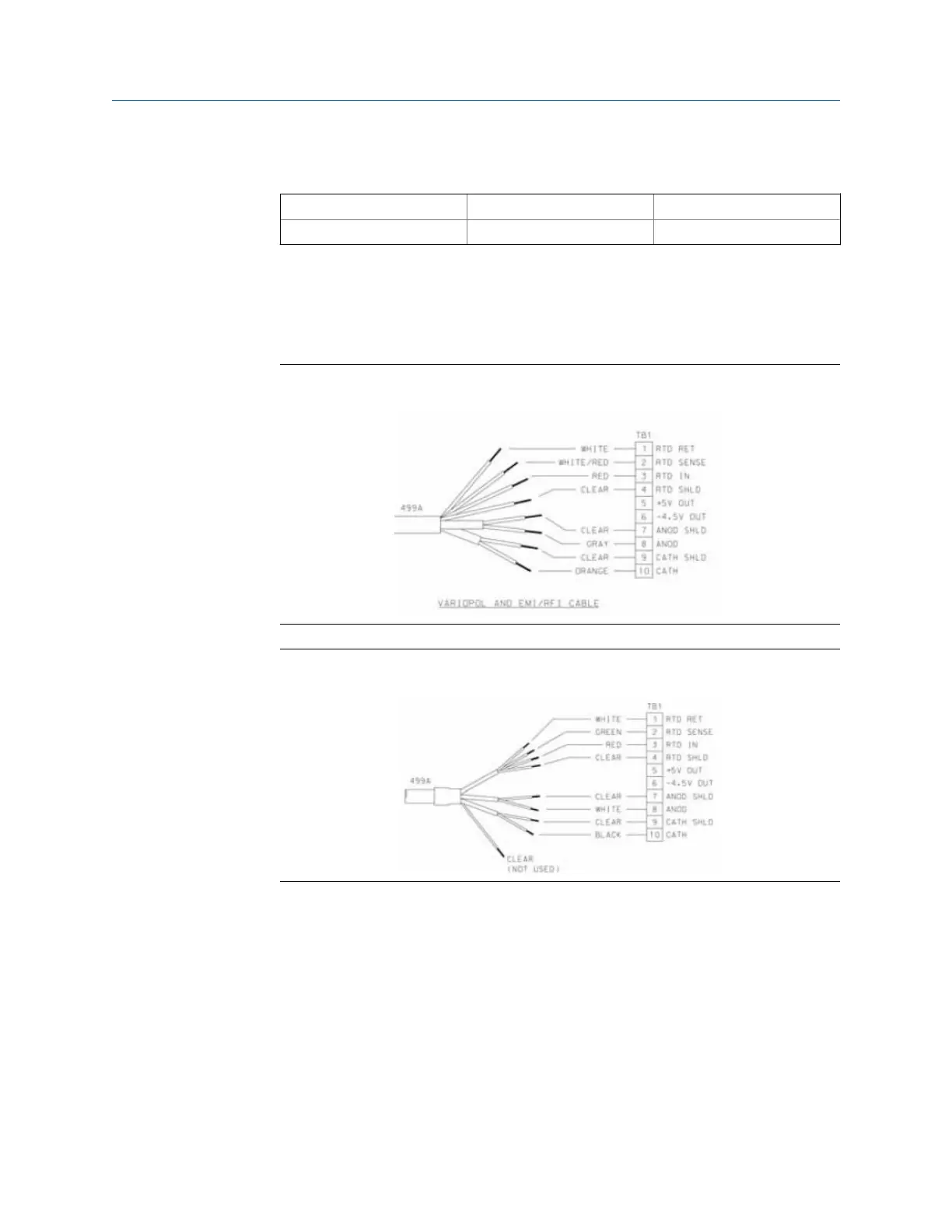
5. Connect the sensor to the chlorine board. Refer to Figure 4-4 or Figure 4-5.
Wiring Sensor with Optimum EMI/RFI or Variopol Cable to
Rosemount 1056 Transmitter
Figure 4-4:
Wiring Power with Standard Cable to Rosemount 1056 TransmitterFigure 4-5:
6. Once the cable has been connected, slide the board fully into the enclosure while
taking up the excess cable through the conduit opening.
7.
If you are using a cable gland, tighten the gland nut to secure the cable and ensure a
sealed enclosure.
Wiring
Instruction Manual 23



 To Next Page
 Loading...










