35
Manual: Transport, Installation and Start-Up: DC CompactCharger ECC 320 ©EnerCharge GmbH
ELECTRICAL INSTALLATION ECC 320
7.10.2 Network Settings
When connected locally to the ECC320 via LAN or WiFi, settings can be made via the web interface. The
web interface is accessed by entering an IP address directly in the web browser. Keep the IP
address in a safe place and only pass on this information to persons who are authorized to access
the web interface.
Observe the following steps for opening the web interface in the browser:
EnerCharge recommends using the Microsoft Edge or Mozilla
Firefox browser.
For information about installing a web browser on a computer
or other interface, see the browser provider's installation
instructions.
ATTENTION
Action Steps: Open the Web Interface with local access
!
The charging system and the Computer/Smartphone/Interface
are connected to the internet via LAN or WiFi.
1
IP-address for the EnerCharge Web Service Tool :
https://192.168.111.10:5001
2
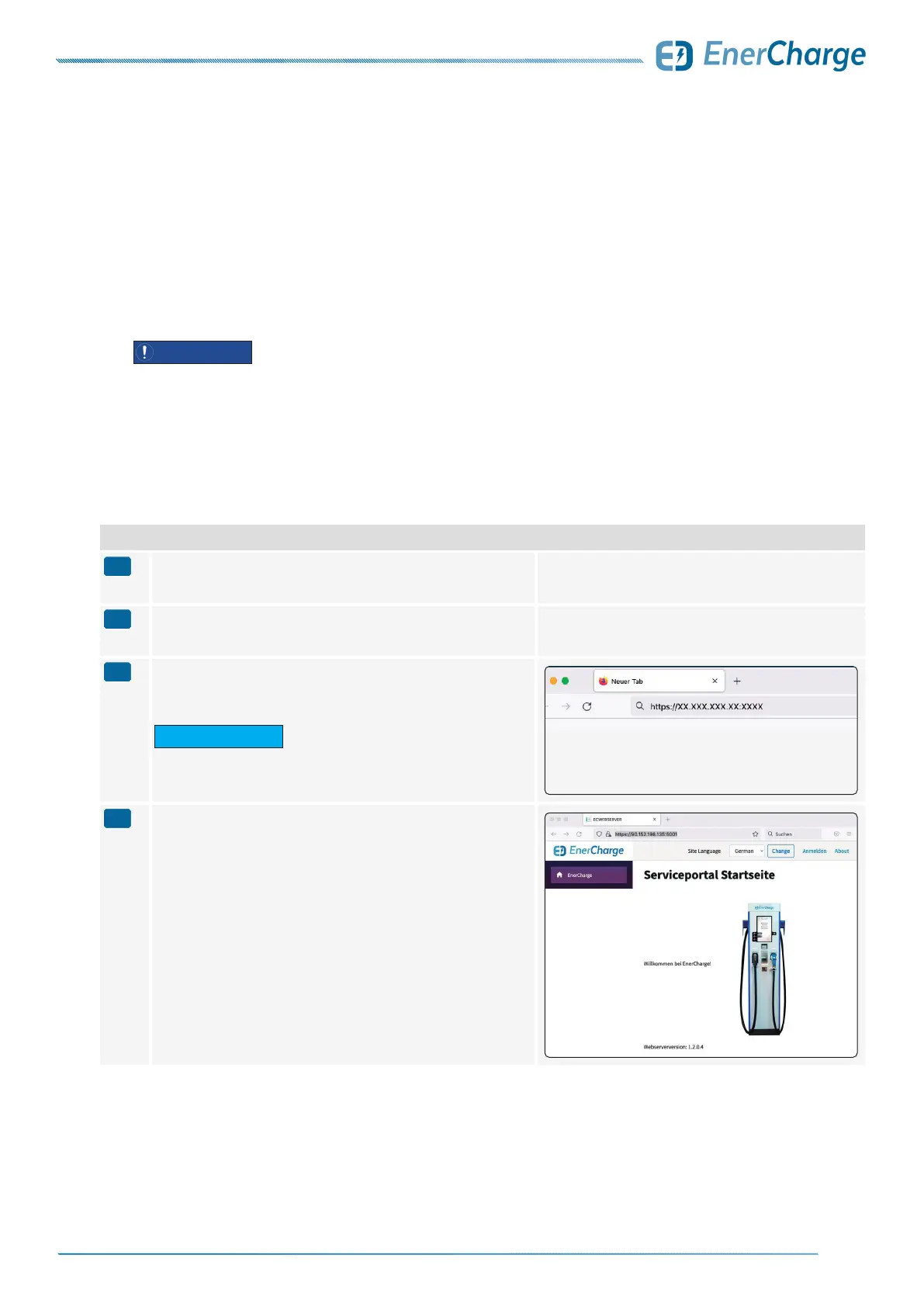
Open a web browser on your computer/smartphone/interface
and enter the IP address from step 1 in the browser's address
window (see image on the right).
G INFORMATION
Accept the certificate when you open the
Web Service Tool for the first time.
>
The web interface of the charger opens.



 To Next Page