36
Manual: Transport, Installation and Start-Up: DC CompactCharger ECC 320 ©EnerCharge GmbH
ELECTRICAL INSTALLATION ECC 320
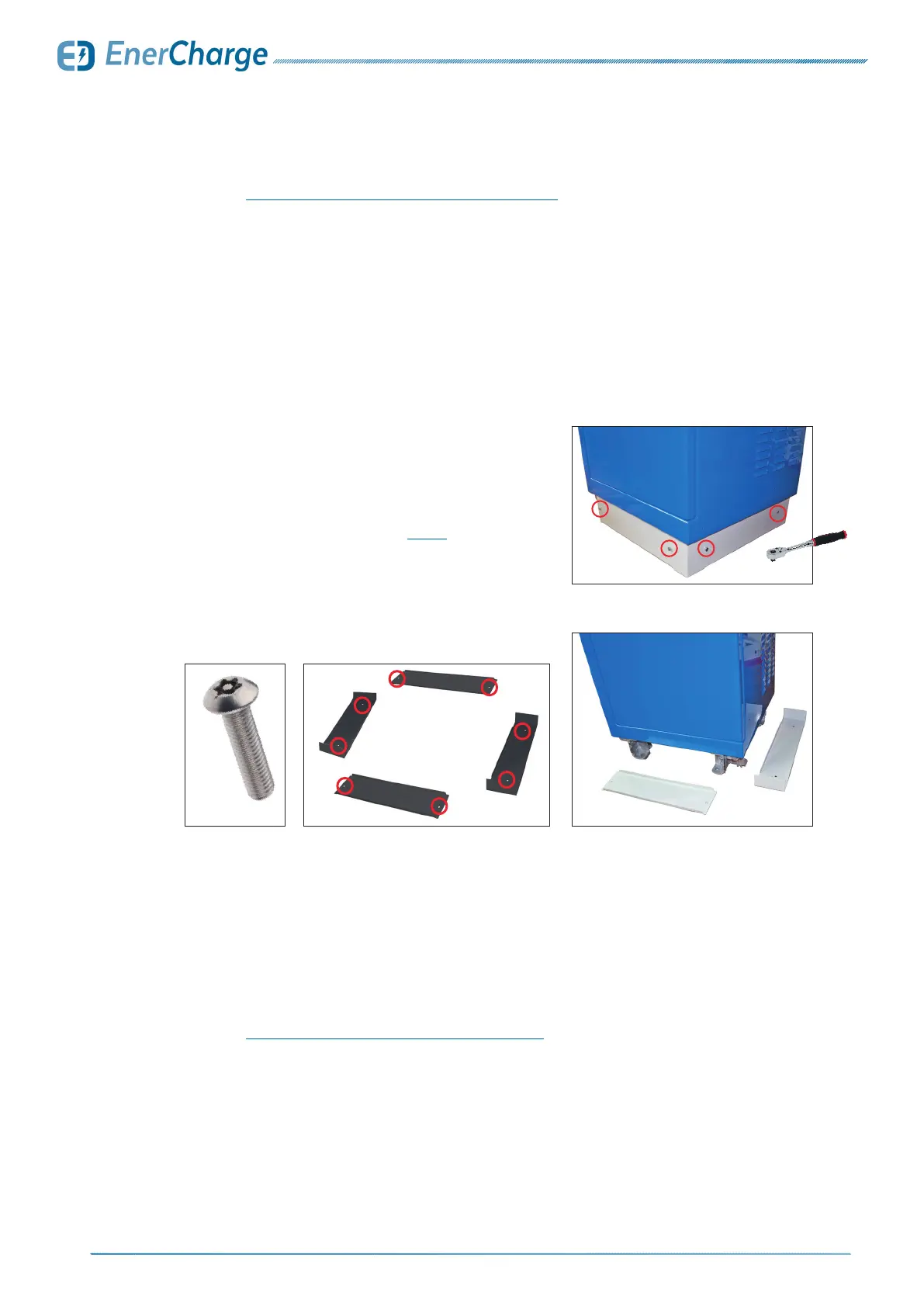
The base panels are not mounted when delivered and are part of the scope of delivery. The base
panels of the ECC 320 charging station are mounted on the foundation after installation.
Please observe the following:
7.12 Attach the Base Panels
8x M5x40
Fig. 40: mounted base panels on ECC 320
Fig. 41:
removed base panels for ECC 320
Fig. 42: base panels for ECC 320
Fig. 43: screw for base panels
> Carefully remove the base panels from the packa-
ging. The ECC 320 has a total of 4 base panels:
• 2 short base panels
• 2 long base panels with corner parts.
> Install the screw ttings according to Fig. 40.
Install a total of 8 screws.
• tighten screws
7.13 Close and Lock the Service Door
> See section: „5.8 Opening and Closing the ECC 320“ on page 18.
7.11 Activate the Line Fault Current Circuit Breaker
> See section: „7.5 Disconnect the ECC 320 from the Power Supply“
7.14 Install AD/DC Module Upgrade
> See the document "Maintenance Manual ECC320"



 To Next Page