11
3ComputerSettings
3.1AssignaStaticIP
InordertoconfigureEOC5611P,pleasefollowtheinstructionbelow:
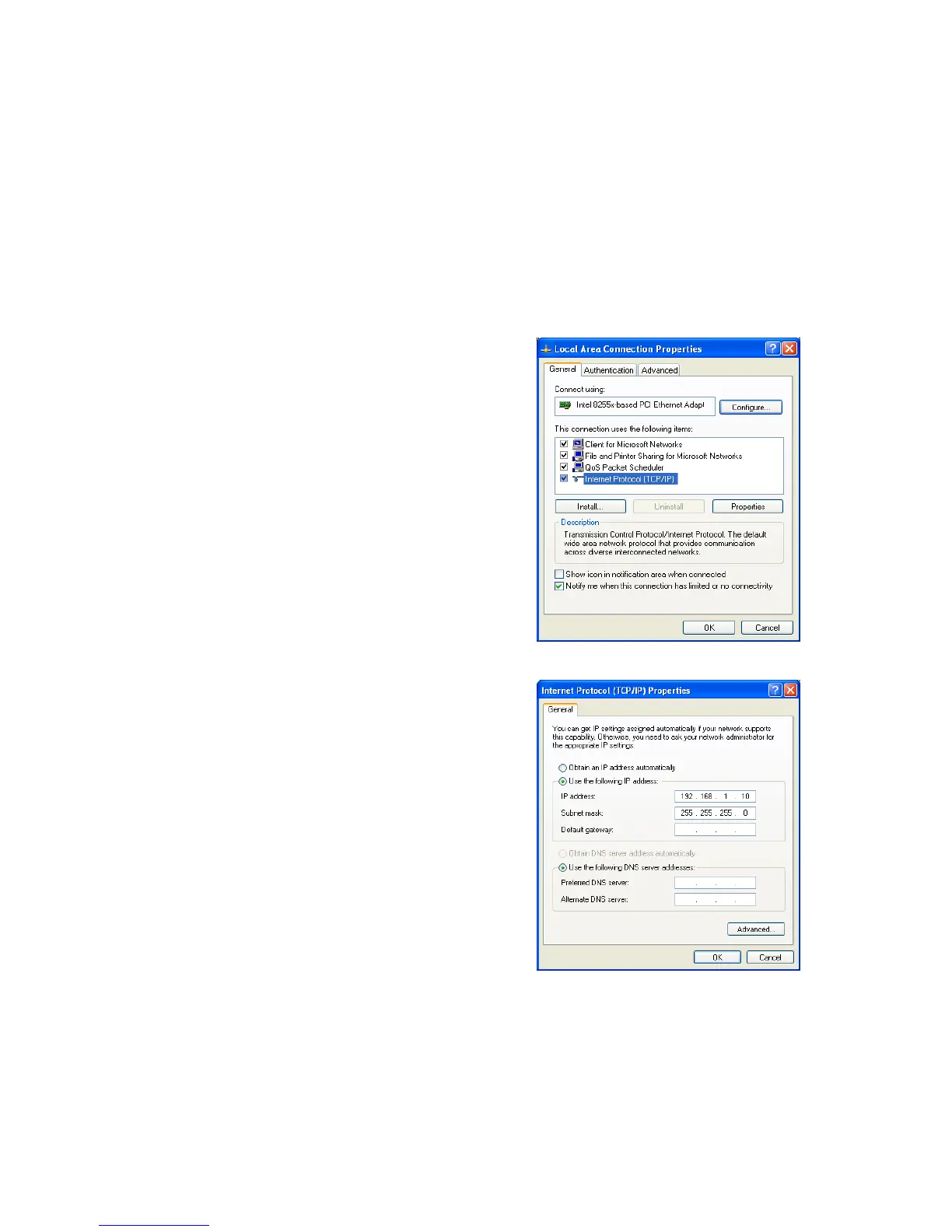
1.IntheControlPanel,doubleclickNetwork
Connectionsandthendoubleclickontheconnectionof
yourNetworkInterfaceCard(NIC).Youwillthenseethe
followingscreen.
2.SelectInternetProtocol(TCP/IP)andthenclickonthe
Properties
button.Thiswillallowyoutoconfigurethe
TCP/IPsettingsofyourPC/Notebook
3.SelectUsethefollowingIPaddressradiobuttonand
thenentertheIPaddressandsubnetmask.Ensurethat
theIPaddressandsubnetmaskareonthesamesubnet
asthedevice.
4.Clickon
theOKbuttontoclosethiswindow,andthen
closeLANpropertieswindow.
Auction:IPAddressenteredintheTCP /IPPropertiesneedstobeatthesamesubnetofthe
EOC5611PIPAddress.Forexample:EOC5611P’sdefaultIPAddressis192.168.1.1sotheIPAddressin
theTCP/IPsettingscouldbe192.168.1.10.



 To Next Page