54
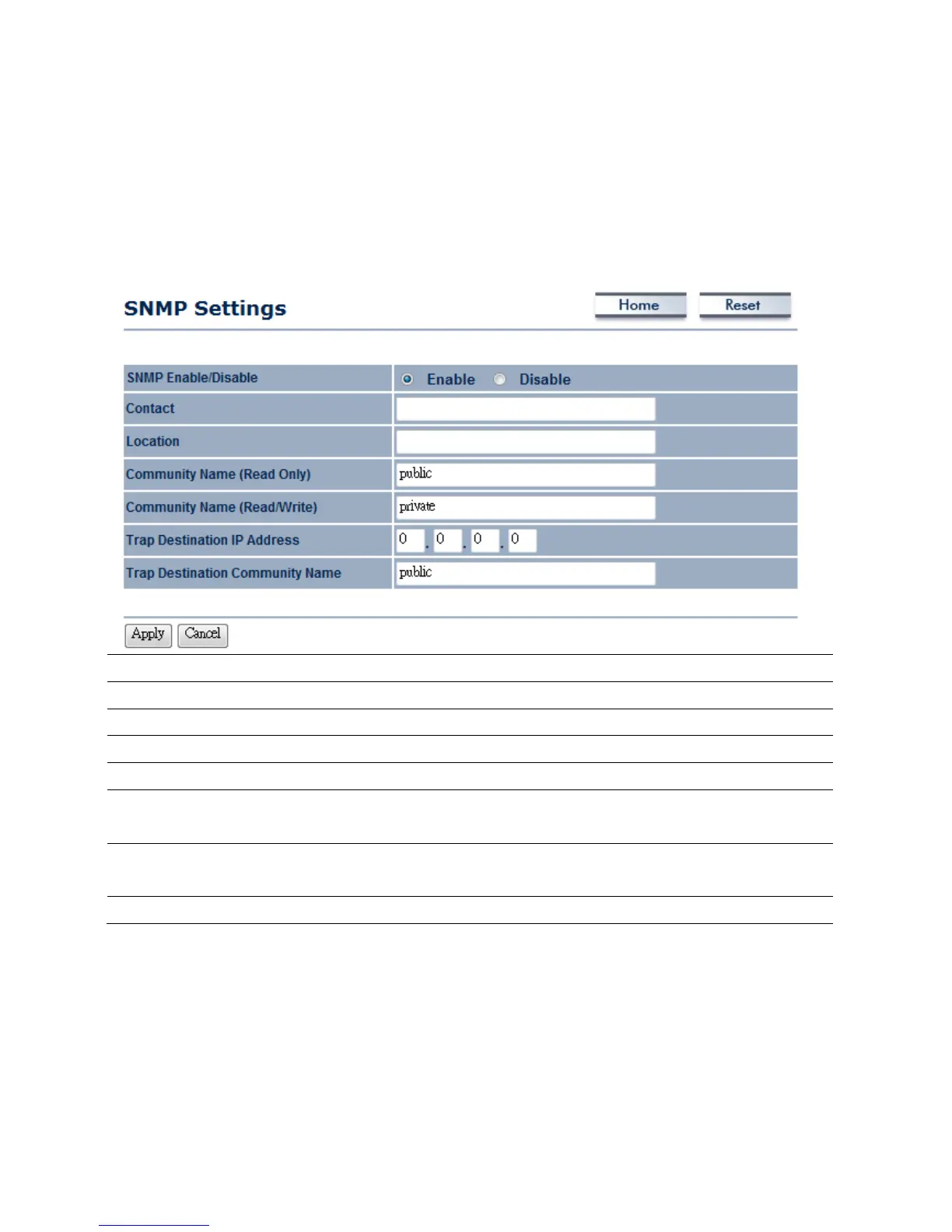
8.3Management→SNMPSettings
ClickontheSNMPSettingslinkundertheManagementmenu.Thisisanetworkingmanagement
protoc olusedtomonitornetwork‐attacheddevices.SNMPallowsmessages(calledprotocoldata
units)tobesenttovariouspartsofanetwork.Uponreceivingthesemessages,SNMP‐compatible
devices(calledagents)returndatastoredin
theirManagementInformationBases.
SNMPEnable/Disable
SelecttheRadiobuttontoEnableorDisableSNMPfunction.
Contact
Specifythecontactdetailsofthedevice.
Location
Specifythelocationofthedevice.
CommunityName
SpecifythepasswordforaccesstheSNMPcommunityforreadonlyaccess.
CommunityName
Specifythepassw ordforaccesstheSNMPcommunityforreadandwriteaccess.
TrapDestinationIP
Address
SpecifytheIPaddressthatwillreceivetheSNMPtrap.
TrapDestination
CommunityName
Specifythepassw ordoftheSNMPtrapcommunity.
Apply/Cancel
PressApplytoapplythechangesorCanceltoreturnpreviousset tings.



 To Next Page