66
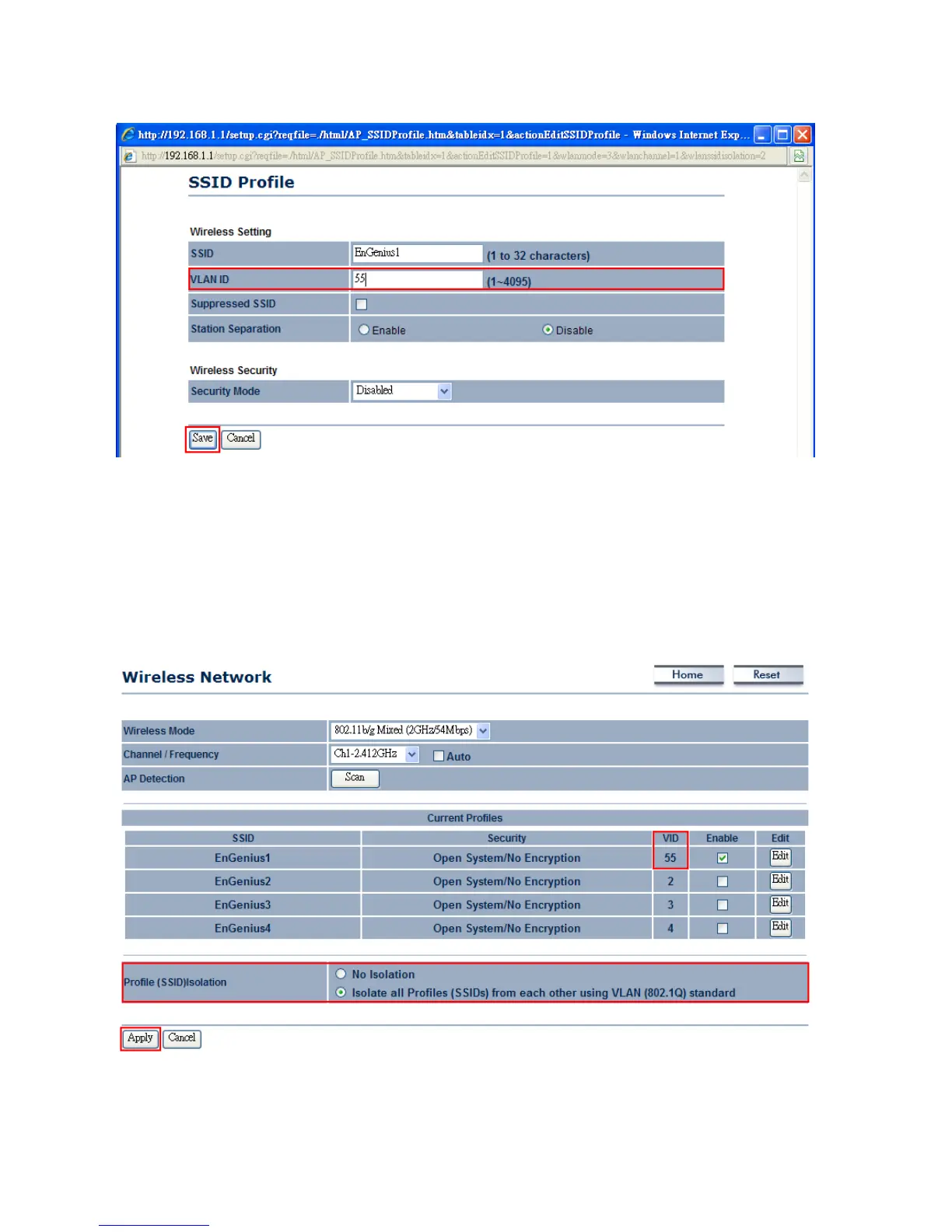
4.AfterPressEdit,webshouldpop‐outawindowasbelow.YoumayenteryourdesireVLANID.Then,
pressSavetosavethechanges.
5.WirelessNetworkwebpageshouldhavedisplayalltheVIDasbelow.Ifyouwouldliketoenable
WirelessVLANfunction,selecttheradiobuttonof“IsolateallProfilesfromeachotherusingVLAN
standard”andthenpressApplytoconfigurethechanges.
Note:AnyWirelessclientsassociatedwithSSID1toSSID4cannotaccesstothemanagementpage
unlessitsWirelessVLANIDisthesameasthe ManagementVLANID.EnableProfileIsolationwill
alsodenythecommunicationbetweendifferentgroupsofVID.
Auction:Ifyouwouldliketouse802.1xauthentications(WPA/WPA2/WPA‐Mixed)withVLANtagging,youmust
enableManagementVLAN.Formoredetails,pleasefollowtheinstructionbelow.



 To Next Page