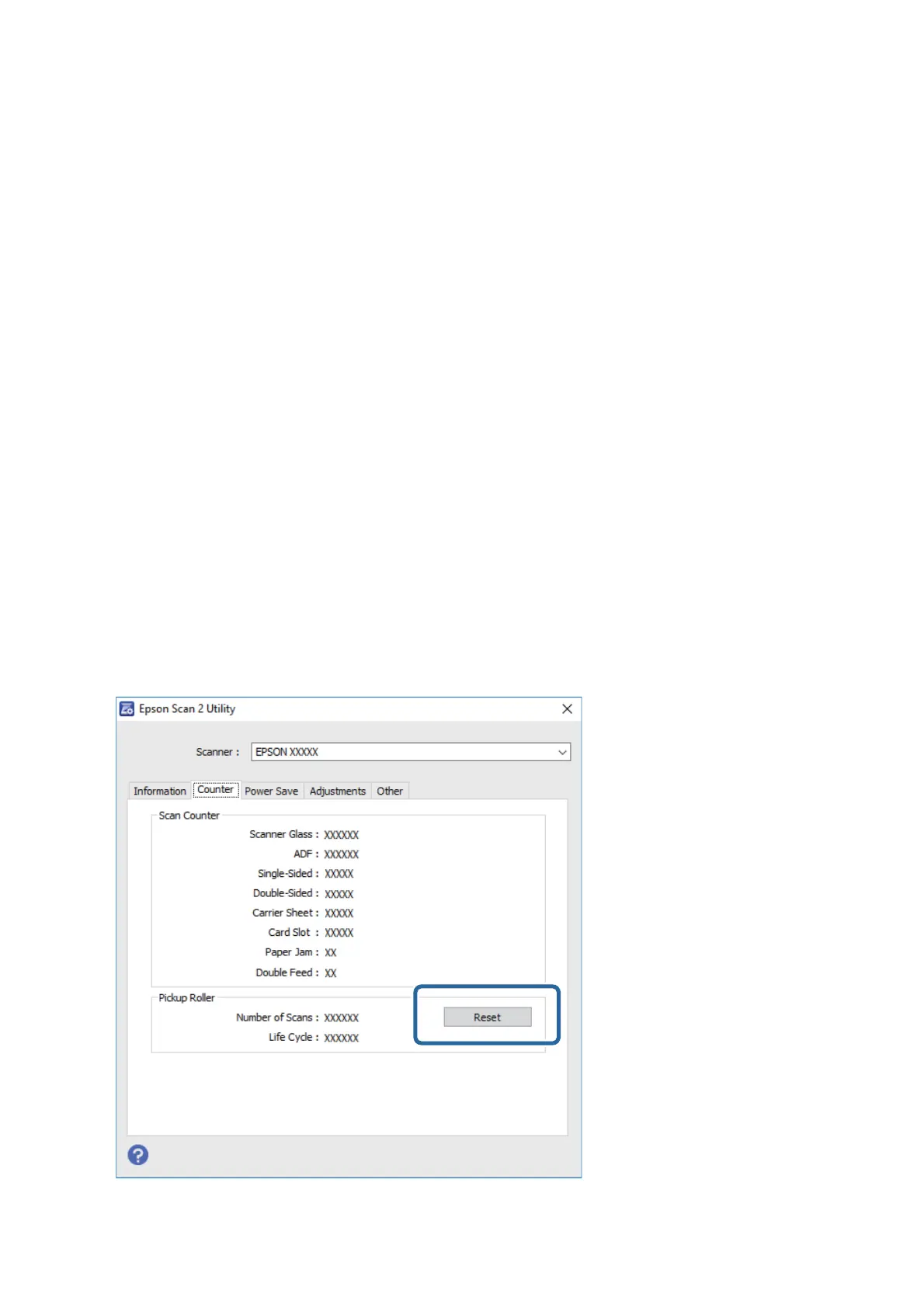
1. Turn on the scanner.
2. Start Epson Scan 2 Utility.
❏ Wind ow s 1 0
Click the start button, and then select EPSON > Epson Scan 2 > Epson Scan 2 Utility.
❏ Windows 8.1/Windows 8
Start screen > Apps > Epson > Epson Scan 2 Utility.
❏ Wind ow s 7
Click the start button, and then select All Programs (or Programs) > EPSON > Epson Scan 2 > Epson
Scan 2 Utility.
❏ Mac OS
Select Go > Applications > EPSON Soware > Epson Scan 2 Utility.
Note:
You can also start Epson Scan 2 Utility from Epson FastFoto or Epson ScanSmart.
Click Settings > Scanner Settings tab > Device Settings.
3.
Click the Counter tab.
Note:
When scanning photos with Epson FastFoto, every scan is counted as Double-Sided, even if the backs of the photos are
blank. However, this does not aect the life of the Roller Assembly Kit.
4. Click Reset for the roller assembly kit.
User's Guide
Maintenance
112








 To Next Page