EasyManua.ls Logo

Epson RX4111CE - Page 56

Epson RX4111CE
61 pages
Print Icon
To Next Page IconTo Next Page
To Previous Page IconTo Previous Page
Loading...
14. How to use
RX4111CE Jump to Top / Bottom
ETM62E-02 Seiko Epson Corporation 55
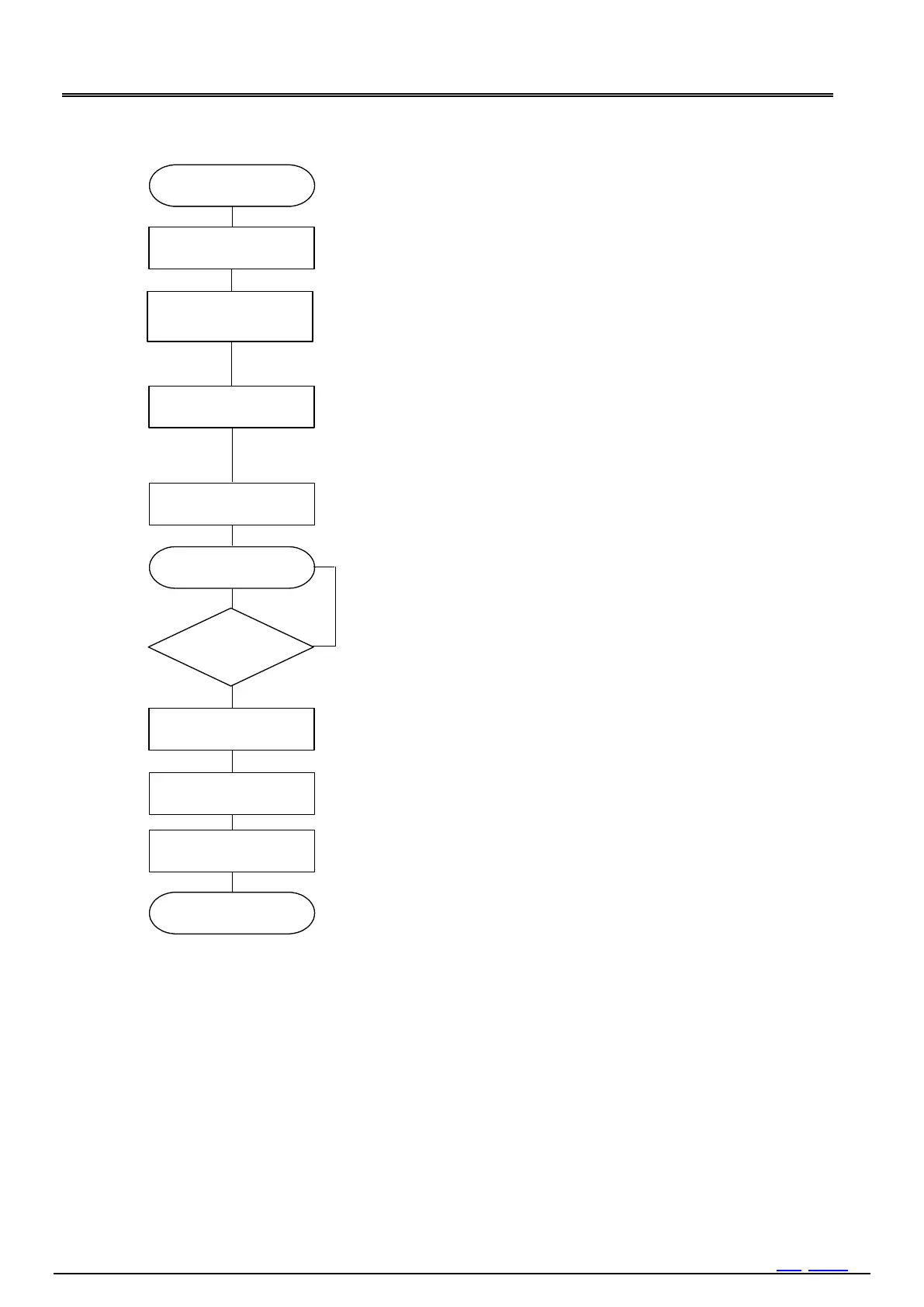
7) 
Next process
Bank1 - Eh
 Clear EVF to "0".
/INT=L?
or
Reg-1Eh EVF=1?
When an event occurs, the EVF bit changes to "1", and an interrupt
occurs from the /INT pin.
Bank2 - 0h 8h
Read the time stamp data.
Start
 Clear EVF. to 0.
Set EIE to 1.
Bank1 - Eh
Fh
Waiting for event
YES
NO
 Clear EIE bit to 0.
Bank3 5h
 Set EVDET or EXST to 1.
Bank3 5h
Clear EVDET and EXST to "0" to disable the time stamp function.
Do not generate time stamps while reading time stamp data.
Bank1 - Fh
Figure 46 Flow8

Table of Contents

Related product manuals